



1 min read
|
03-30-2026
How to Build a Points-Based Loyalty Program in Magento 2
Vinh Jacker
|
03-17-2025

Why do customers keep coming back to certain Magento 2 stores? The answer goes beyond products or prices, it’s about building a relationship that keeps your brand top of mind.
Magento 2 already includes a default reward points feature, but it comes with very limited options and flexibility. To truly engage shoppers, stores need a more powerful, customizable points-based system. With Mageplaza’s Magento 2 Reward Points extension, merchants can unlock advanced features to create, manage, and optimize loyalty programs that drive sales, boost engagement, and improve retention.
In this guide, learn step by step how to build your Reward Points program in Magento 2 using the Mageplaza module, with tips for success included to inspire your Magento store strategy.
Why do Magento 2 stores prefer a points-based loyalty program?
According to E&Y, 41% of consumers would come back to a store if there is a loyalty program, and 60% of them expect a point-earning benefit.
There are reasons why a points-based loyalty program might work for various industries and companies in Magento 2:
- Included in default Magento 2: This points system is already included in default Magento 2; therefore, if users do not need advanced features, they can use the basic version right away.
- Easy to understand: The concept of points earning and spending is popular and straightforward for customers to follow, with points clearly shown on different touch points in Magento 2.
- Easy to redeem: Customers can use their points as a form of payment, which is time-saving compared to other methods requiring exchange. Therefore, it boosts average order value (AOV) and purchase frequency.
- Seamless Magento 2 integration and customization: Magento 2 store owners can set earning rates, spending rules, point expiration, and program tiers to match business goals. The offer can also be applied to different customer groups as a personalized approach.
- Encourage interactions: Unlike generic discounts, a points system encourages engagement by rewarding customers for specific actions such as purchases, referrals, or social interactions.
- Expanding brand reach through referrals: Rewarding customers with points in Magento 2 can also be used for referrals, turning existing loyal customers into effective brand ambassadors - helping attract new customers at a lower acquisition cost.
This approach not only increases customer retention but also provides valuable insights into shopping behavior, allowing merchants to tailor offers and improve the overall shopping experience.
How to Create a Magento 2 Reward Points Program (Step-by-Step with Tips)
Step 1: Setting Goals: Defining your point-based loyalty program objectives
Start by designing your objectives - or what you want to achieve by using a reward point loyalty program.
- Identify business objectives: Are you looking to increase repeat purchases, boost average order value, or grow your email list?
- Set a budget: Determine how much you are willing to invest in rewards and program management.
- Define measurable KPIs: Track key performance indicators like sales growth, customer engagement rate, or retention rate.
💡 Tips
- Align with business goals: Tie KPIs directly to store objectives. Example: Increase repeat customer rate by 30% within 6 months of implementing the reward program.
- Keep it simple & clear: A program with clear goals is easier to explain to customers later.
- Benchmark first: Review your current repeat purchase rate or churn rate before launch, so improvements can be measured accurately.
Step 2: Decide on rules of your Reward Points Program
The rules will define how your program works and ensure it aligns with your business goals. A clear and simple rule system ensures customers understand how to participate, which improves satisfaction and loyalty:
- Earning & Spending Ratio: Decide how points are earned and redeemed. For example, earn 1 point for every $1 spent, and allow customers to redeem 100 points = $10 discount.
- Points Validity: Set expiration for unused points to encourage timely redemption and guide the behaviours. For example, points from purchases can be used in 3 months; however, points from reviews and newsletter subscriptions can be used in 1 month only.
- Program Structure: Consider introducing tiers or levels (e.g., Silver, Gold, Platinum) to reward high-value customers and incentivize engagement. For example, for higher tiers, customers can receive more perks such as gifts for birthday, or free shipping.
💡 Tips
- Offer valuable rewards: Discounts, free products, or VIP perks motivate participation.
- Encourage non-purchase actions: Reward product reviews, referrals, newsletter sign-ups, or birthdays. This broadens engagement.
- Don't overcomplicate: Too many earning conditions can discourage usage.
Step 3: Set up must-have features for your Magento 2 Reward Points program
It is important to select an easy-to-use and customizable tool to create your loyalty program in Magento 2. These following steps will help you configure your own program using Mageplaza Magento 2 Reward Points extension - Standard version. Start with all details a point-based reward program might need. Configure points earning, spending rules, and expiration periods.
- Install the Extension: Add the Mageplaza Reward Points module to your Magento 2 store & enable the module.
- Set up earning rate: Convert earning rate to points as well as customer group and store view in the Earning Configuration.
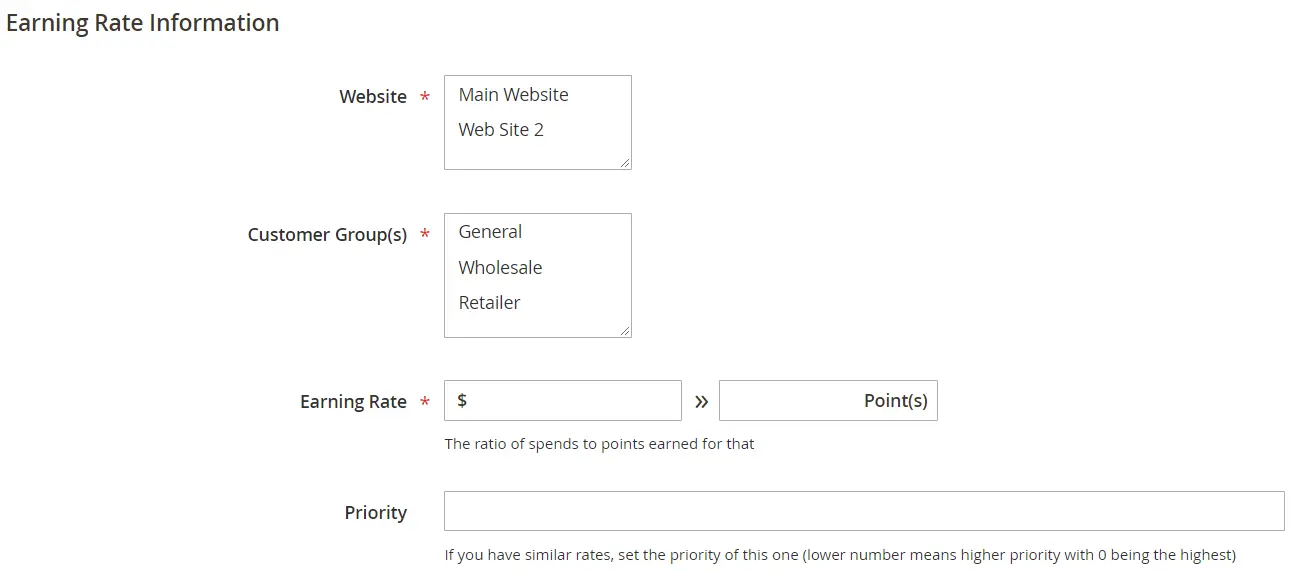
Go to Marketing > Reward Points > Earning Rate > Add New Rate
- Select Website & Customer Groups that are eligible for this reward points collection
- Define the earning rate from $ (money) to X (points)
- Select Priority to apply this rate compared to other rates.
💡 Tips
Promote visibility: Show points earned on product, cart, and checkout pages. Clear visibility encourages redemption.
- Set up spending rate: Decide how much money can be exchanged with those points.
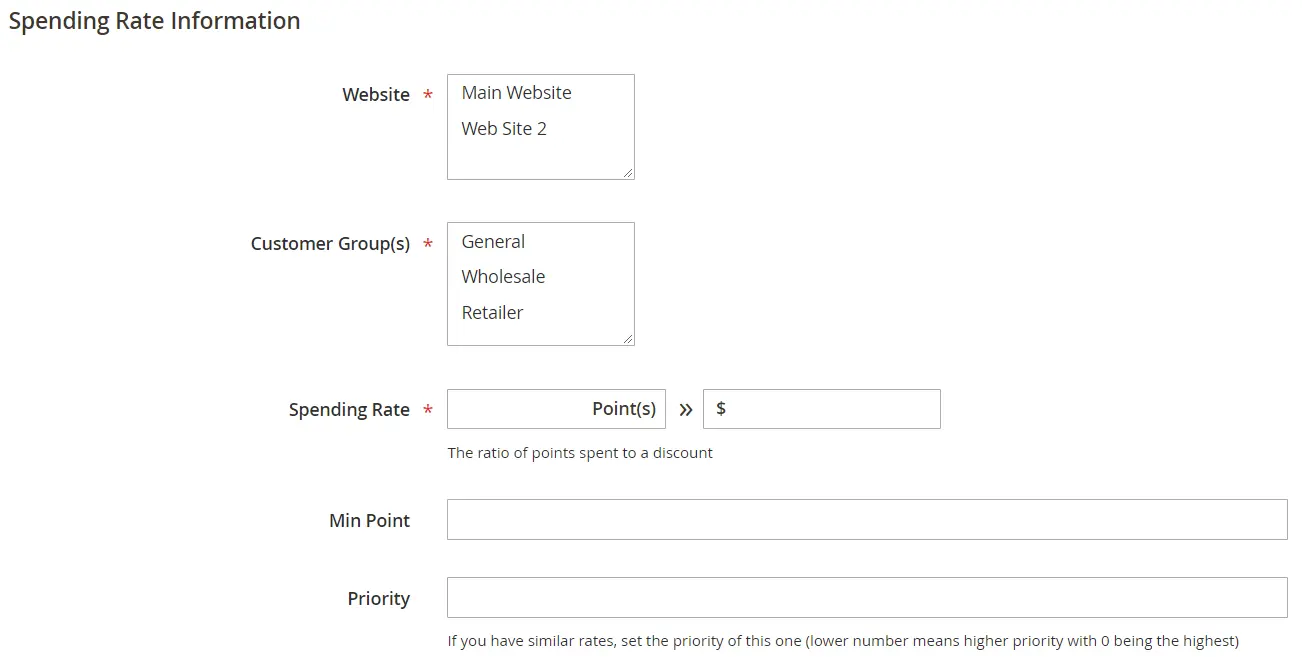
Go to Marketing > Reward Points > Spending Rate > Add New Rate
- Select Website & Customer Groups that are eligible for this reward points collection
- Define the spending rate from X (points) to $ (money)
- Set Min Point to be spent of each order.
- Select Priority to apply this rate compared to other rates.
Manage transactions: View all earning and spending transactions via a grid
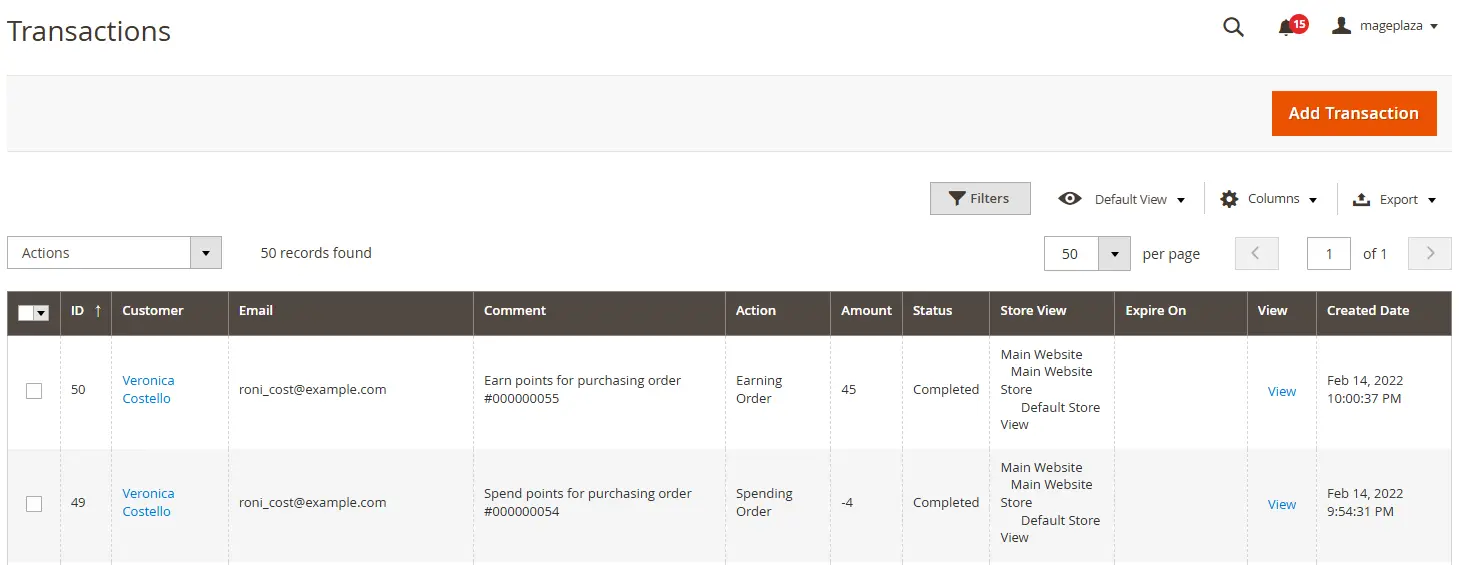
- View more details of the transaction
- Cancel created transactions
-
Select Expired to set expiration in case the transaction is not auto expired
- Create a new transaction in the backend with ease
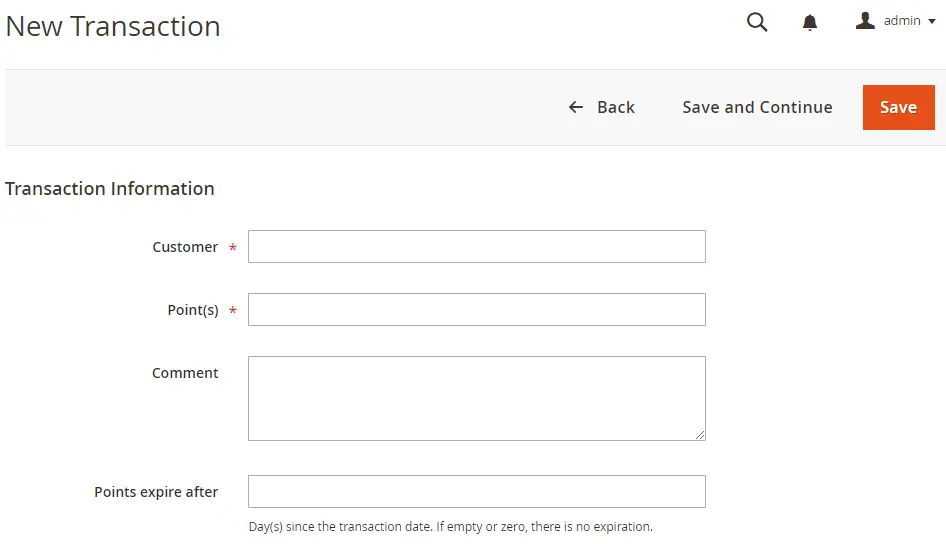
- Select the customer in the Customer field
- Enter the eligible points for that customer
- Add Comments
-
Set the expiration time in the Points expire after section.
- Build your reward points landing page: Show all information of your reward program on a page, and make it accessible from footer:
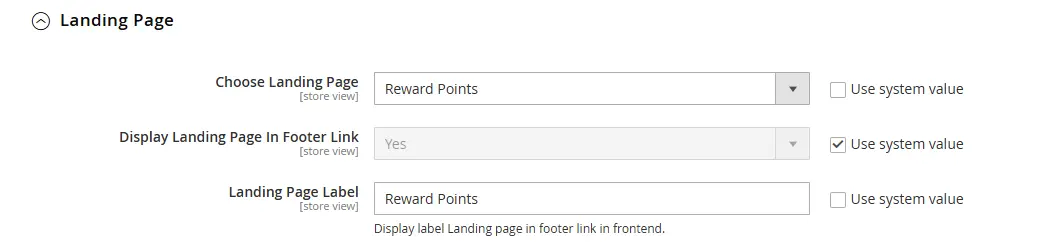
- Create a landing page by choosing Reward Points in the dropdown
- Display that link in the footer
- Set label of that landing page to suit your business strategies
- The default page will look like this:
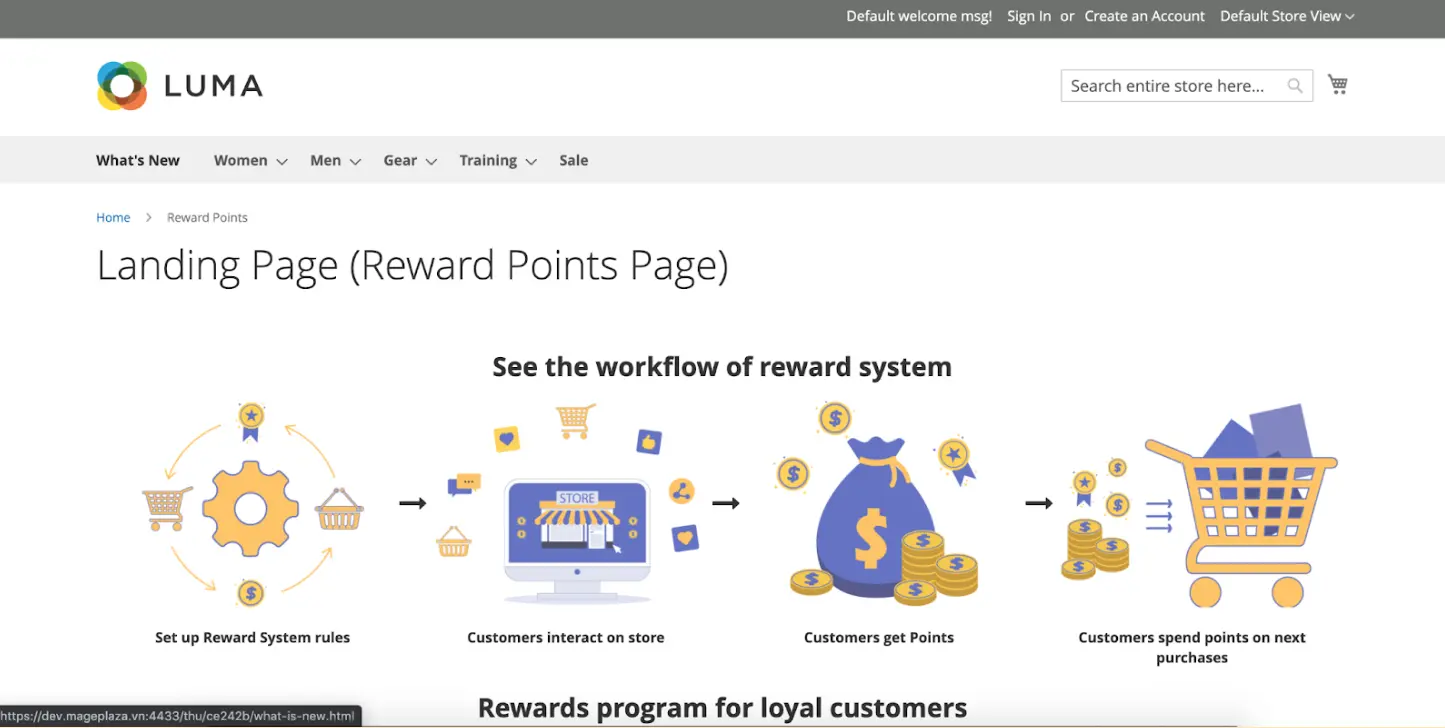
📌FYI: Mageplaza Rewards Program is also built using this module. Take a look at this landing page for more inspiration.
- Email Configuration: Enable this feature to send email updates to customers of the point balance and point expiration.
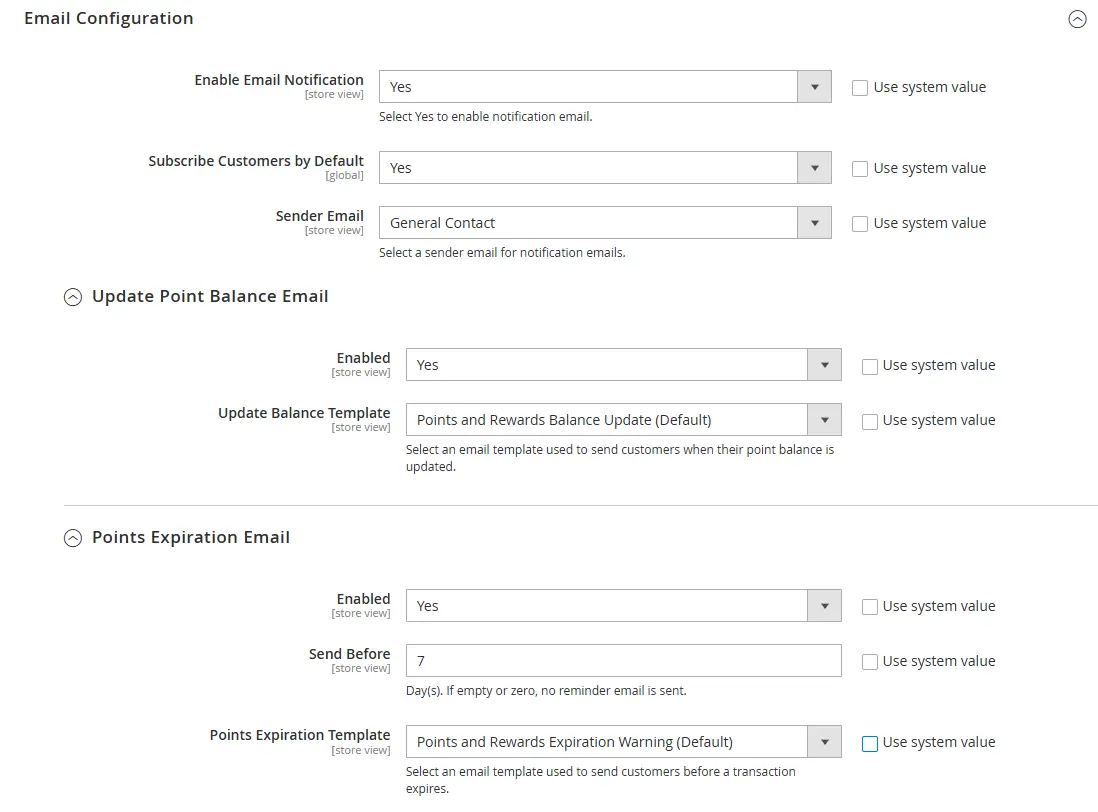
- Subscribe Customers by Default: Select Yes for auto email subscription, or No to let them choose in the My Account page.
- Select Sender Email
- Select template of each email: Update Balance Template & Points Expiration Template
- Send Before: Time to send expiration email reminder before the expired date
💡 Tips
- Integrate with marketing: Sync reward emails with promotional campaigns to increase open/click rates.
- Default subscription: Auto-subscribe customers to point emails, but allow opt-out for GDPR compliance.
- Manage Reward Points of customers: View balance information as well as update balance quickly
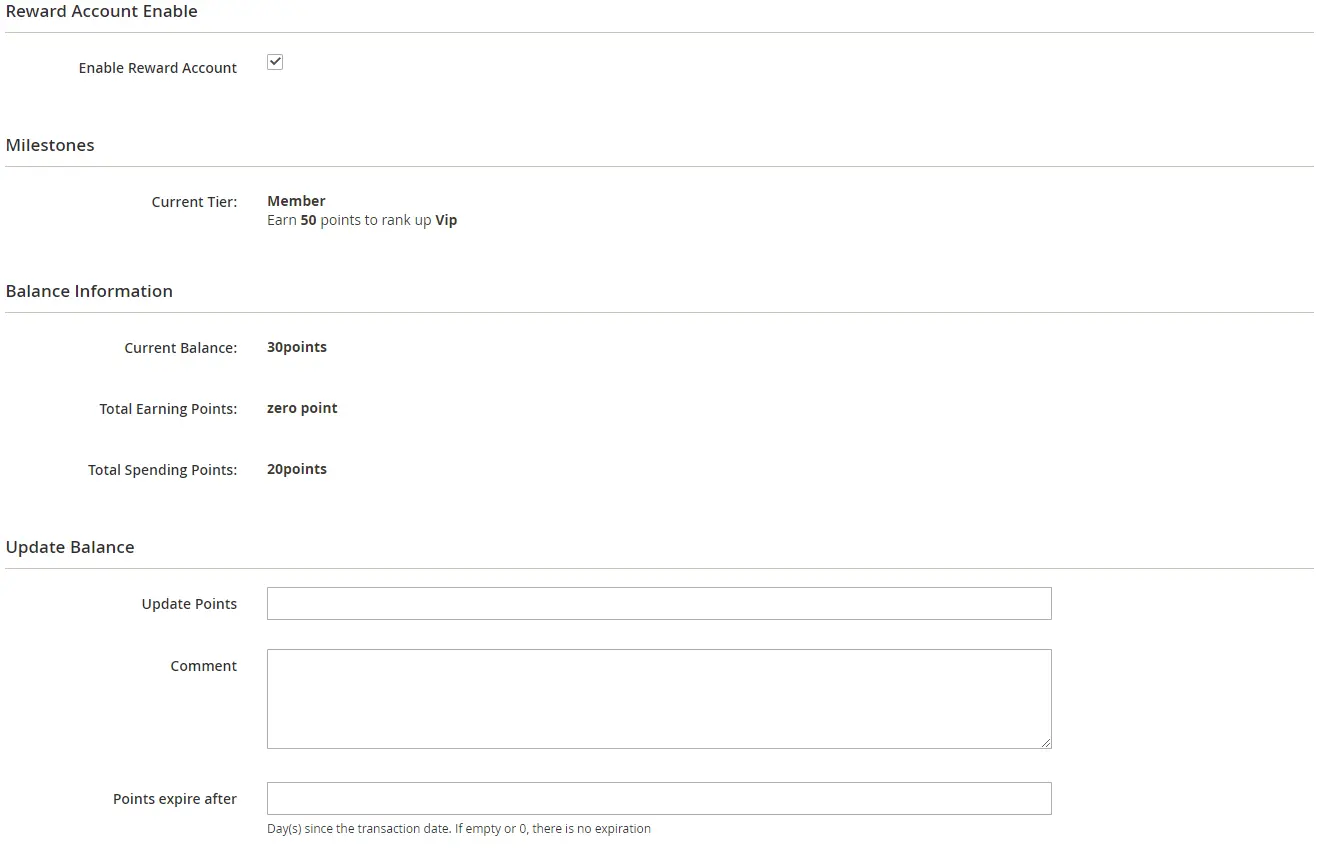
Go to Customer > Edit Customer > Reward Points
- View Current Balance, Total Earning Points, Total Spending Points
- Update Balance and add Comment if needed
-
Set email subscription status in the Email Notification field.
- Refund spent points: In case of returned or cancelled order, you can allow customers to get their reward points refunded to their account.
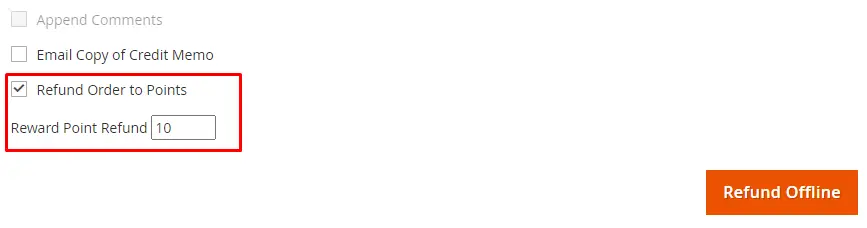
- Tick on the Refund Order to Points checkbox to enable this feature, then enter the refunded amount in the Reward Point Refund field.
Step 4: Set up advanced features you’ll need for your store
With Mageplaza Magento 2 Reward Points Pro & Ultimate versions, you can easily configure more than just the above features - making your program more unique and serving more purposes:
| Features | What Mageplaza Magento 2 Reward Points Programs Can Do | Why It Matters for Your Store | How to Configure |
|---|---|---|---|
| Program Customization | Customize the point label name (e.g., “Coins,” “Hearts,” “Stars”) and icon of the reward points (upload your own) | Aligns with brand identity, makes the program memorable and engaging | Go to Stores > Configuration > Mageplaza Extensions > Reward Points > General Configuration, set Point Label, Plural Point Label, Zero Amount Label, as well as where to display that label. After that, upload the icon to use for Reward Points Icon. |
| Earning from behaviors | Reward points for actions beyond purchases (account creation, newsletter signup, reviews, referrals, birthdays, etc.) | Increases engagement and strengthens brand loyalty | Go to Marketing > Reward Points > Earning > Behavior Rules, Add New Rule, select behaviors in Conditions tab |
| Advanced Earning Configuration | Admins can control how customers can earn their points, from tax/shipping fee, or orders with applied coupons, orders with spent points, max earned points per order. | Ensure your loyalty program aligns with your business rules, prevents misuse, and encourages fair, targeted customer engagement. | Go to General Configuration > Earning Configuration and start setting things up. |
| Advanced Spending Configuration | Limit how customers spend points in your control - with minimum balance to spend points, max spent points per order, spent points after order refunded, use max points by default, or spend points from orders with applied coupon. | Keep the program sustainable, prevent over-discounting, and ensure customers spend points in ways that maximize store revenue. | Set up in the General Configuration > Spending Configuration |
| Tiered loyalty programs | Set up customer tiers with exclusive benefits based on points or orders | Encourages customers to reach higher tiers, boosting retention and average order value | Go to Marketing > Reward Points > Milestone, Add Milestone Tier, configure conditions, benefits, and assign customers |
| Referral & social sharing boost | Generate referral URLs/codes for customers to earn points when friends sign up or purchase | Lowers acquisition cost and leverages word-of-mouth marketing | Go to Marketing > Reward Points > Referral, create Referral Rules and follow instructions here. |
| Sell by points | Allow customers to spend points directly on products or convert them into discounts | Encourages customers to redeem points, boosting sales and engagement | Go to Catalog > Products > Edit Product > Enter the number of points in the Reward Points field. |
| Psychology & Visibility | The Standard version allows displaying total points in Top Links, Minicart, while in Pro & Ultimate versions, points earned for each product can also be shown on Product Page, Cart Page, and Checkout Page. | Gives customers instant motivation, encouraging repeated engagement | Enable Display Total Points on Top Links and Display Earning Points on Minicart in Display Configuration. To show points of each product, Mageplaza Reward Points Pro & Ultimate support configuration in Highlight Point on Storefront section. |
| Analytics & Dashboards | Track real-time performance of your reward points program, monitor earning/spending trends | Data-driven decisions improve ROI and help you optimize offers fast | Use Reports > Reward Points Reports, check charts, trends, and reports |
| Import Rewards data | Magento 2 Reward Points Ultimate module by Mageplaza supports importing reward points data, including customer accounts and transaction history, making it easy to back up information or migrate to a new system without losing loyalty data. | Ensure continuity of your loyalty program, and prevent loss of accumulated points during system upgrades or platform migrations. | Sytem > Data Tranfer > Import, select Entity Type = Mageplaza Reward Account, or Mageplaza Reward Transaction then Import data according to the sample file. |
To learn on how to configure these features, please read more in our user guide.
💡 Tips
- Customize for customer segments: Release to a small customer group for feedback before going wide.
- Encourage social engagement: Use infographics or examples (“Spend $100 → Earn 100 points = $10 discount”).
- Prevent abuse: Offer bonus points for the first X participants.
- Psychology matters: Rename points creatively: “Stars” or “Coins” feel more fun than generic “Points.”
Step 5: Test & Launch
After setting up rules for your program, thorough testing ensures everything works smoothly and to catch potential issues early. Also, start preparing a flawless program launch.
- Testing:
- Simulate different scenarios in your store, such as earning points from purchases, redeeming points during checkout, and applying referral bonuses.
- Check how points are calculated, displayed, and updated in the customer account
- Verify that notifications, emails, and invoices show the correct information.
- Test across multiple devices and browsers to guarantee consistency for all users.
- Use Magento’s staging environment to avoid disrupting live store operations.
- Check the reports to see if data is updated timely and correctly
- Create a launch plan:
- Announce your loyalty program through emails, website banners, and social media posts.
- Explain how points are earned and redeemed in a clear, easy-to-understand way.
- Offer early access or bonus points for the first participants to drive initial engagement.
- Encourage feedback from customers during the launch period to identify any small issues quickly.
💡 Tips
- Soft launch first: Release to a small customer group for feedback before going wide.
- Clear communication: Use infographics or examples (“Spend $100 → Earn 100 points = $10 discount”).
- Early engagement perks: Offer bonus points for the first X participants.
By combining thorough testing with proactive communication, your Magento 2 reward points program can start strong, boosting participation and customer satisfaction from day one.
Step 6: Analyze reward points program results
After launch, tracking and analyzing the performance of your points-based loyalty program is essential to ensure it meets your business goals and delivers value to your customers.
- Monitor key metrics: Use real-time data from your Magento 2 Reward Points extension to track points earned, redeemed, and overall customer engagement. Measure KPIs like repeat purchase rate, average order value, and program participation to see what’s working.
- Collect customer feedback: Encourage customers to share their experiences with your reward program through surveys, emails, or on-site prompts. Understanding their perspective helps identify pain points or areas for improvement.
- Optimize program rules: Based on performance data and feedback, adjust point earning rates, redemption rules, expiration policies, or tier structures. This ensures your loyalty program remains attractive, fair, and aligned with your business objectives.
💡 Tips
- Track, test, optimize: Run A/B tests on earning ratios (e.g., 1 point/$1 vs. 2 points/$1) to see which drives more repeat sales.
- Iterate with seasons: Offer double points during holidays or sales events.
By continuously analyzing and refining your reward points program, you can boost customer satisfaction, increase repeat purchases, and maximize lifetime value, to turn casual shoppers into loyal brand advocates. Check Mageplaza Reward Points demo to learn more.
Conclusion
Building a points-based loyalty program is one of the most effective strategies to increase customer engagement, retention, and repeat purchases. With Mageplaza Magento 2 Reward Points, store owners can easily create a fully customizable, easy-to-understand program that rewards customers for purchases, referrals, and other valuable actions. Start building your points-based loyalty program today, track results, and continuously refine your strategies to ensure your Magento store stays competitive and your customers remain engaged.
Table of content

Jacker is the Chief Technology Officer (CTO) at Mageplaza, bringing over 10 years of experience in Magento, Shopify, and other eCommerce platforms. With deep technical expertise, he has led numerous successful projects, optimizing and scaling online stores for global brands. Beyond his work in eCommerce development, he is passionate about running and swimming.
Related Post

Magento 2.4.9 Beta Release: What's New?
Magento 2.4.9 beta is here. Stay up to date with every release milestone with this regularly updated guide.
11 mins read
|
03-17-2026

Google Analytics Website Traffic: The A–Z Guide for Magento 2 Store Owners
Learn how to analyze website traffic in Google Analytics 4, identify high-quality traffic sources, and grow your Magento 2 store with data-driven insights.
18 mins read
|
03-17-2026

The Complete Guide to UTM Parameters & Google Analytics for Magento website
Master UTM parameters and Google Analytics for Magento. Track traffic sources, measure campaign performance, and practical tips to use it for better business decisions.
9 mins read
|
10-05-2025
How to implement Cookie Consent for GTM & Google Analytics in Magento Under GDPR?
Implement cookie consent for GTM & GA4 in Magento under GDPR. Step-by-step guide using Google Consent Mode v2 to avoid fines and maintain analytics.
15 mins read
|
02-27-2026

Speed vs. Sales: Comparing Hyvä Checkout and Mageplaza One Step Checkout
Learn how Hyvä Checkout and Mageplaza One Step Checkout impact order completion rates and revenue growth.
8 mins read
|
02-25-2026
1 min read
|
03-30-2026
Magento 2.4.9 Beta Release: What's New?
Magento 2.4.9 beta is here. Stay up to date with every release milestone with this regularly updated guide.
11 mins read
|
03-17-2026
Google Analytics Website Traffic: The A–Z Guide for Magento 2 Store Owners
Learn how to analyze website traffic in Google Analytics 4, identify high-quality traffic sources, and grow your Magento 2 store with data-driven insights.
18 mins read
|
03-17-2026
The Complete Guide to UTM Parameters & Google Analytics for Magento website
Master UTM parameters and Google Analytics for Magento. Track traffic sources, measure campaign performance, and practical tips to use it for better business decisions.
9 mins read
|
10-05-2025
How to implement Cookie Consent for GTM & Google Analytics in Magento Under GDPR?
Implement cookie consent for GTM & GA4 in Magento under GDPR. Step-by-step guide using Google Consent Mode v2 to avoid fines and maintain analytics.
15 mins read
|
02-27-2026
Speed vs. Sales: Comparing Hyvä Checkout and Mageplaza One Step Checkout
Learn how Hyvä Checkout and Mageplaza One Step Checkout impact order completion rates and revenue growth.
8 mins read
|
02-25-2026