



1 min read
|
03-30-2026
How to Setup Best Seller block in Magento 2
Vinh Jacker
|
10-31-2017
What is Best Seller Products?
Best Seller is used to interpret a certain number of products have the top-selling record, which its figures, in usual based on your internal store sales. The label already says the content itself, it’s easy to draw a quick attention when visitors surf your site and notice which items were guaranteed their credits safely.
Why does Best Seller block become a must-have-in-store part now?
1. Sales Encouraging
It’s obvious that the more people know the product’s existence, the more chances you can entice them to purchase. It also pleases them that you’re suggesting the great quality items in your store to their eyes, tie the engagement between store owners and customers happily.
2. Cutting the shopping time down
Instead of wasting tons of time researching a bunch of products to find out which item is favoured by the majority of customers, a shopper can quickly decide which one to buy thanks to the helpful list of best sellers.
3. Enhance promotion campaigns
This cross promotion utterly fits with any advertising campaigns to pin all the notable merchandises up when they visit your site. Best seller products can generate as well as consolidate your brand name in the market gradually, so most of e-commerce platforms are launching this kind of recommendation as an usual work.
And keep scrolling down to explore more reasonable purposes to have Best Seller in your Magento 2’s store.
How Best Seller block performs in product pages?
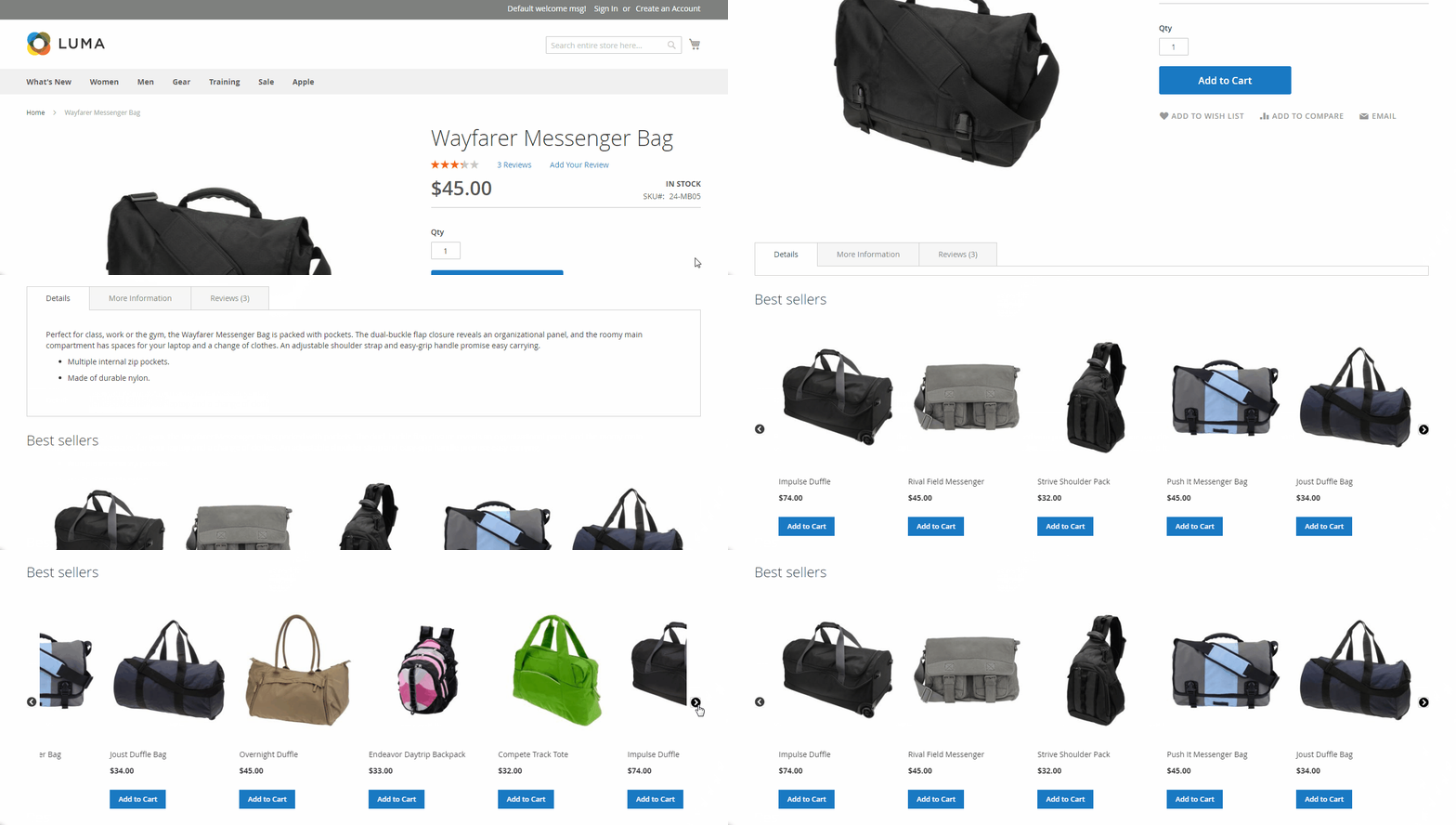
The most friendly and effective way to promote tons of Best Seller products at the same time is destining them a stylish block under a slider/grid form. This usually performs under the main product’s content, in a true recommendation way.
Want to have Best Seller block in your store now?
You won’t ever see an easier task more than this when you have Magento 2 Auto Related Products by Mageplaza supports for your store. Now, this guide will show you how to obtain this clever function within 1-2 minutes, not only Beseller in a one-product page but in other pages by automatically applying principles.
The installation guide of Automatic Related Product can be travelled over this link.
How to create a Best Seller block
This section allows you to install a Best Seller in your desired Product pages. On product pages that meet this rule, Best Seller blocks will be displayed. In this example, I want that every time a visitor comes to a men’s category page, a Best Seller slider will be shown under the main content.
Step 1: Create a new rule
First, you have to set a new rule to determine when this block is allowed to be display. To create a new Rule on Product Page, go to Mageplaza > Automatic Related Products > Manage Rules. In the Add Rule section, select Category Page.
A new Related Block Rule form will be appeared
Step 2: Set Rule Information
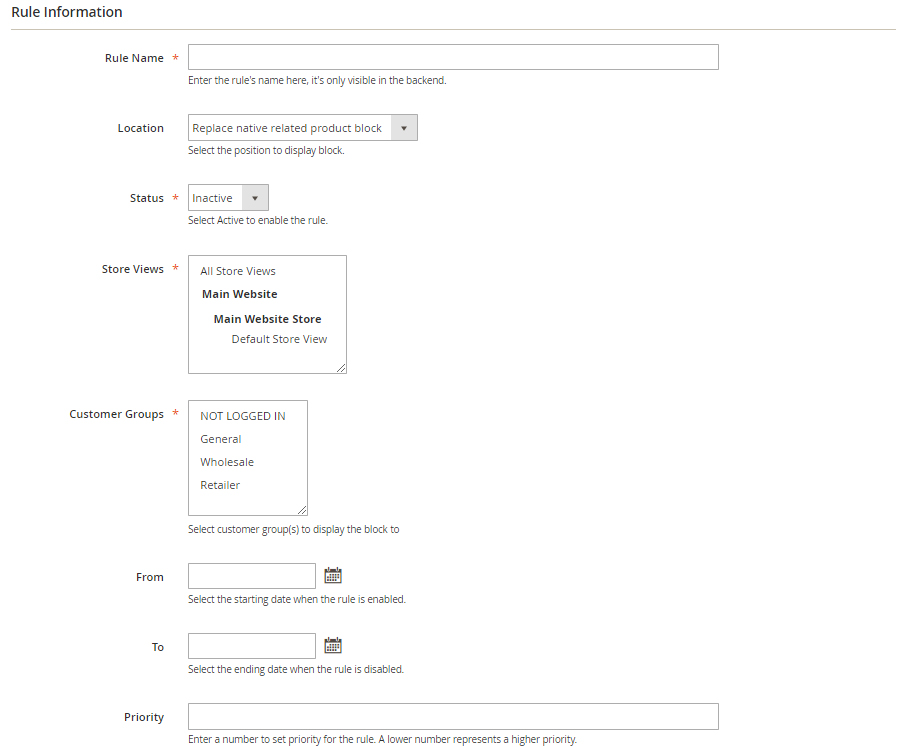 In the Rule Information form:
- Rule Name field is where you name the rule in the backend only. Here I’ll name it as “Best seller - Men”
- Location is where you specify the block where it located. I’ll choose it as “Above Content”
- In the Status field: choose “Active” to enable the rule.
- In the Store View field you can select the store view where the rule applies on.
- In the Customer Group field: The rule is only applicable to customers who in the selected group. I selected all :)
- In the From and To if you want to set the block in a period of time only, feel free to config this section.
- In the Priority field: This is the field where you enter the priority of the rule. I’ll enter 1.
Step 3: Set Rule’s Condition
Choose the product list to limit which products can be displayed in the block. I’ll check all the category relates to “Men”
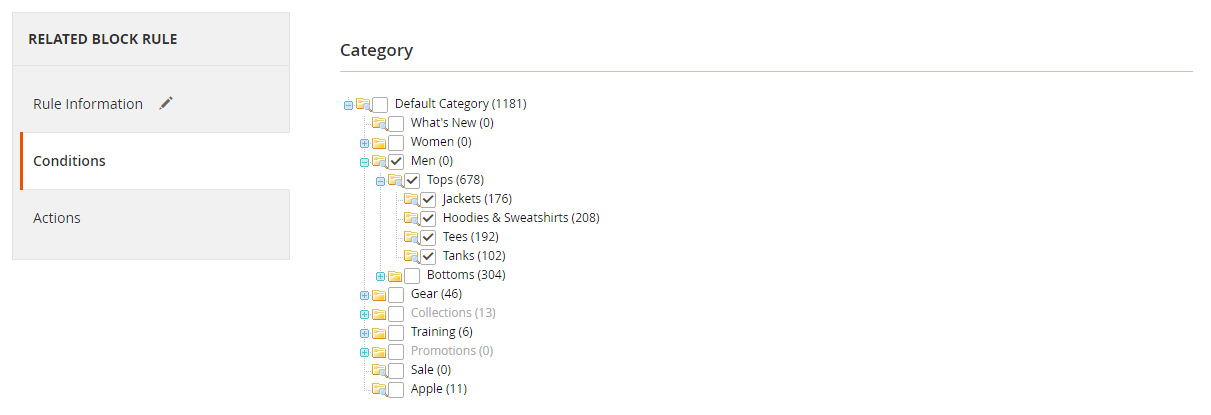
Then in the Action tab, the condition will be change into catgegory’s number automatically.
Step 3: Set Rule’s Action
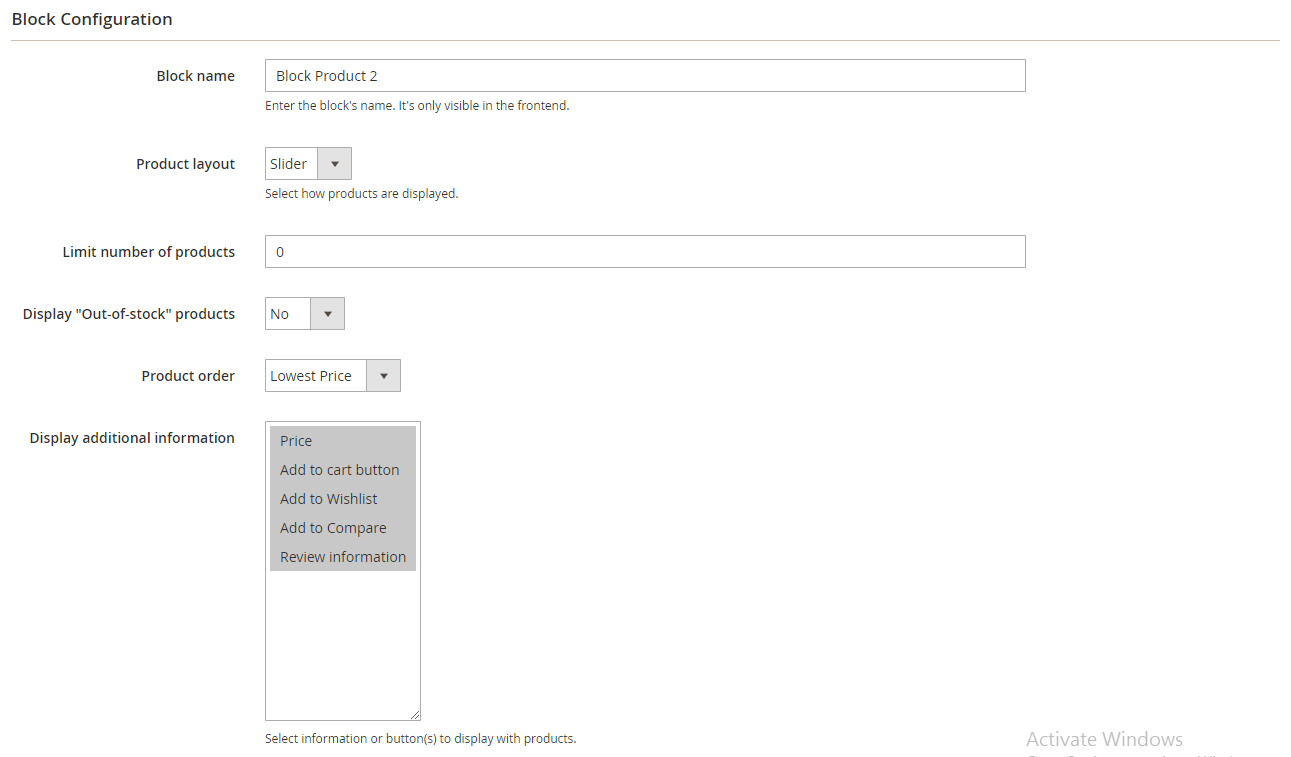
- The Block name field is where you can name the block which is displayed in the frontend. I name it as Best Seller
- In the Product Layout field: I choose “Slider” for its layout.
- In the Limit number of products field: Enter the maximum number of products displayed in a block. At this field I set 8.
- In the Display “Out-of-stock” products field: select “No” to not display Out-of-Stock products in my Best Seller slider.
- In the Product order field: choose how to sort products in the block. Best Seller means more purchased products will be displayed first.
- In the Display additional information field: choose additional information or/and buttons displayed under products in the block, include Price, Review Information, Add to Cart buttons.
Don’t forget to click Save Config
Step 4: Check result
Now back to the frontend and see the result! When I click on Men Category, Best Seller is attractive in my eyes now. It’s your turn to boost up your best sales significantly.
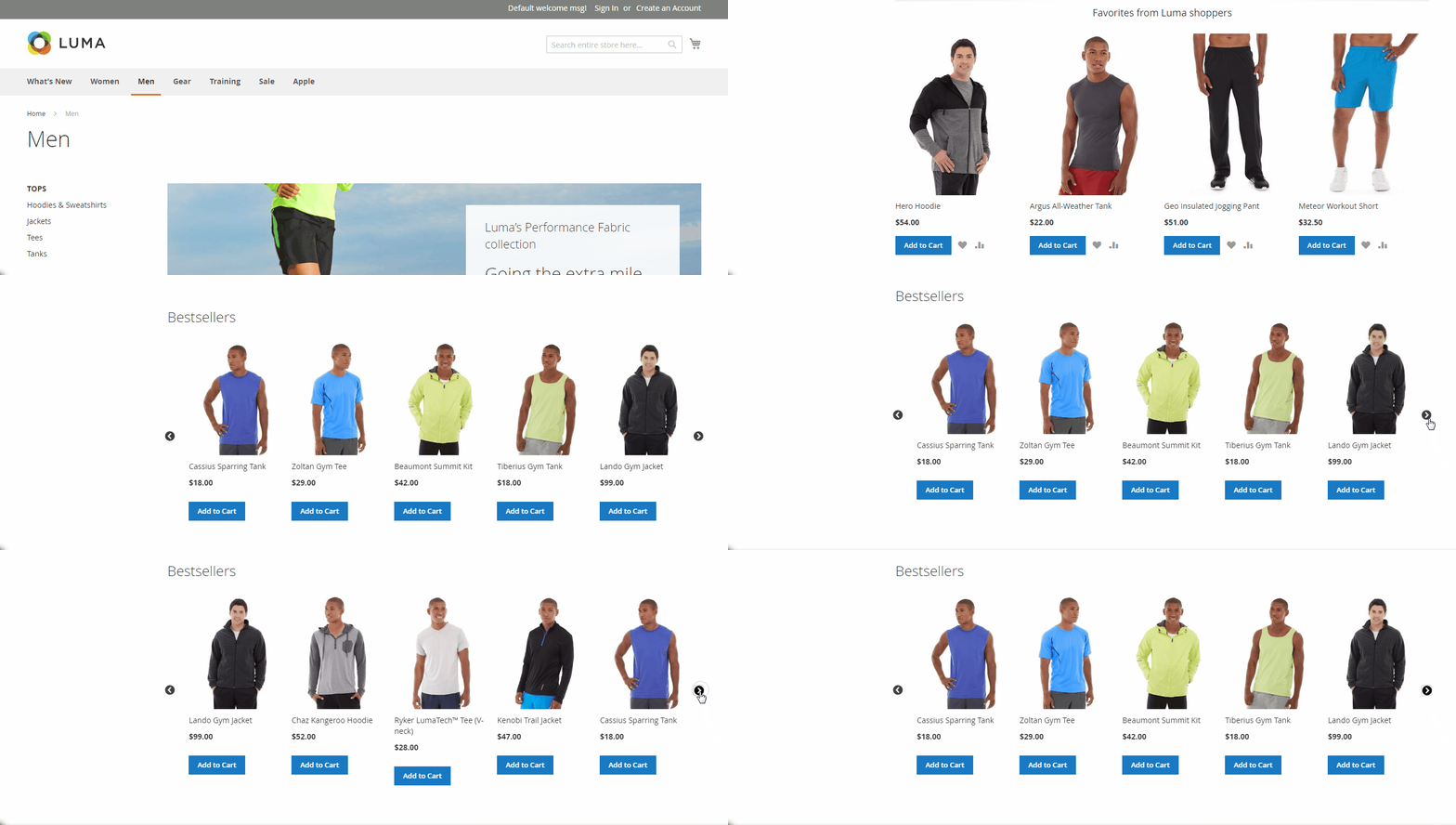
Visit the official page of Magento 2 Automatic Related Products extension to blow your mind off more!
Table of content

Jacker is the Chief Technology Officer (CTO) at Mageplaza, bringing over 10 years of experience in Magento, Shopify, and other eCommerce platforms. With deep technical expertise, he has led numerous successful projects, optimizing and scaling online stores for global brands. Beyond his work in eCommerce development, he is passionate about running and swimming.
Related Post

Magento 2.4.9 Beta Release: What's New?
Magento 2.4.9 beta is here. Stay up to date with every release milestone with this regularly updated guide.
11 mins read
|
03-17-2026
Google Analytics Website Traffic: The A–Z Guide for Magento 2 Store Owners
Learn how to analyze website traffic in Google Analytics 4, identify high-quality traffic sources, and grow your Magento 2 store with data-driven insights.
18 mins read
|
03-17-2026
The Complete Guide to UTM Parameters & Google Analytics for Magento website
Master UTM parameters and Google Analytics for Magento. Track traffic sources, measure campaign performance, and practical tips to use it for better business decisions.
9 mins read
|
10-05-2025
How to implement Cookie Consent for GTM & Google Analytics in Magento Under GDPR?
Implement cookie consent for GTM & GA4 in Magento under GDPR. Step-by-step guide using Google Consent Mode v2 to avoid fines and maintain analytics.
15 mins read
|
02-27-2026

Speed vs. Sales: Comparing Hyvä Checkout and Mageplaza One Step Checkout
Learn how Hyvä Checkout and Mageplaza One Step Checkout impact order completion rates and revenue growth.
8 mins read
|
02-25-2026
1 min read
|
03-30-2026
Magento 2.4.9 Beta Release: What's New?
Magento 2.4.9 beta is here. Stay up to date with every release milestone with this regularly updated guide.
11 mins read
|
03-17-2026
Google Analytics Website Traffic: The A–Z Guide for Magento 2 Store Owners
Learn how to analyze website traffic in Google Analytics 4, identify high-quality traffic sources, and grow your Magento 2 store with data-driven insights.
18 mins read
|
03-17-2026
The Complete Guide to UTM Parameters & Google Analytics for Magento website
Master UTM parameters and Google Analytics for Magento. Track traffic sources, measure campaign performance, and practical tips to use it for better business decisions.
9 mins read
|
10-05-2025
How to implement Cookie Consent for GTM & Google Analytics in Magento Under GDPR?
Implement cookie consent for GTM & GA4 in Magento under GDPR. Step-by-step guide using Google Consent Mode v2 to avoid fines and maintain analytics.
15 mins read
|
02-27-2026
Speed vs. Sales: Comparing Hyvä Checkout and Mageplaza One Step Checkout
Learn how Hyvä Checkout and Mageplaza One Step Checkout impact order completion rates and revenue growth.
8 mins read
|
02-25-2026