Free installation badge Product image of Abandoned Cart Email
Magento Edition *
Version *
FREE installation Tooltip
Ends in:
03 : 00 : 00 : 00
Get 10% OFF
$149
icon logo magento 2.4.4 - 2.4.8
Tooltip
Hyva logo Theme
Tooltip

Abandoned Cart Email Extension For Magento 2

v4.6.7
5.0
(41 reviews)
Read all >
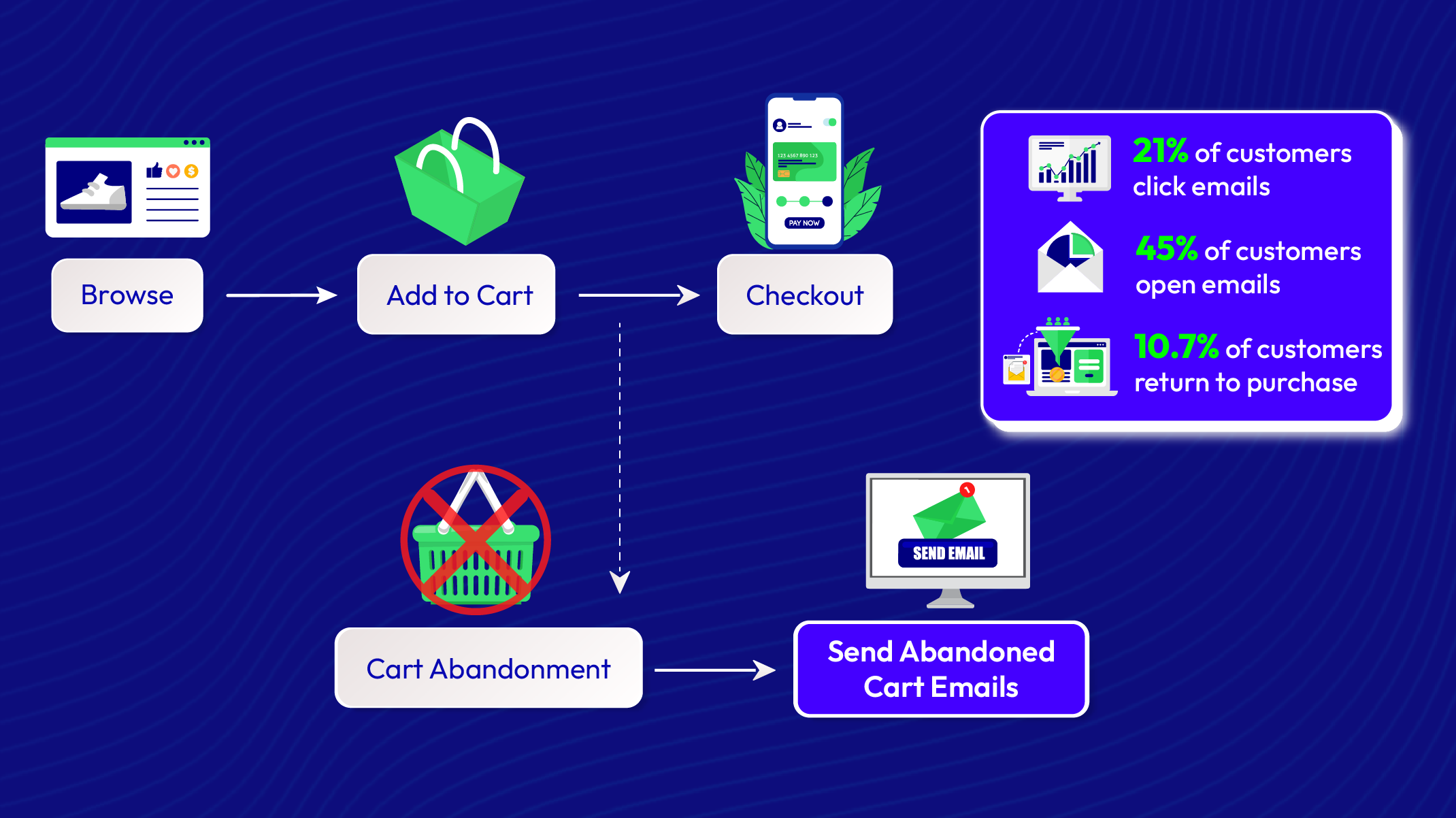
The Magento 2 Abandoned Cart Recovery extension is a powerful cart abandonment solution that helps online stores recover lost sales and incomplete orders effortlessly. Through advanced cart recovery automation, the module sends personalized recovery emails, reminder notifications, and discount offers to encourage customers to return and complete their purchases, significantly boosting sales conversion and reducing cart abandonment rate.
tick icon
Compatible with Hyva theme
tick icon
Compatible with Magento 2.4.8
tick icon
Need API/GraphQL for Magento 2 Abandoned Cart Email? Chat now
tick icon
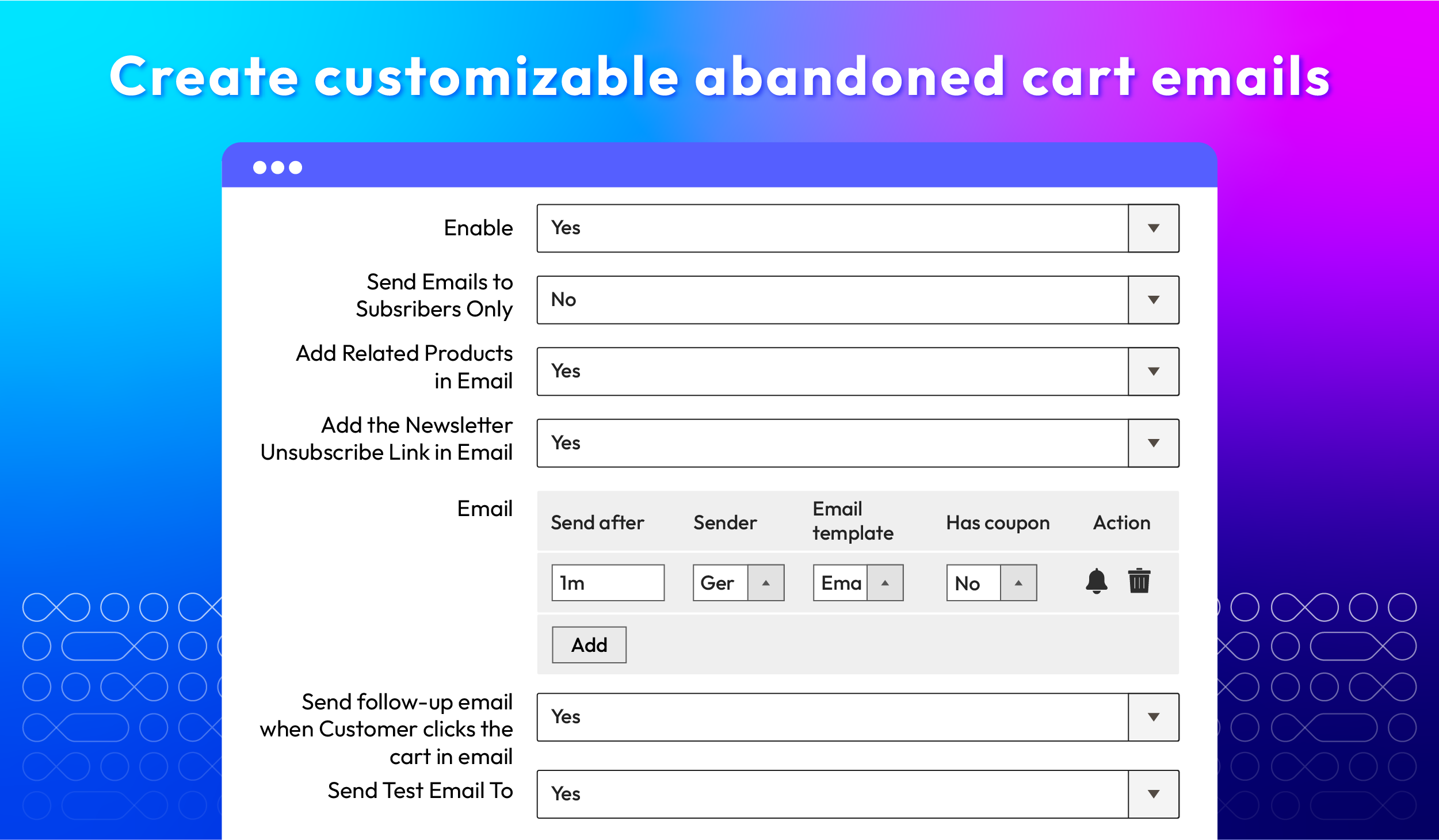
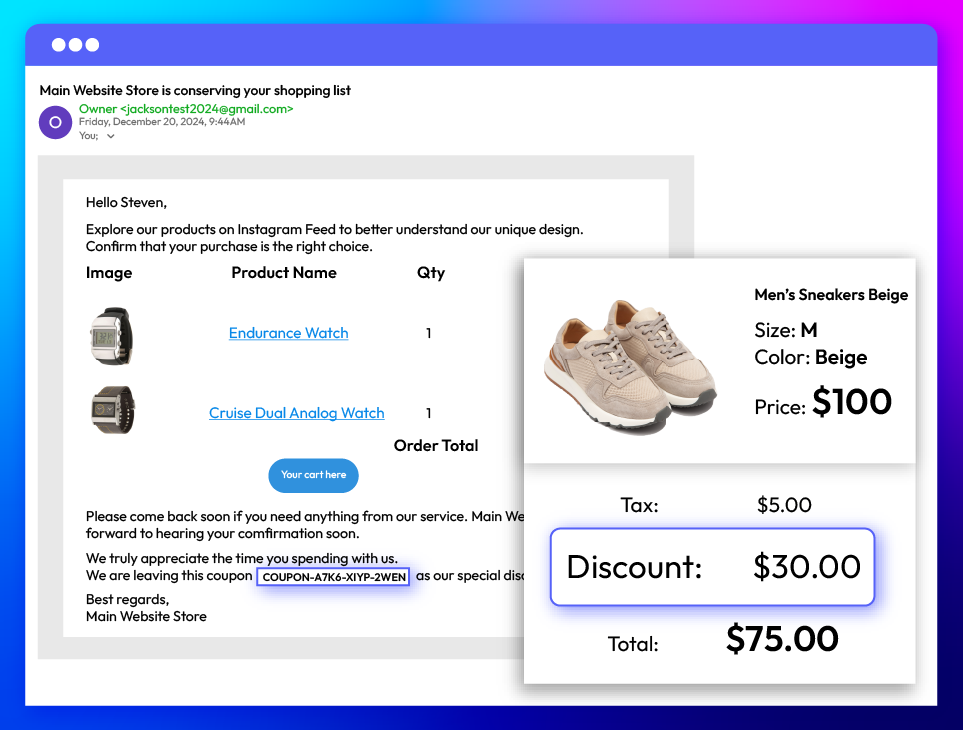
Create customizable abandoned cart emails
tick icon
Support 5 abandoned cart email templates
tick icon
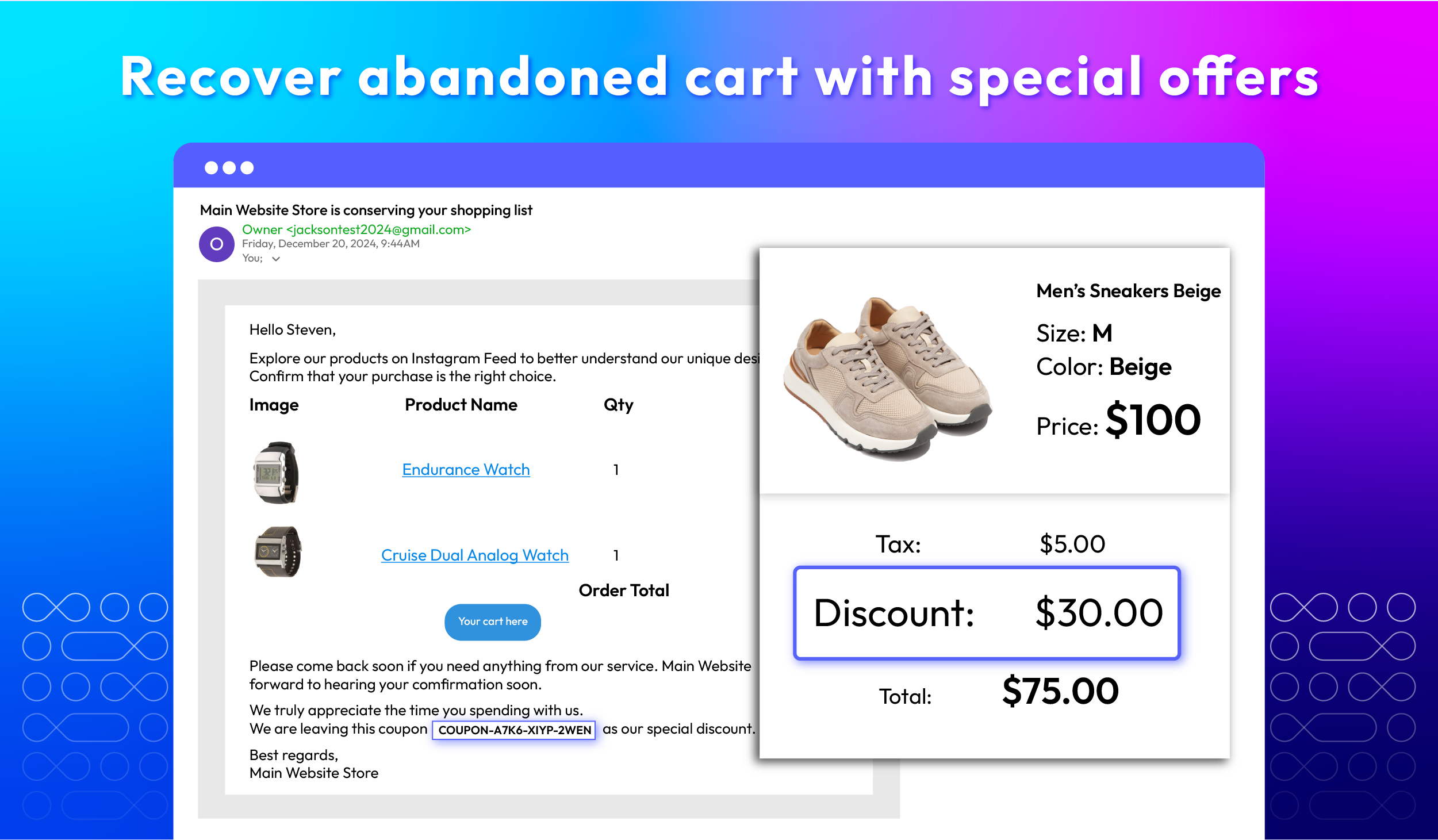
Add coupons to abandoned cart emails
tick icon
Set the schedule for email dispatches
tick icon
Add UTM parameters to links to monitor cart returns
tick icon
Provide in-depth email reports and email logs
tick icon
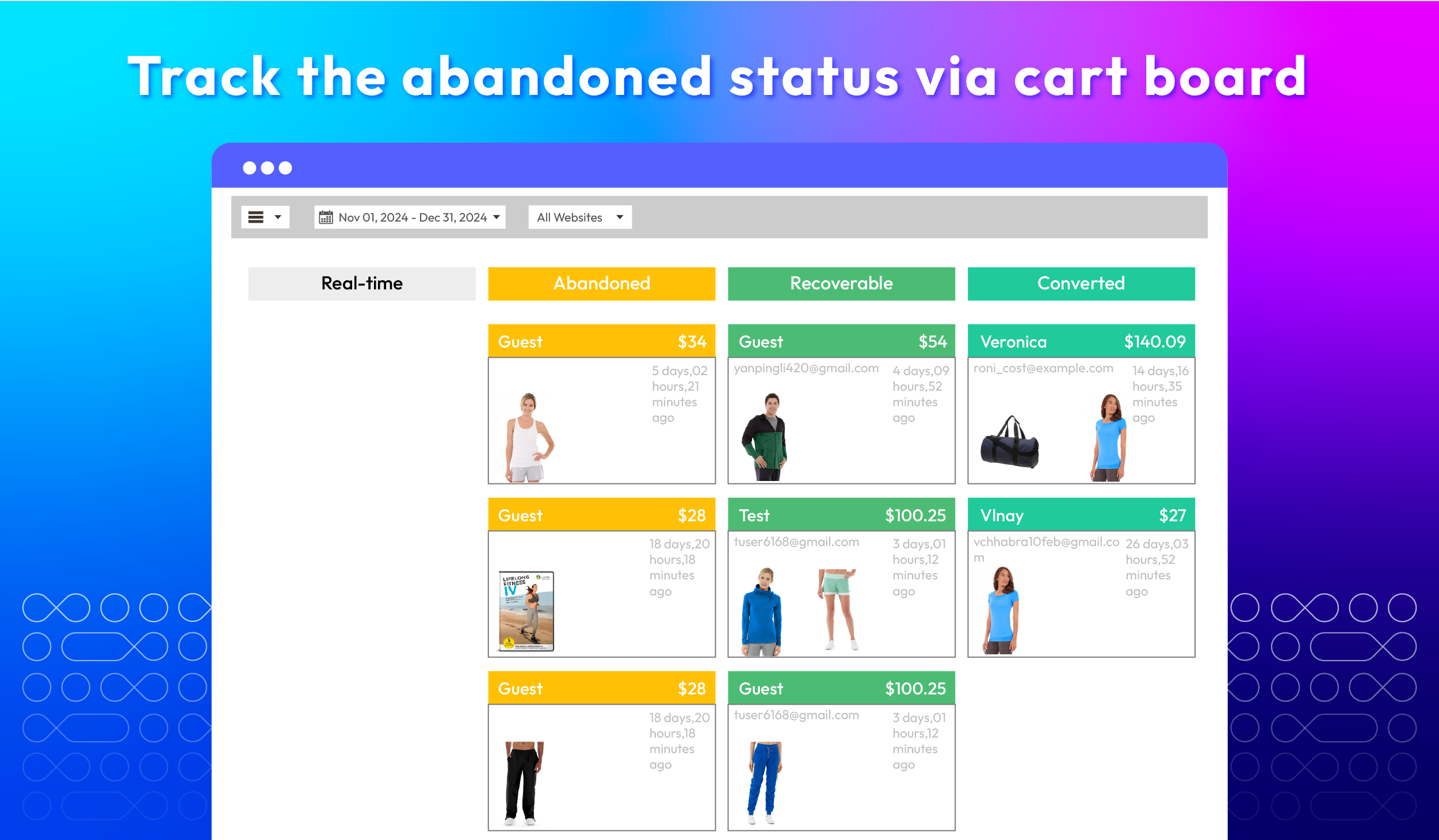
Track the abandoned status via Cart Board
tick icon
Send test emails to check the configuration accuracy
tick icon
Send SMS notifications to abandon cart customers
tick icon
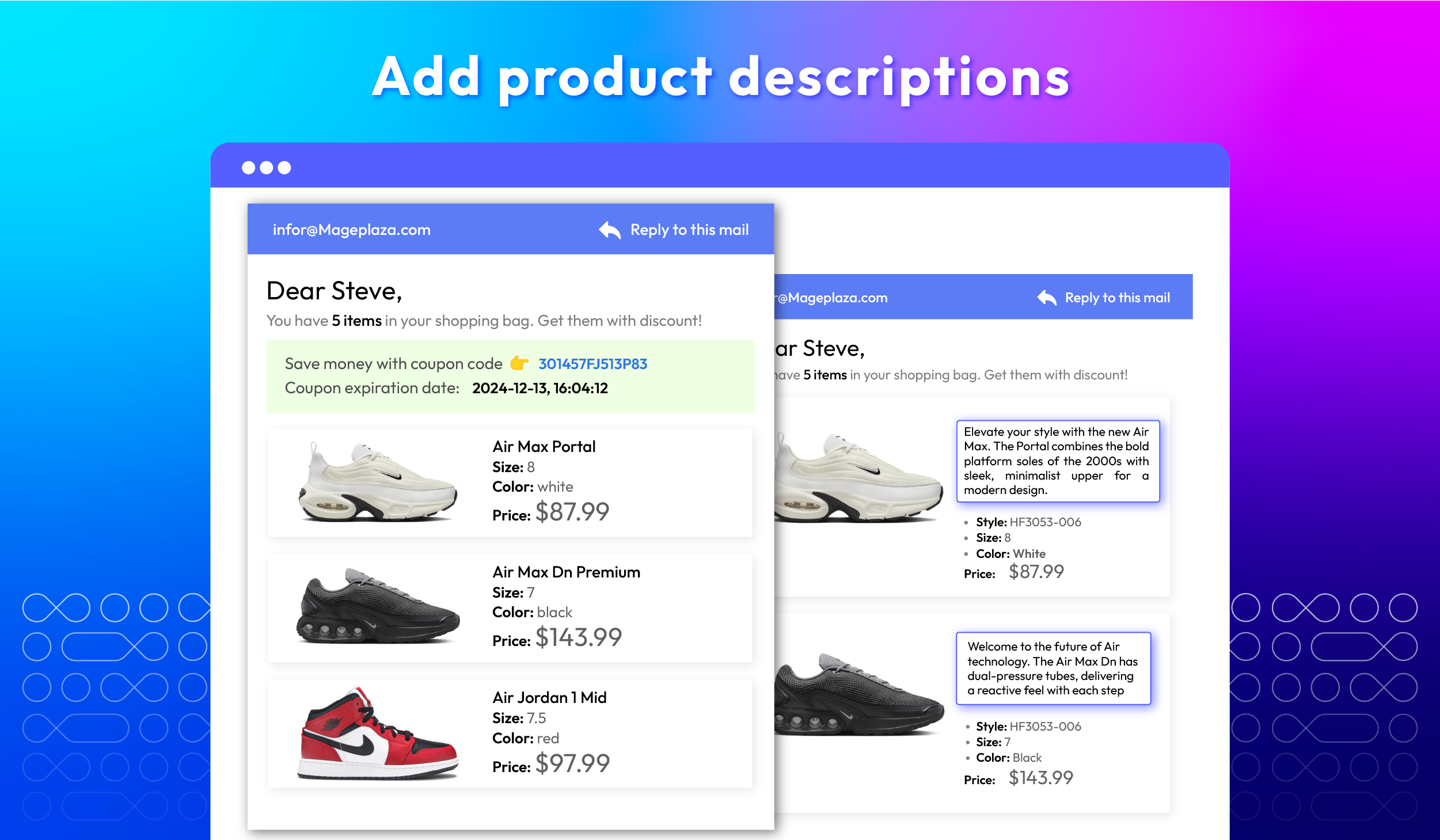
Add related products in emails & send follow-up emails
Free Installation
60 days money back guarantee

Benefits of Magento 2 Abandoned Cart Email extension

Benefits of Magento 2 Abandoned Cart Email extension
Recover lost sales
by recovering incomplete orders and abandoned checkouts
Entice customers to return
with personalized recovery emails and targeted discount offers
Track abandoned cart campaigns' performance
with real-time analytics and cart recovery reports

Abandoned Cart Email Flow to Increase Conversions

Abandoned Cart Email Flow to Increase Conversions

Generate customizable abandoned cart emails

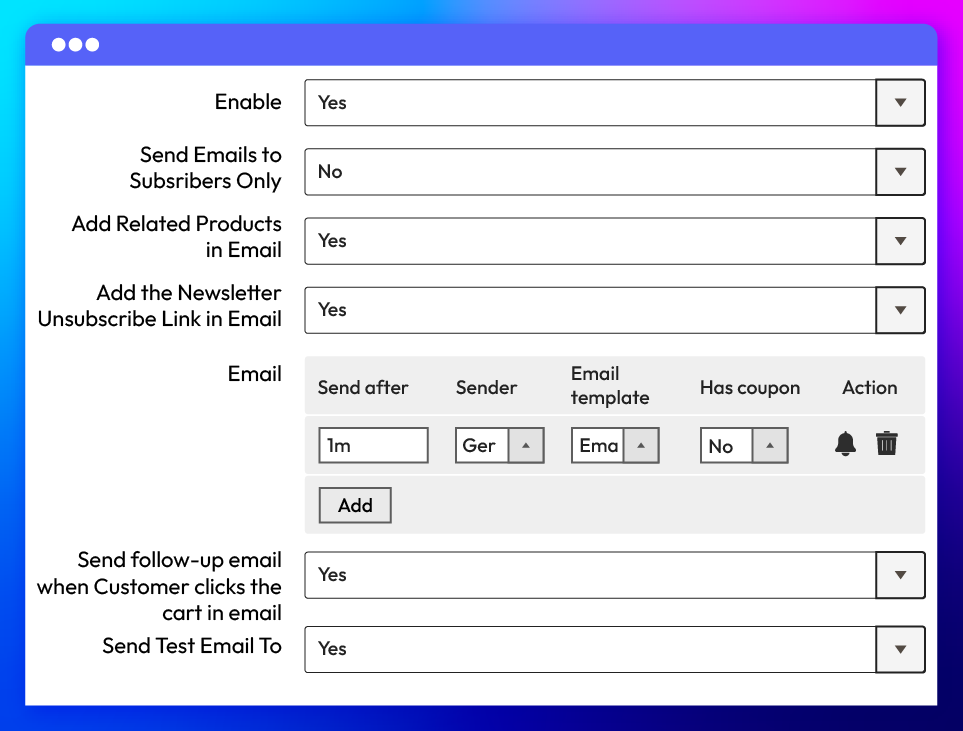
With the Abandoned Cart Email extension, store admins can easily configure and customize emails. This module offers full control over email settings: targeting subscribers, adding unsubscribe links, sending test & follow-up emails, and adding related products.

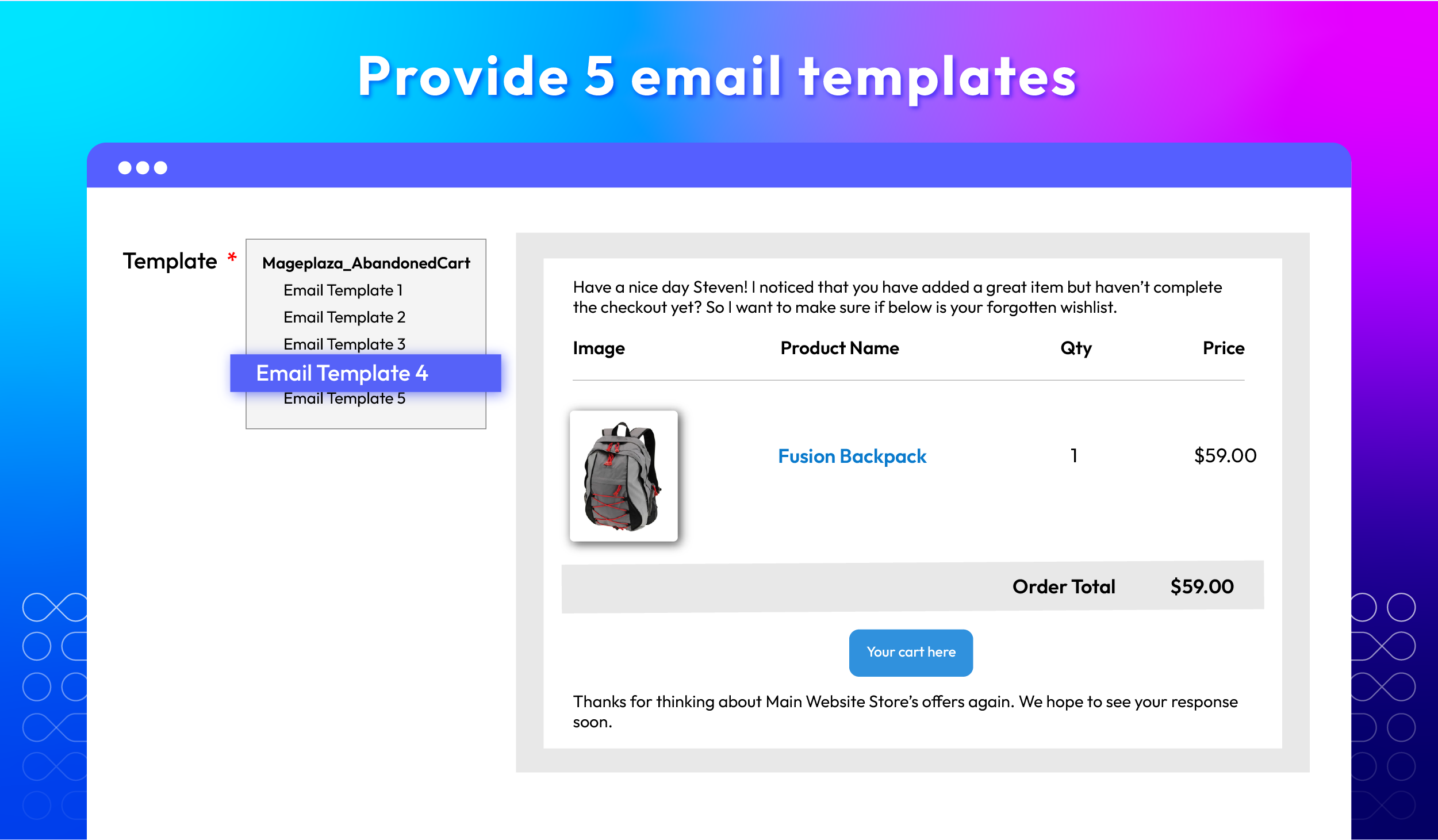
Support 5 appealing abandoned cart email templates

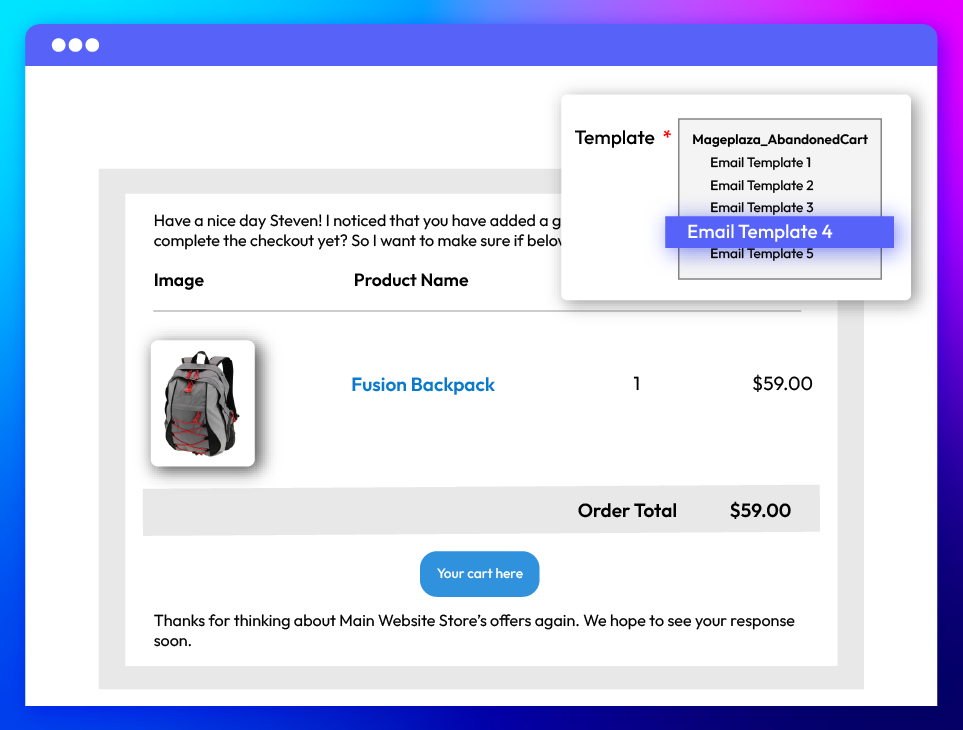
Businesses can save time on configuration by leveraging 5 pre-installed templates to quickly design abandoned cart emails. These professionally designed templates are visually appealing, ensuring the emails grab attention and stand out in the recipient's inbox.

Apply promotional coupons in emails

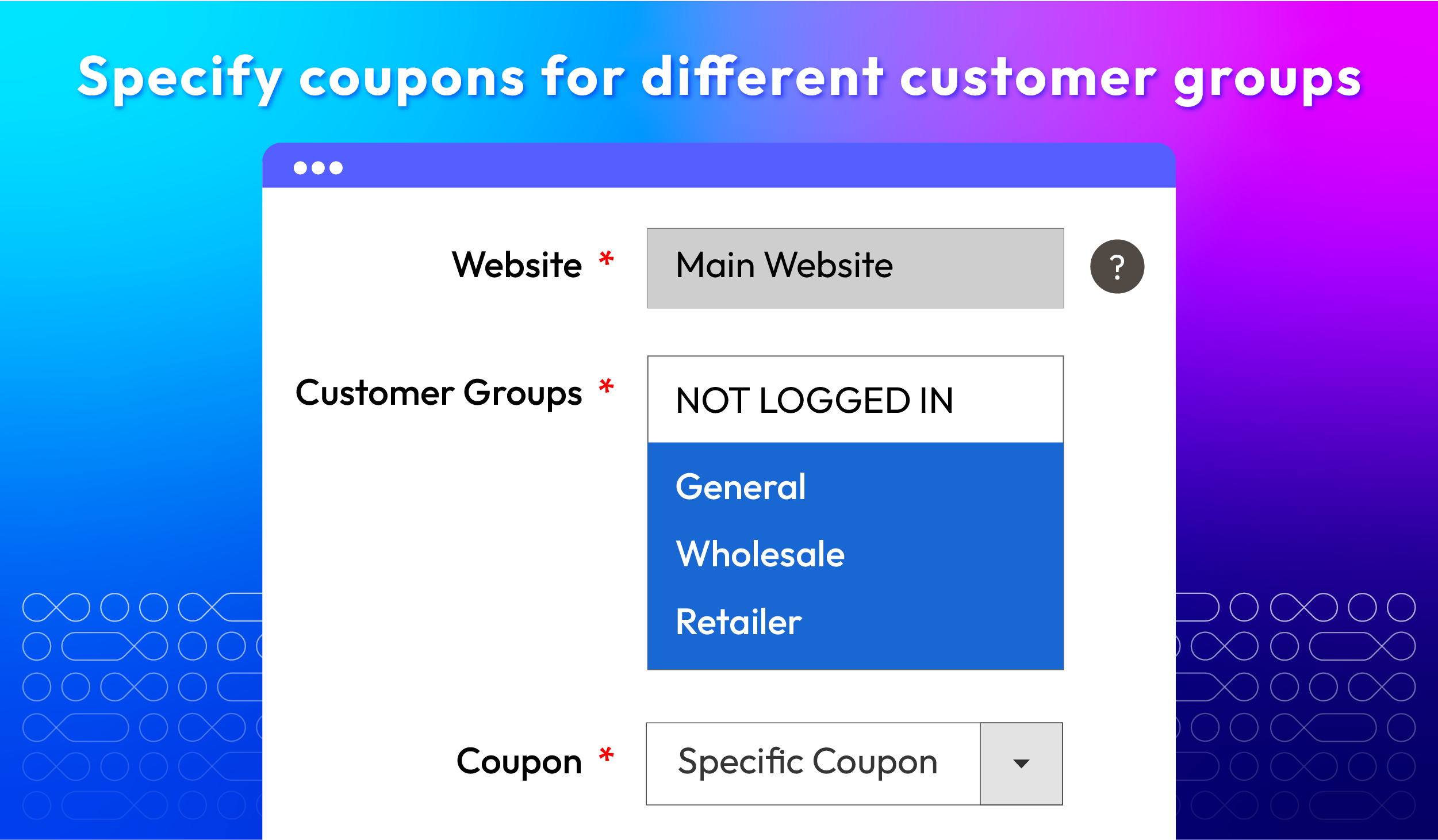
The Magento 2 Abandoned Cart Email extension helps online stores recover sales by adding discount coupons in reminder emails. These emails encourage customers to complete their abandoned purchases, and store admins can select and customize coupon rules.

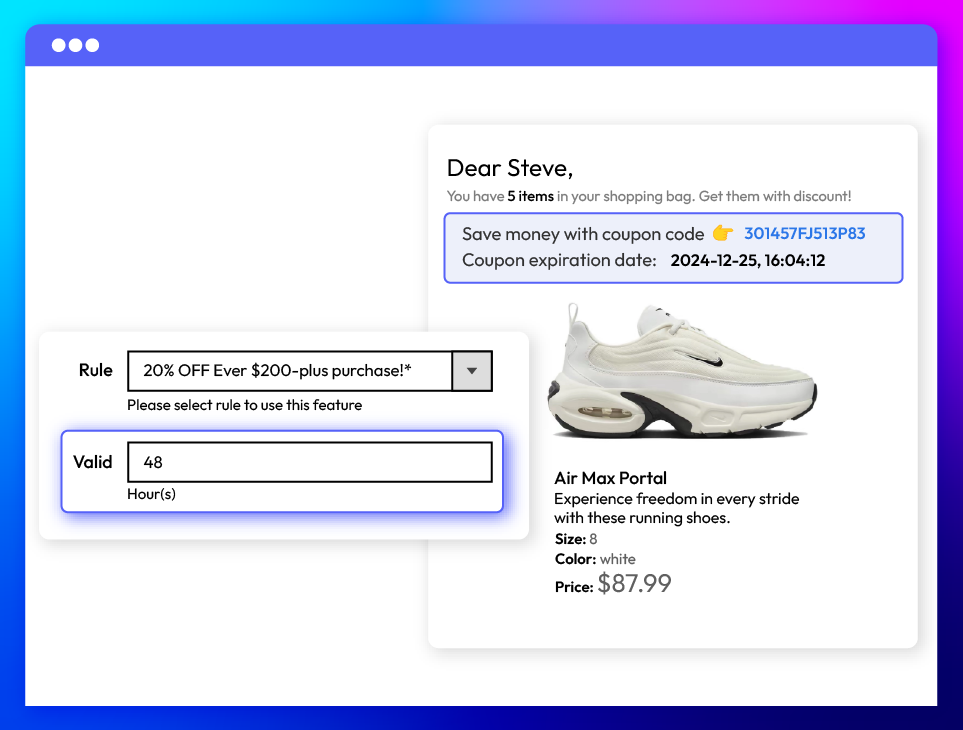
Set the valid time for coupons

The validity of a coupon will be measured in hours, allowing admins full flexibility to edit this information until abandoned cart emails are sent to customers. Time-limited coupons create a strong sense of urgency and "fear of missing out" (FOMO), effectively motivating customers to complete their purchases.

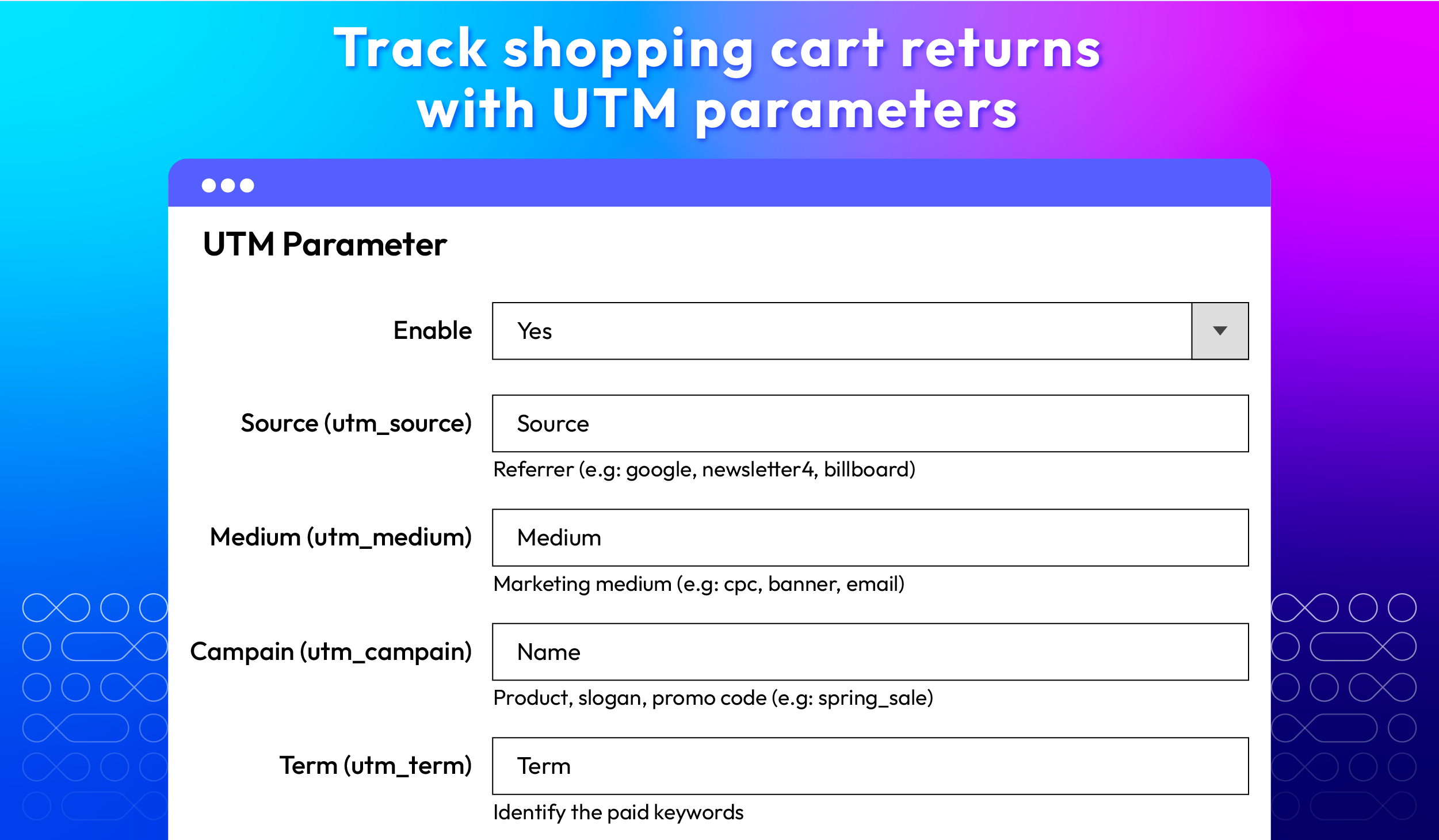
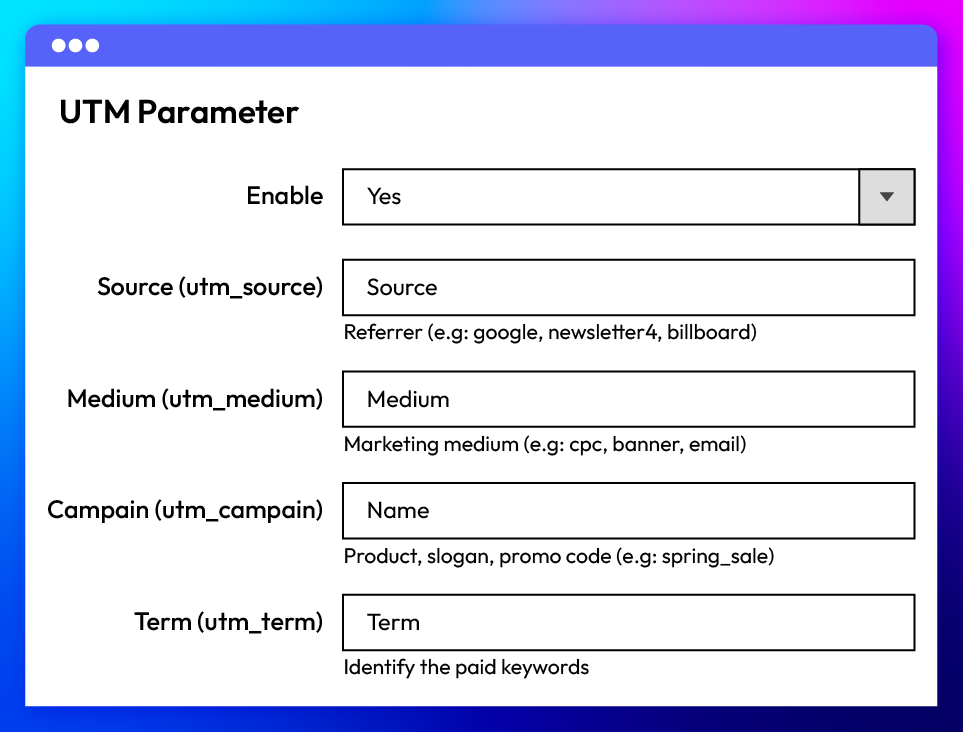
Insert UTM parameters to URLs

The Abandoned Cart Email plugin enables store admins to track the performance of marketing campaigns by appending UTM parameters to URLs. These parameters help determine if customers returned to the website via abandoned cart recovery emails and pinpoint the exact source of the return traffic.

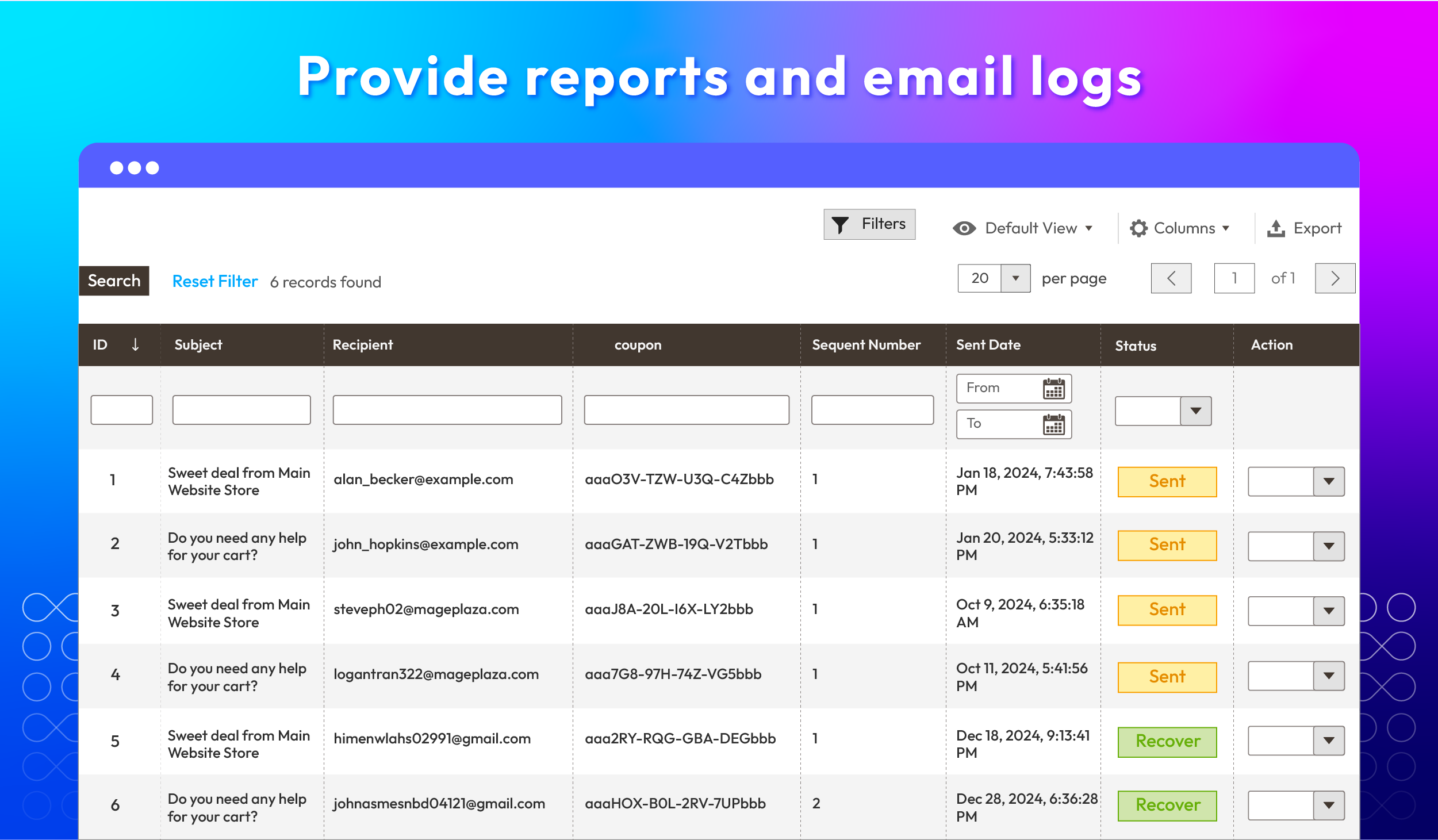
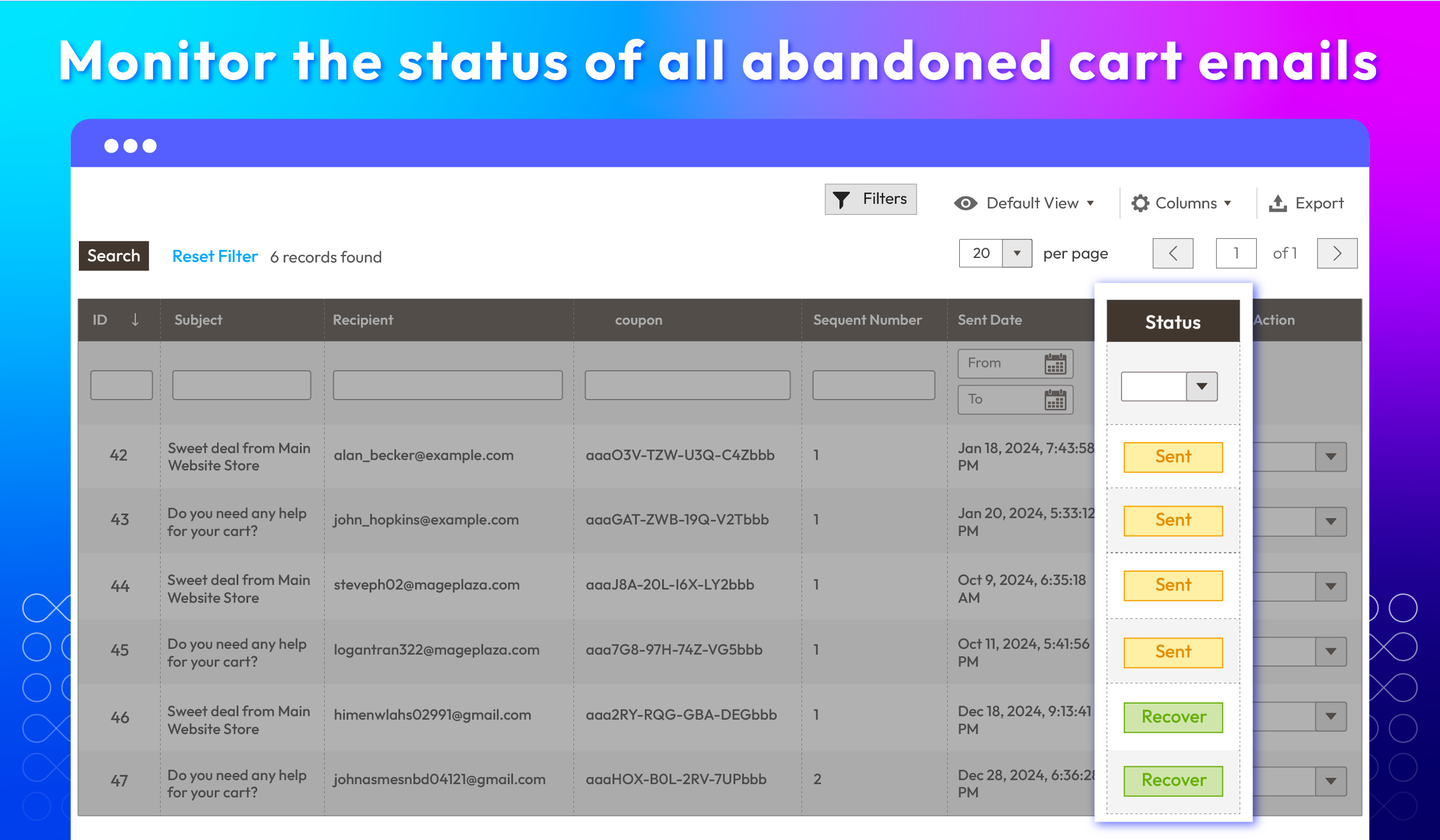
Track abandoned cart emails in log grid
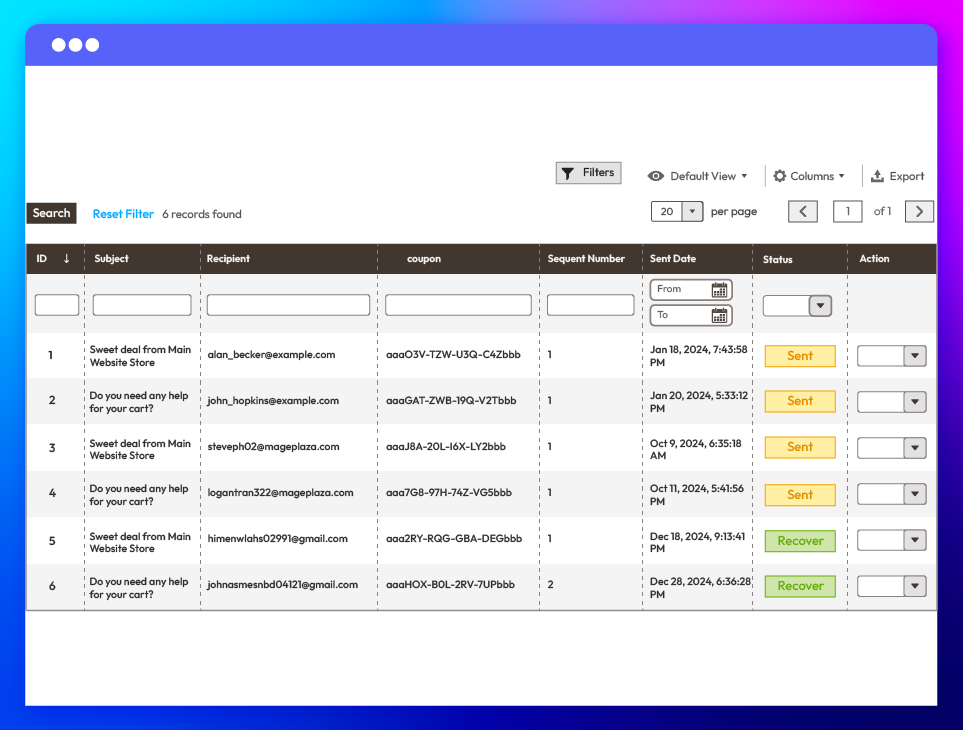
The extension provides store admins with a centralized log grid to manage all abandoned cart emails at any time. This centralized view simplifies the review and adjustment process, ensuring efficient email management and better monitoring of your cart recovery automation performance.

View the Checkout Abandonment Report

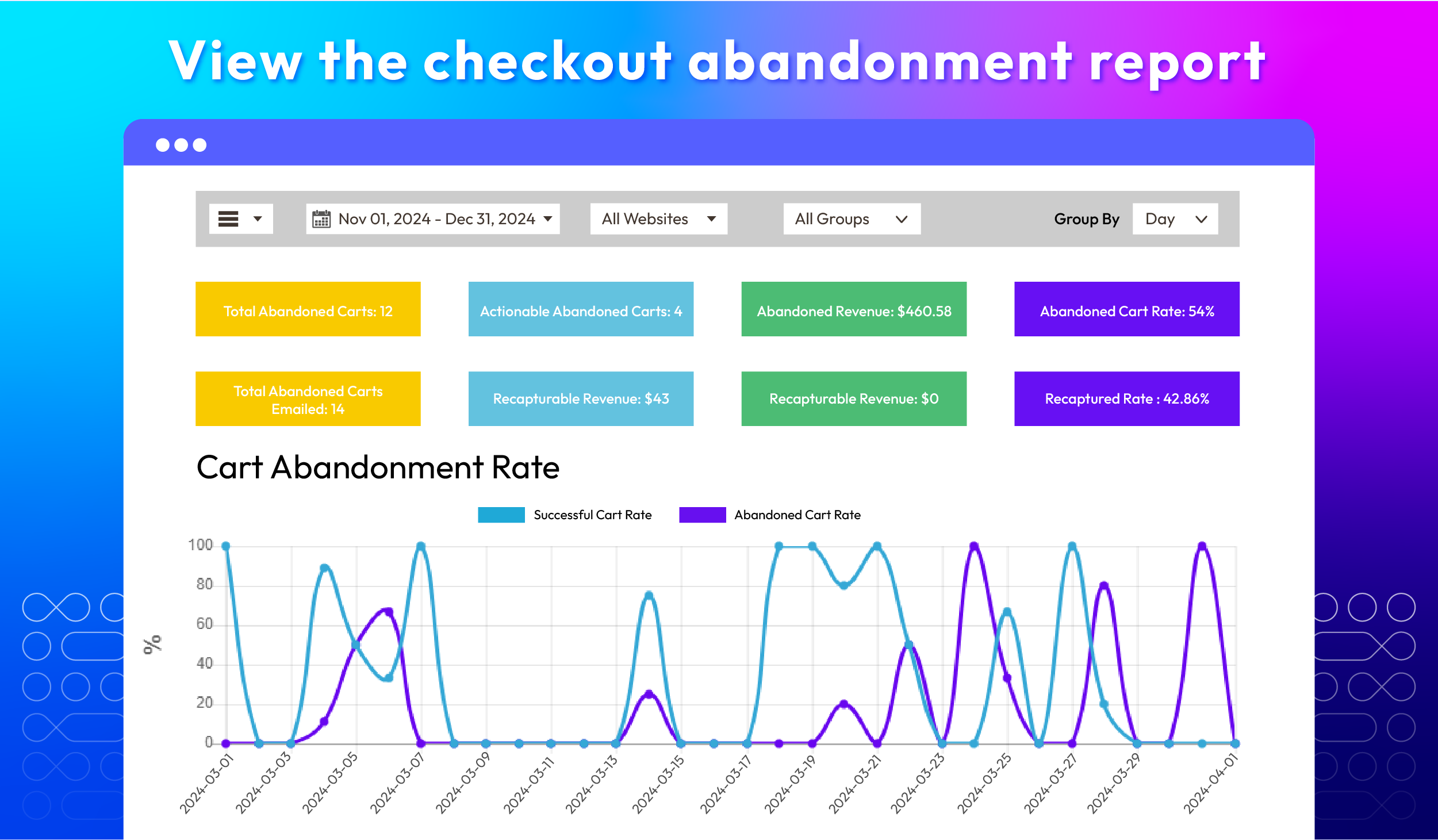
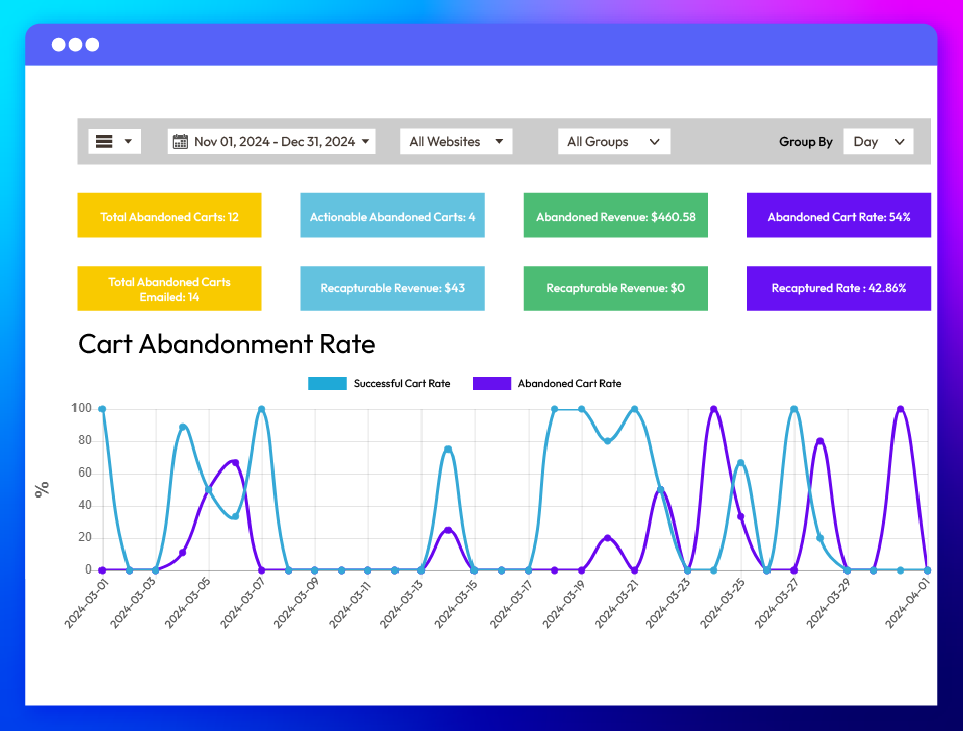
The Mageplaza Abandoned Cart Email module offers comprehensive insights through the Checkout Abandonment Report, including abandoned cart quantity, abandonment rate (%), and total revenue ($). These detailed statistics enable admins to effectively monitor and optimize email recovery performance.

Analyze shopping behavior

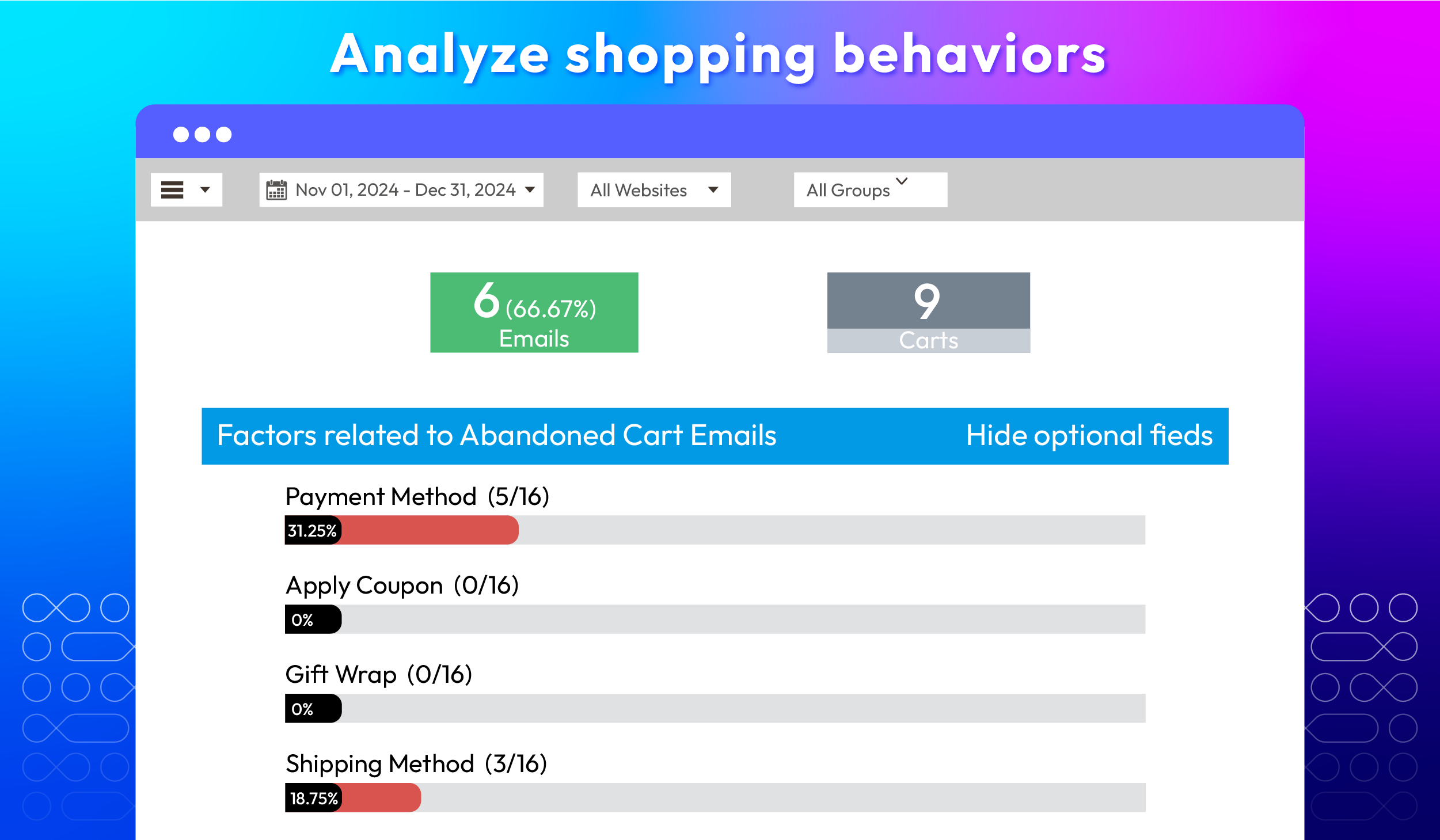
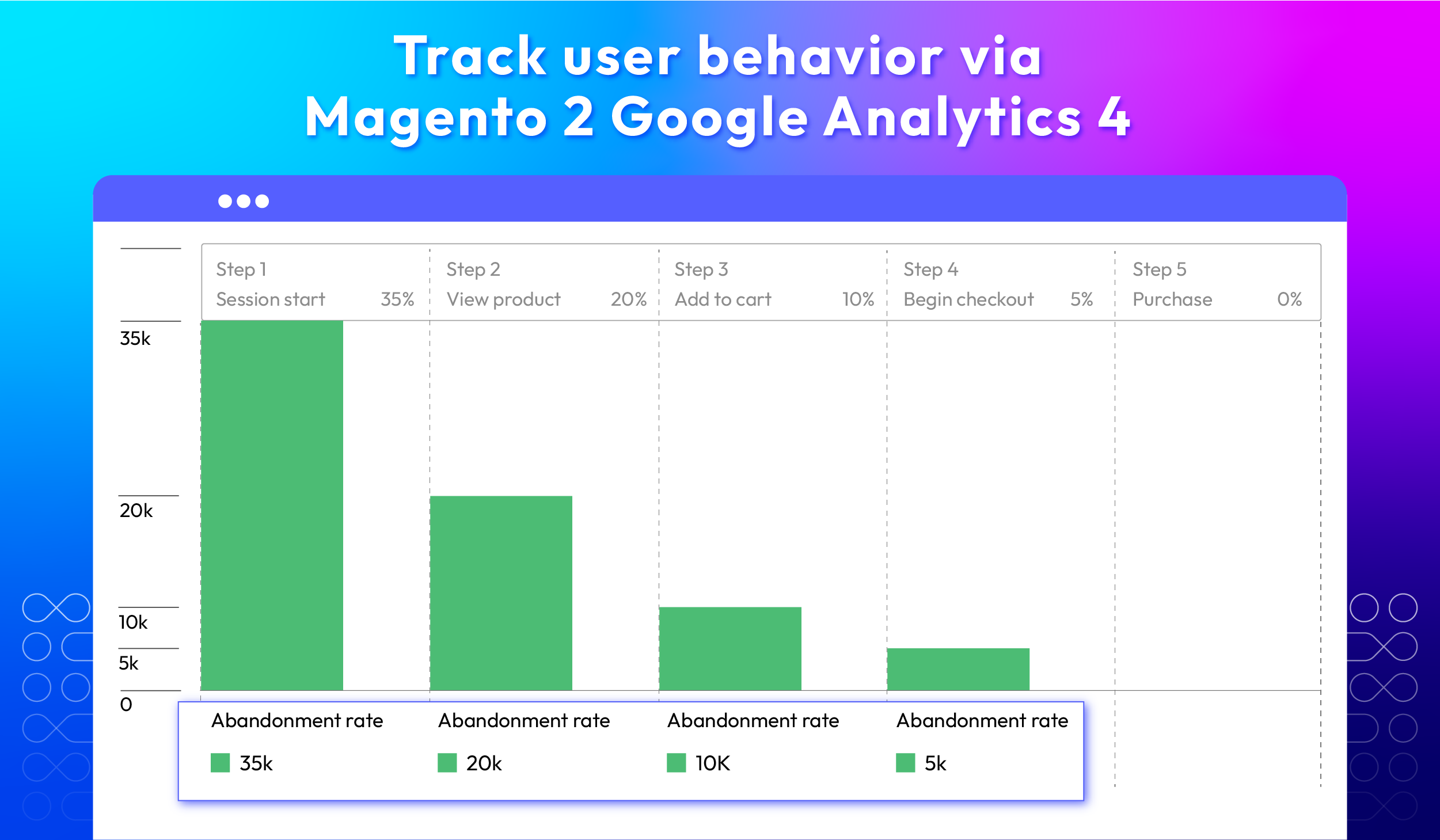
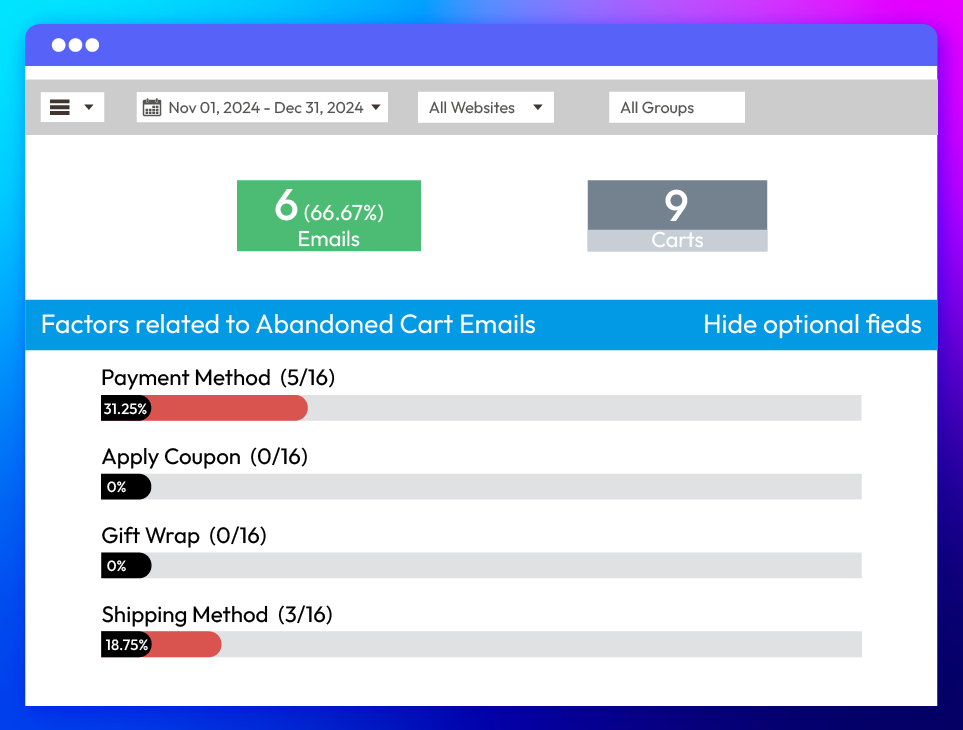
The report tracks customer behavior leading up to cart abandonment, presented in percentages. This data helps store owners identify and analyze the primary reasons for abandoned checkouts, enabling targeted improvements to the checkout process and personalized recovery emails.

All features

Customize abandoned cart emails

With the Magento 2 Abandoned Cart Email extension, store admins can manage all aspects of abandoned cart email settings, including:
check
Email to Subscribed Users if Items Are In Stock: Admins can send abandoned cart emails only to subscribed customers if at least one item in the cart is in stock. Emails won't be sent if all items are out of stock.
check
Unsubscribe Link in Email: The extension allows you to add an unsubscribe link in abandoned cart emails. Therefore, customers can unsubscribe from future emails.
check
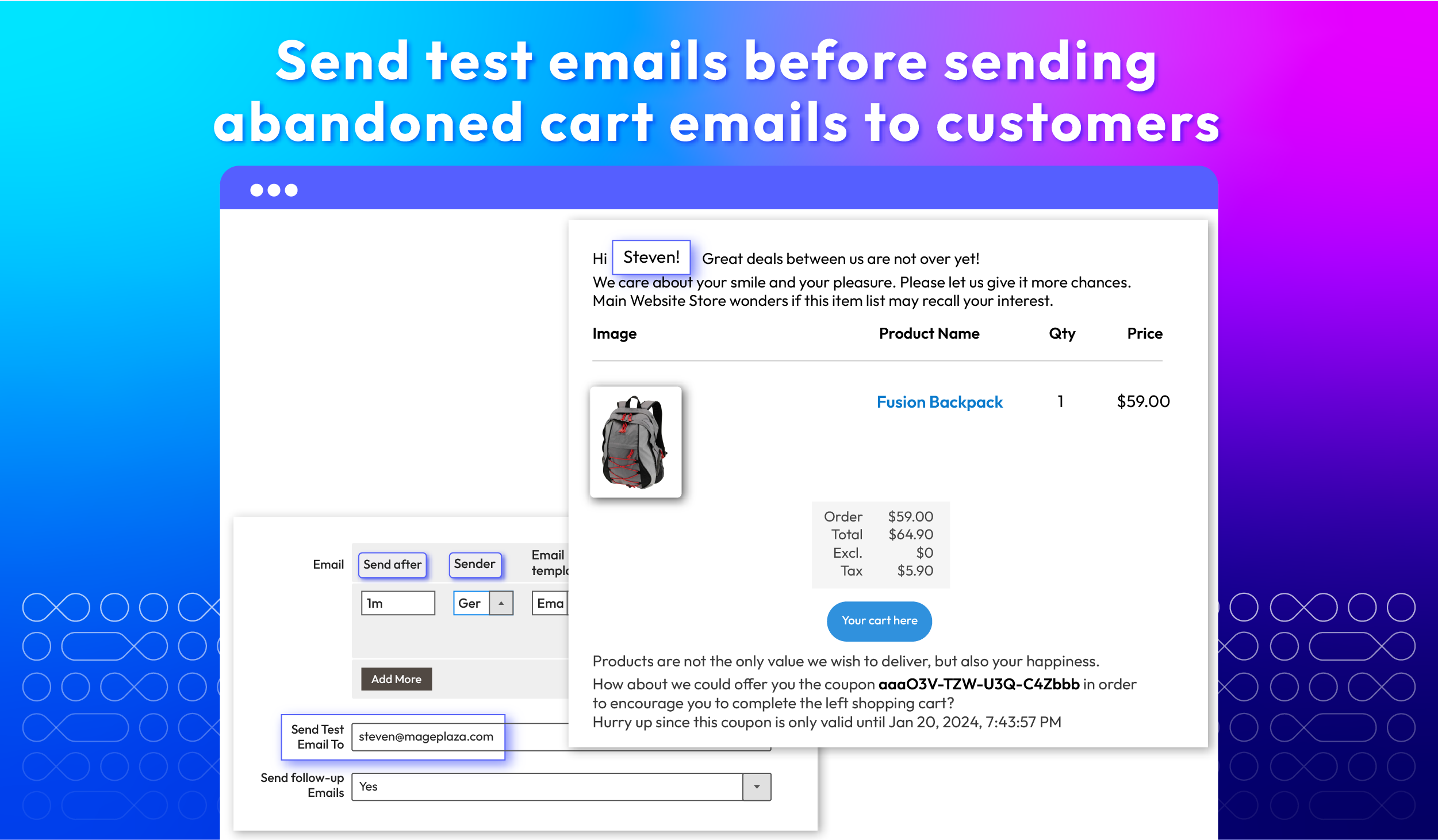
Test Email To: Before sending actually abandoned cart emails to customers, admins can send test emails to their own or a specific address to ensure everything looks as expected.
check
Follow-up Emails: The admins can set up follow-up emails to re-engage customers who have yet to return to complete their purchase after the initial abandoned cart email.
check
Related Products in Email: The extension allows admins to add related product recommendations to abandoned cart emails. Thus, customers are encouraged to consider additional purchases

Customize email templates

Apart from pre-installed templates, store admins can create their own abandoned cart email templates to meet specific marketing needs or campaigns. To do this, go to the Magento admin panel and click on Marketing > Email Template.
Once a new template is created, it will automatically appear in the list of available email templates within the Abandoned Cart Email extension.

Auto-apply promotional coupons

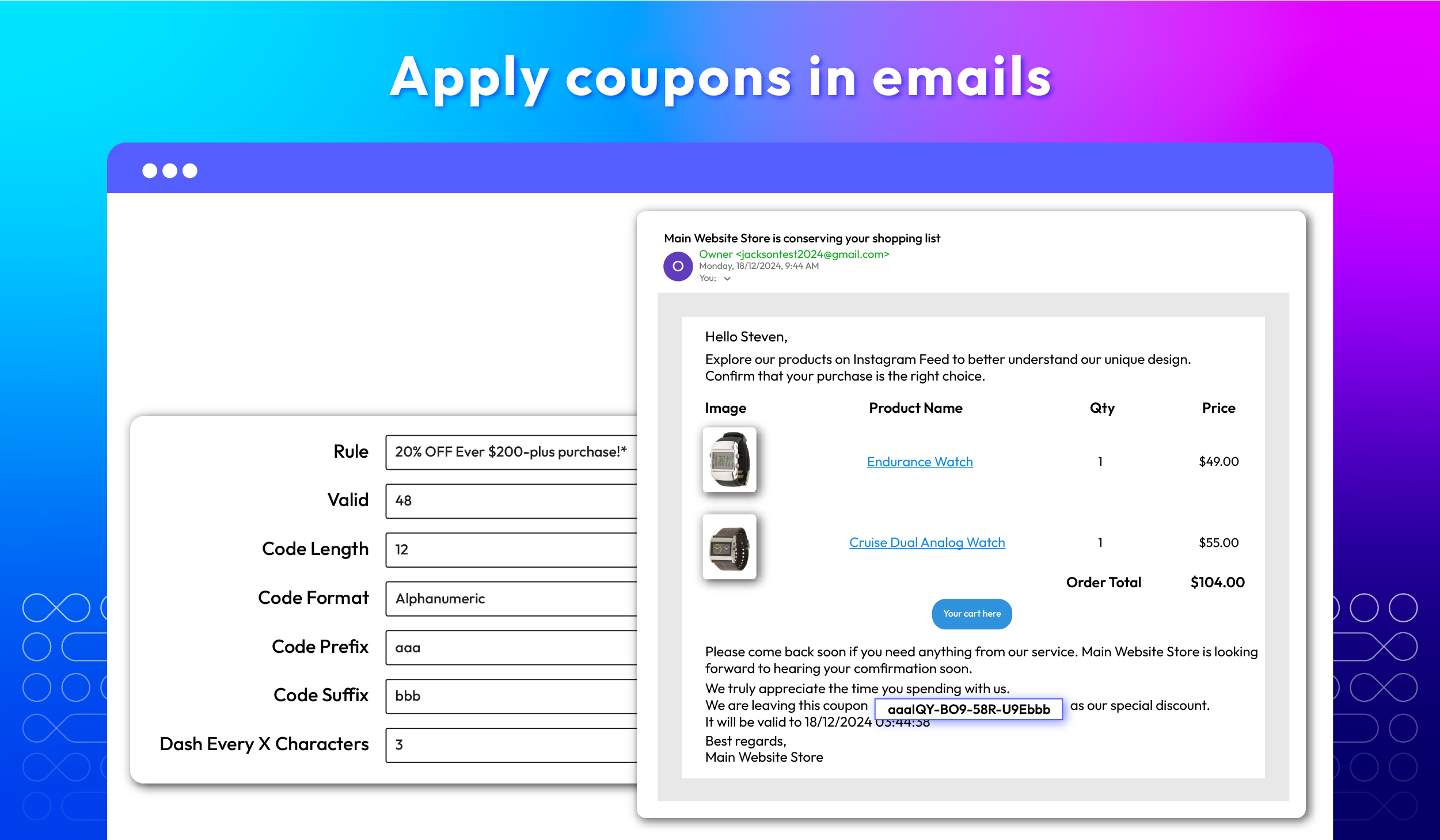
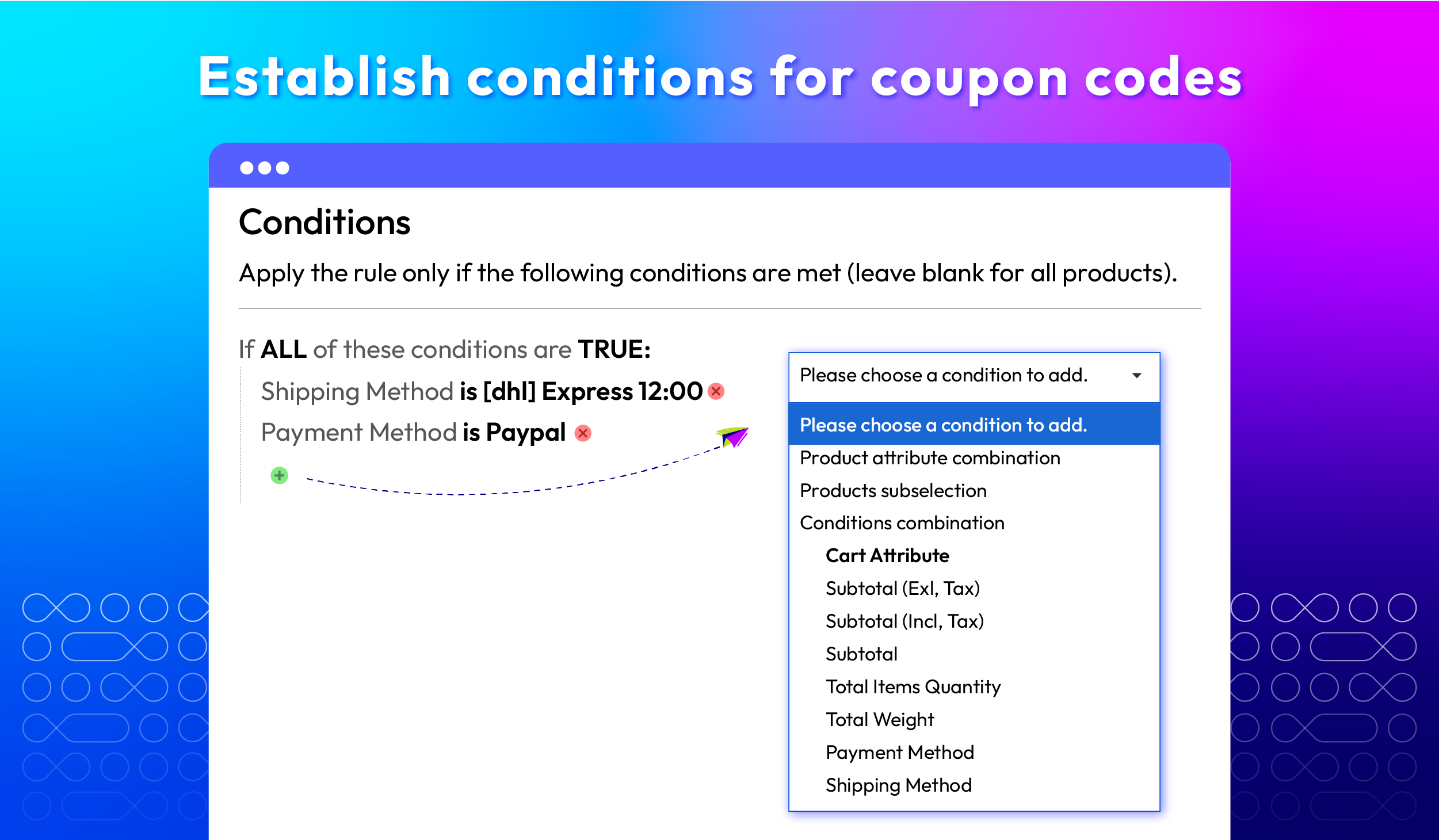
By configuring the backend, coupons can be generated automatically. Store admins can choose a coupon rule and customize attributes.
check
Choose a specific coupon rule
With the Abandoned Cart Email module, admins can add coupons to abandoned cart emails using specific condition rules, such as "20% off every $200-plus purchase". Admins can also create unlimited cart price rules with this simple instruction.
check
Easily edit coupon's code
Store admins can create and adjust the length of coupon codes in emails to match templates and content. They can also choose from three formats available: alphabetic (letters and numbers), alphabetical (letters only), and numeric (numbers only). This flexibility makes it easy for coupon codes to fit into different email designs.

Insert UTM parameters into links

UTM parameters are snippets of text added to the end of URLs. They enable tracking of specific details about traffic sources and user behavior. When linked to Magento 2 Google Analytics 4 (GA4), these parameters help analyze user interactions and conversions from abandoned cart emails.
Best practices for using UTM Parameters:
check
Clear name: Choose clear and meaningful names for UTM parameters so that you can easily understand the data.
check
Consistent Name: Maintain a consistent naming convention for UTM parameters to avoid confusion when analyzing data.

Monitor abandoned cart emails

The Abandoned Cart Email extension for Magento 2 provides specific information about abandoned cart emails that have been sent, including ID, Subject, Receiver, Coupon, Sequent Number, Sent Date, Status (Sent / Error / Recover), and Action (Preview / Delete / Send Again) in log grid.

View the Checkout Abandonment Report

The Checkout Abandonment Report provides statistics about Abandoned Cart Checkout and Abandoned Cart Emails, which helps admins track email recovery effectiveness.
Statistics on Abandoned Cart Checkout
check
The number of abandoned carts
check
The abandonment rate (%) calculated as a percentage of total cart checkouts
check
The total revenue ($) lost due to cart abandonment
Abandoned Cart Email (ACE) Statistics
check
Number of abandoned carts after email has been sent
check
Revenue that can be recovered after sending the email
check
Checkout rate of recovered abandoned carts

Analyze shopping behavior

With a color-coded column chart, the Abandoned Cart Email extension delivers an at-a-glance view of shopping behaviors and cart abandonment trends. As a result, administrators can quickly understand customer behavior patterns leading to cart abandonment.
check
Red: 0-40%
check
Yellow: 40-70%
check
Green: 70-100%
Administrators also choose to hide or display columns in each statistics table. Clicking on "Hide optional fields" opens a popup showing all available information fields as checkboxes. Checked fields remain visible in the table, while unchecked ones will not display statistics.

Set sending times & senders

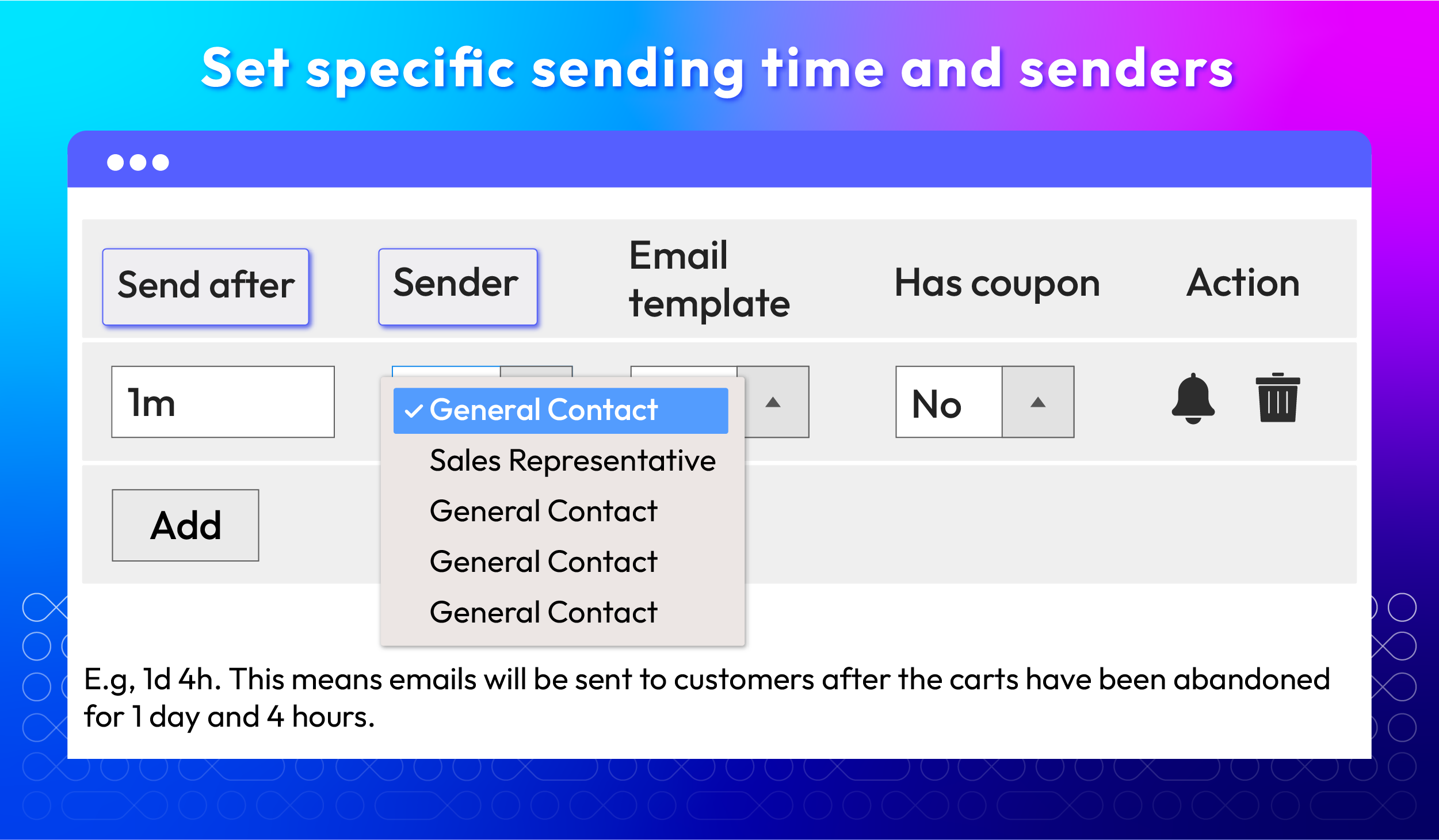
Admins can freely set and change the abandoned cart email sending time. In the event that the admins make any changes, the email will be sent to the customers at the time that was most recently updated.
Also, admins can change the sender's name with 5 options: General Contact, Sales Representative, Customer Support, Custom Email 1, and Custom Email 2.
Besides, merchants can set a time limit to determine when a cart is abandoned. If a customer adds items to their cart but doesn't complete the purchase within this timeframe, the cart is marked as abandoned.

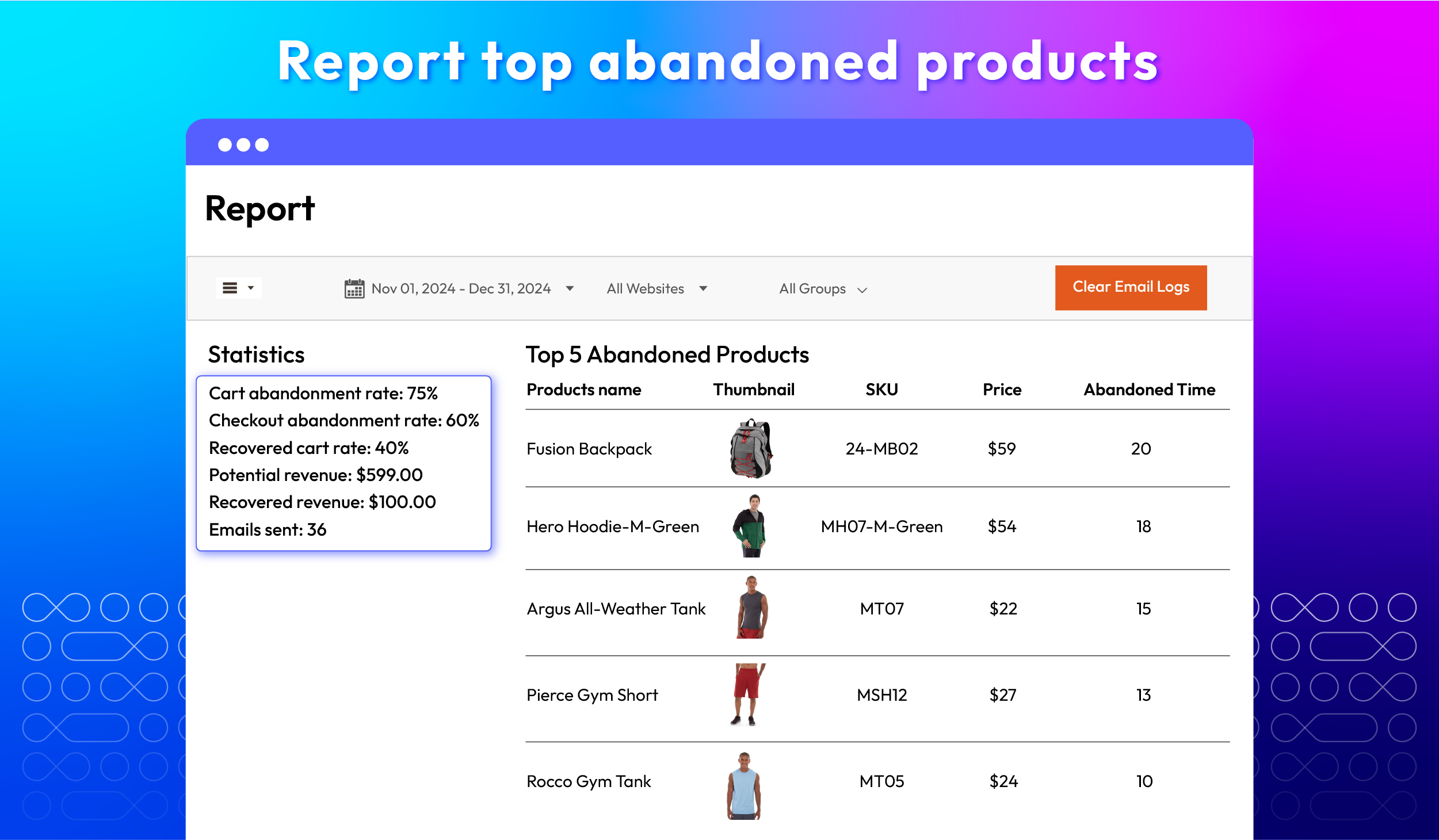
Report top 5 abandoned products

The 'Top 5 Abandoned Products' report offers a detailed breakdown of products frequently left in shopping carts, including the quantity of times each product has been abandoned within a specified timeframe. This granular data helps merchants to make informed decisions.

Track the abandoned status

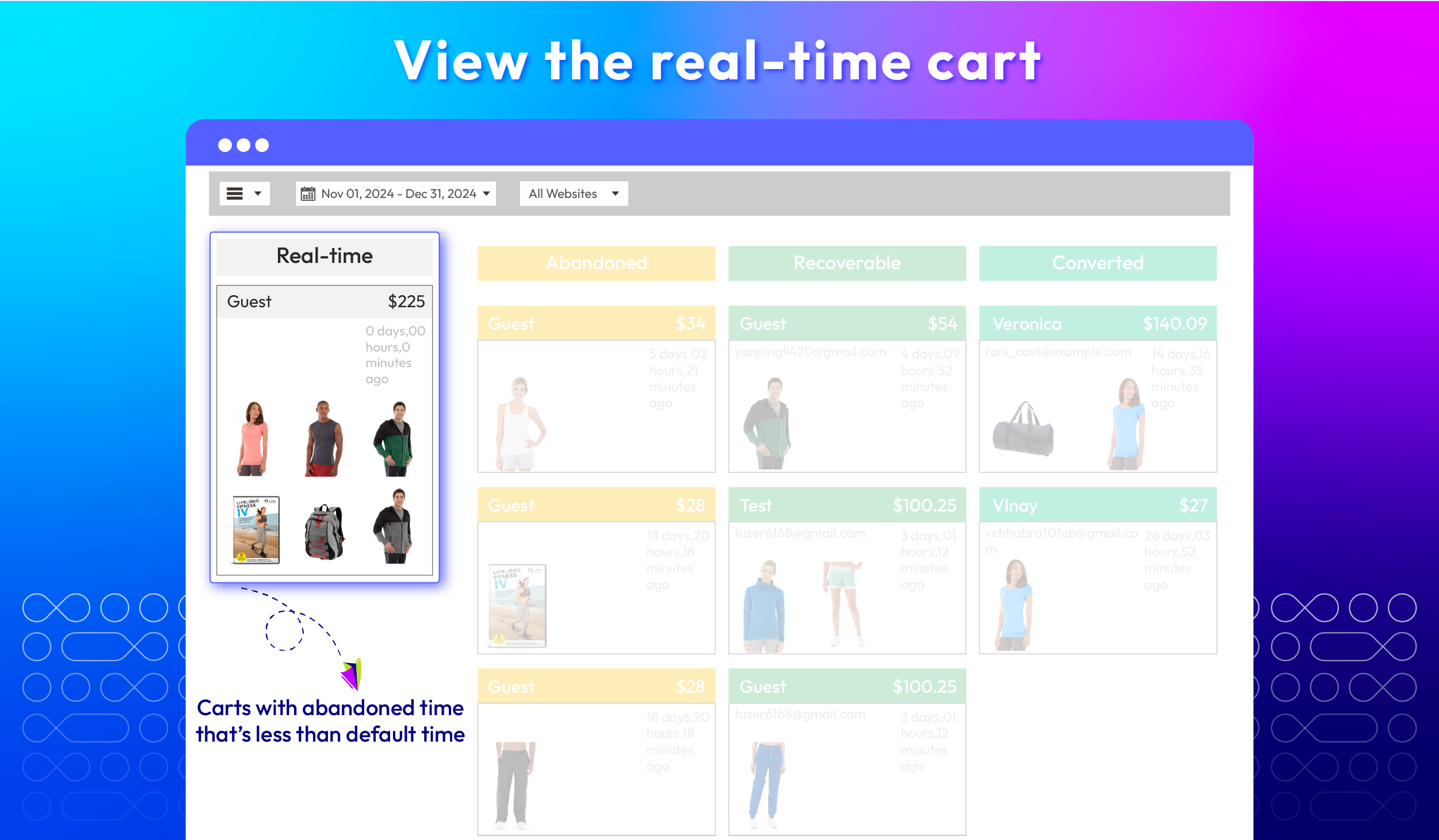
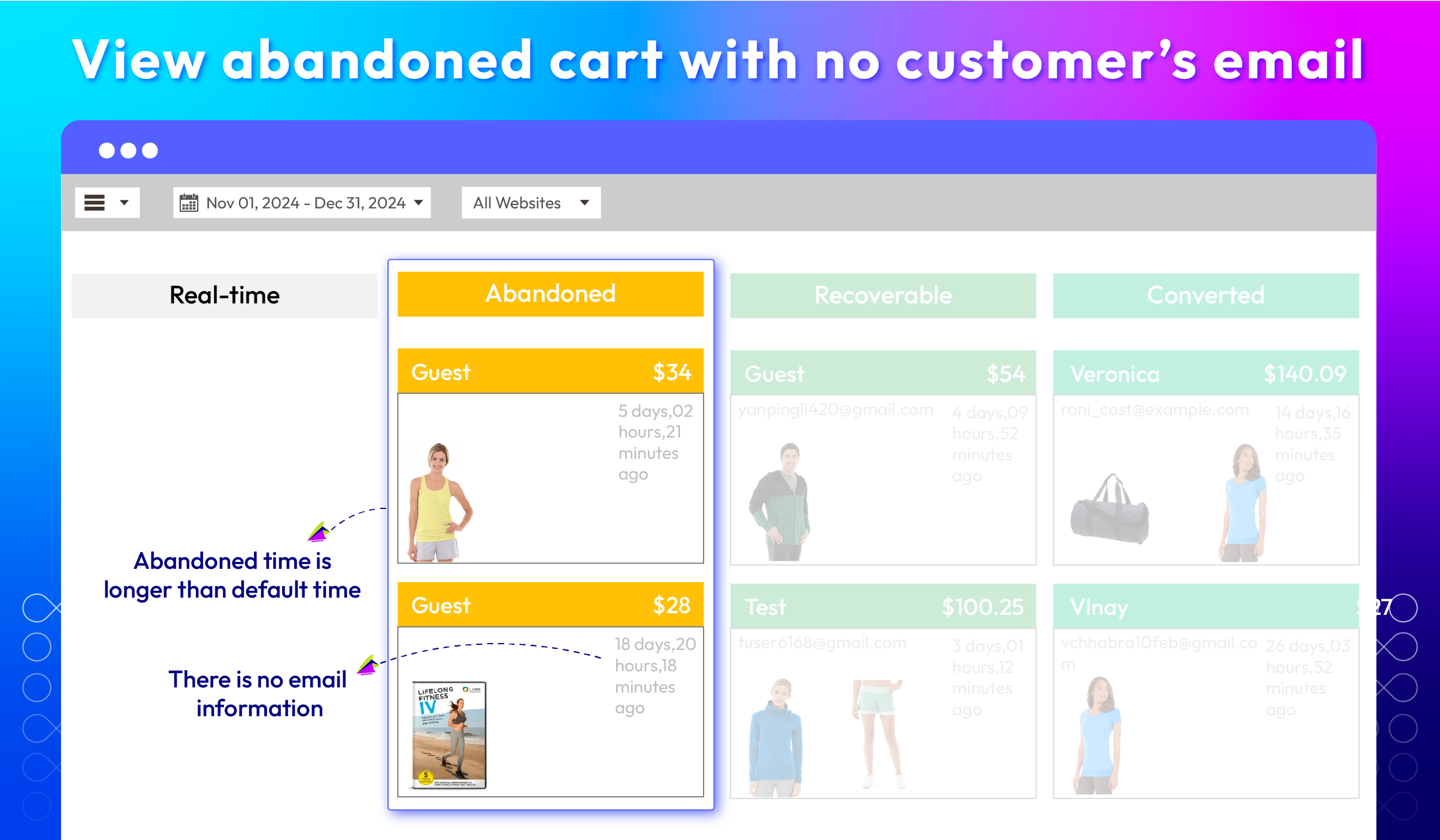
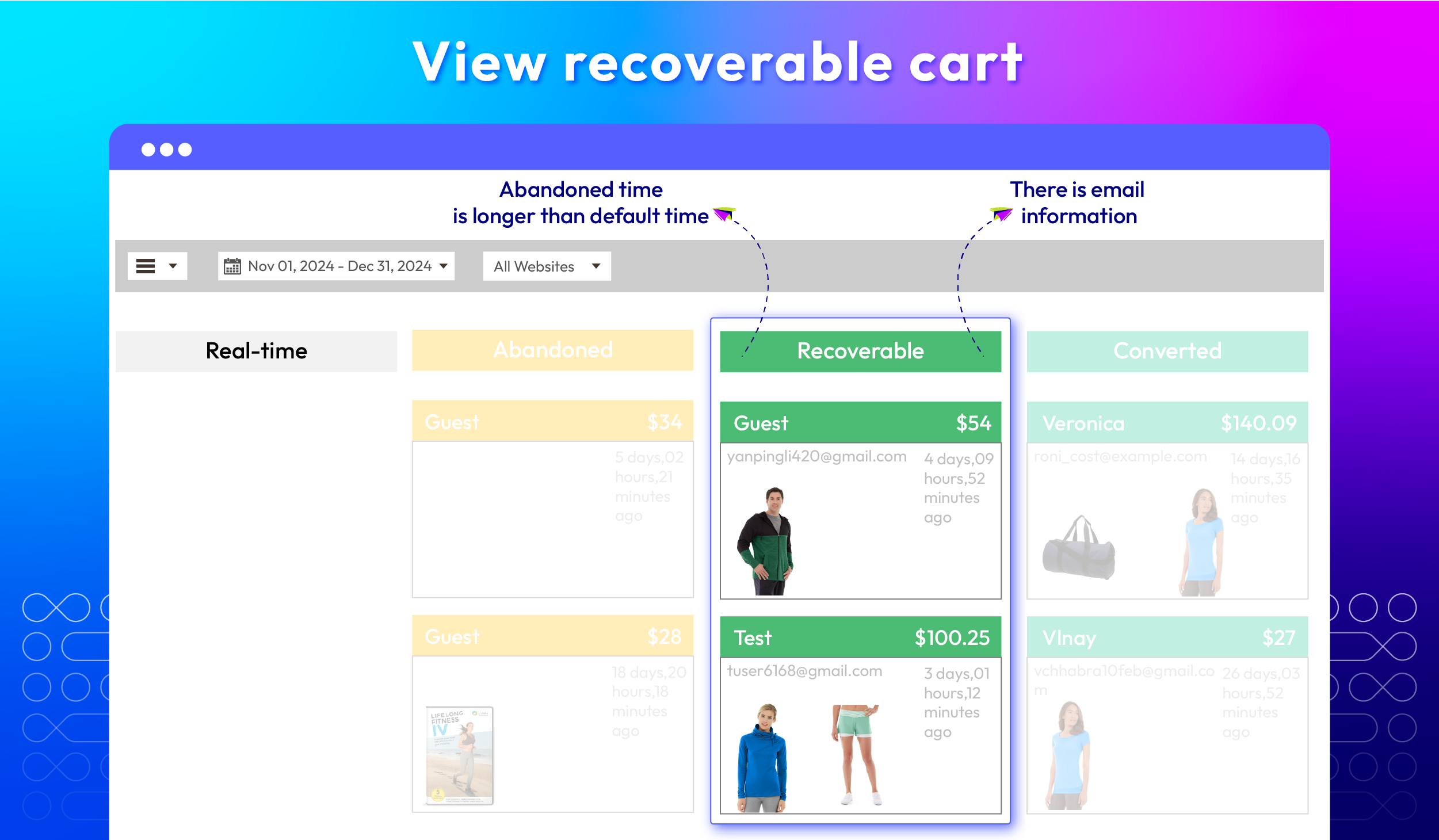
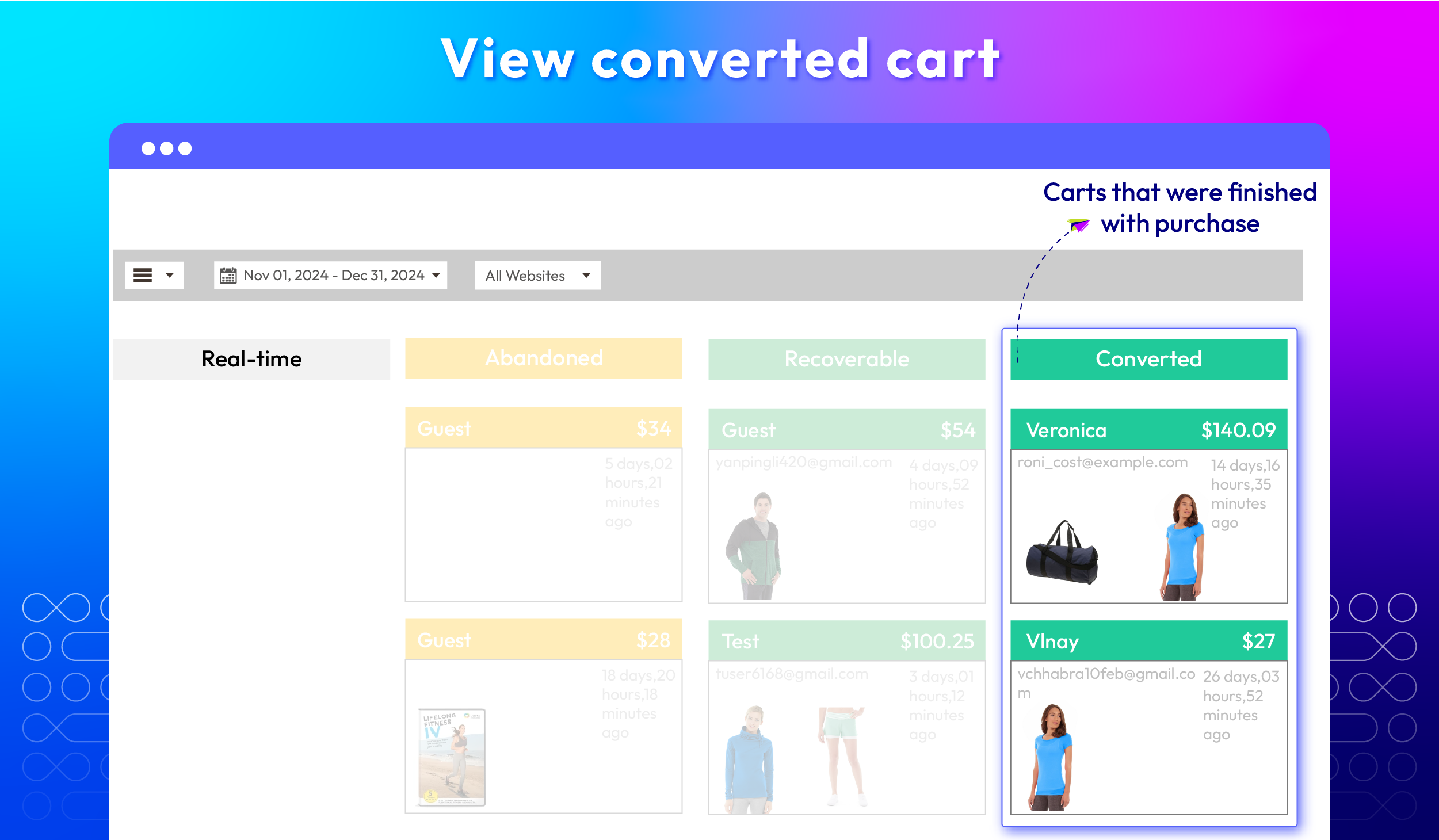
The Cart Board classifies abandoned carts into four categories: Real-time, Abandoned, Recoverable, and Converted. It also shows the time when each cart was abandoned. This tracking helps store owners identify patterns and adjust email timing to maximize cart recovery.
Here are all the Cart types:
check
Real-time: Carts will be located here if the abandoned time is less than the default abandonment time.
check
Abandoned Cart: Carts are listed here if the abandoned time is longer than the default abandonment time and there is no email information.
check
Recoverable: Carts will appear here if the abandoned time is longer than the default abandonment time and contains email information. Therefore, Stores can send abandoned cart emails with attractive offers to encourage customers to return.
check
Converted: This Converted column will display carts that have been successfully ordered.

Send SMS notifications

Stores can send SMS reminders directly to customers' phone numbers, providing a timely and personal nudge about their abandoned carts. This feature helps re-engage customers and encourages them to complete their purchases.

Show/ hide unsubscribe link in email

Store admins can decide whether to show or hide the unsubscribe link based on the campaign's objectives and customer behavior.

Set uses per coupon

Merchants can limit coupon usage to prevent abuse and ensure fairness for all customers.

Delete/ add abandoned cart emails

Admins can easily add abandoned cart emails and delete bulk emails in the backend.

API support

The Abandoned Cart Email extension of Mageplaza supports using the REST API to recover shopping carts.

Extension compatibility

This extension works perfectly with other extensions of Mageplaza, including Google Analytics 4, SMTP (Free), SMS Notification, and GDPR.

What customers say about us

Product reviews: 41
Overall rating: 5.0
5
4
3
2
1
How much do you like this product?
Leave your email to get reward points for reviews
Submit a relevant review of 30+ words to earn 5 reward points (one-time per extension)
Carrol Leona
26 January 2024
Verified purchase
Roy
18 November 2022
Verified purchase
Arvind
16 September 2022
Verified purchase
Luke
02 September 2022
Verified purchase
pratheek
05 June 2022
Verified purchase

Release notes

  • v4.6.7 (Magento v2.4.x)

    19 August 2025

    • Bug Fix: We fixed a minor bug with Cron SMS that caused an error
  • v4.6.6 (Magento v2.4.x)

    23 May 2025

    • Security(adminhtml): Test Cart - Added CartToken
    • Bug Fix: Fixed Error when send email by cron
  • v4.6.5 (Magento v2.4.x)

    14 April 2025

    Compatibility: Now compatible with Magento 2.4.8

  • v4.6.4 (Magento v2.4.x)

    11 February 2025

    • New Update: Added pagination for cart page Admin
    • Bug Fix: Fixed some menu not show
  • v4.6.3 (Magento v2.4.x)

    09 December 2024

    New Update: Recovered Revenue fixed - Recovered Order Time watting 5 hours (after click in Email)

  • v4.6.2 (Magento v2.4.x)

    23 October 2024

    • Compatibility: Now compatible with Hyva theme
    • New Update Performance: We have improved the processing speed of Cron by over 11%
  • v4.6.1 (Magento v2.4.x)

    08 May 2024

    • Compatibility: The extension is now compatible with Magento 2.4.7.
    • Bug Fix: We fixed a minor admin bug in report.
  • v4.6.0 (Magento v2.4.x)

    25 April 2024

    • We Update: Merge three sections: Overall Report, Checkout Abandonment Report and Abandoned Product Report into one comprehensive Report
    • We Update: Add UTMs to track effectiveness on GA4
    • We Update: Optimize the configuration
  • v4.5.2 (Magento v2.4.x)

    30 July 2023

    • Fix: Not correct sender according to store view when send again in overall report
    • New Update: UG Link
  • v4.5.1 (Magento v2.4.x)

    09 May 2023

    • Compatibility: Compatible with SMS log
    • Compatibility: Compatible with Magento 2.4.6
  • v4.5.0 (Magento v2.4.x)

    07 February 2023

    • Added feature: exclude out of stock & disabled products from email
    • Improved compatible with Mageplaza One Step Checkout
    • Fixed minor bugs
  • v4.4.2 (Magento v2.4.x)

    19 October 2022

    • Fixed bug: email will be still send after recover link is clicked
  • v4.4.1 (Magento v2.4.x)

    27 September 2022

    • Compatible with Magento v2.4.5
    • Fixed minor bugs
  • v4.4.0 (Magento v2.4.x)

    09 August 2022

    • Added notification via SMS and WhatsApp
  • v1.8.0 (Magento v2.3.x)

    09 August 2022

    • Added notification via SMS and WhatsApp
  • v4.3.1 (Magento v2.4.x)

    15 June 2022

    • Compatible with Magento v2.4.4
    • Fixed data error in abandoned cart report table
  • v1.7.1 (Magento v2.3.x)

    15 June 2022

    • Fixed data error in abandoned cart report table
  • v1.7.0 (Magento v2.3.x)

    23 February 2022

    • Display Related/Up-Sell/Cross-Sell Products in Email
    • Added Unsubscribe Link to Email
  • v4.3.0 (Magento v2.4.x)

    23 February 2022

    • Display Related/Up-Sell/Cross-Sell Products in Email
    • Added Unsubscribe Link to Email
  • v1.6.2 (Magento v2.3.x)

    28 December 2021

    • Improve cart board, checkout abandonment report & abandoned product report
    • Fixed minor bugs
Load More

Frequently Asked Questions

This extension is an indispensable tool for any e-commerce store due to its marketing automation features, specifically email marketing automation.
- Recover lost sales: Remind customers of forgotten items
- Level up customer personalization: Freely customize email content to satisfy different customer groups
- Increase conversion rates: Turn abandoned carts into completed purchases
- Gather customer insights: Understand reasons for cart abandonment
- Build customer relationships: Show customers you care and provide assistance
- Promote additional products: Suggest related items or upsells
- Improve ROI: Effective tool with a high return on investment

First, address your email settings. Ensure that email notifications are enabled in your Magento account settings and that your email address is accurate. Then, check your email templates to make sure they are properly set up and not stuck in a draft or inactive state.

Yes, Mageplaza Abandoned Cart extension can track guest’s abandoned carts as long as they leave their email address.

Here's a recommended timeline for sending abandoned cart emails:
- First email: 1-2 hours after cart abandonment (This initial email serves as a gentle reminder that the customer has left items in their cart. It should be brief and non-intrusive, simply reminding them of the abandoned products).
- Second email: 24-48 hours after cart abandonment (If the first email has not been responded to, send a second one within 24-48 hours. This email can offer a discount or incentive to encourage them to return).
- Third email: 3-7 days after cart abandonment (Send a final follow-up email within 3-7 days. This email can highlight the benefits of the products, offer a personalized recommendation, or express a sense of urgency to encourage them to act quickly)

Yes! Product images will be automatically included in abandoned cart emails.

To help your stores diversify user experience and enhance customer engagement, we offer you 5 pre-made email templates that can be used in different cases. You can edit and create your own templates easily in the backend by clicking on Marketing > Email Template. The newly created template will automatically be displayed in this section.

Yes! You can apply the same rule for all store views or just restrict it in some certain ones.

From the Admin Panel, select Marketing > Abandoned Cart Email > Cart Board. You can view those carts in the Converted section here. Cart Board will categorize carts into 4 types as follows: Real-time, Abandoned Cart, Recoverable, and Converted.

In this case, the module will automatically stop sending reminders to customers.

Yes, Abandoned Cart Email is compatible with Hyva theme. However, the checkout only supports hyva-themes/magento2-theme-fallback. To learn how to enable checkout on Hyva, please follow this guide.

Mageplaza provides FREE Hyva Checkout Compatibility for all of our extensions upon requests. You can request by contacting us via email, live chat, or support ticket. Our team will respond within 24 hours and ask for details such as Order ID, extension name, Magento & Hyva versions, and any special requirements. To qualify, your module subscription must be active. If your subscription has expired, renewal is required as some older modules do not support Hyva. Additional customization requests may incur extra costs, and our team will inform you before proceeding. For assistance, feel free to reach out - we're here to help!

Magento Edition *
Version *
FREE installation Tooltip
Ends in:
03 : 00 : 00 : 00
Get 10% OFF
$149
icon logo magento 2.4.4 - 2.4.8
Tooltip
Hyva logo Theme
Tooltip

Pricing

Choose your suitable edition.

Community

$ 149 first year
Includes support & updates for 1 year Tooltip
60 days money back guarantee
Read our policies
check
Supports for Magento 2 Community Edition

Enterprise/ Magento Cloud

$ 349 first year
Includes support & updates for 1 year Tooltip
60 days money back guarantee
Read our policies
check
Supports for Magento 2 Enterprise Edition
check
Highest priority support
Can't see the feature you're looking for?
Describe it and we will customize this extension to suit your needs!
Request customization
feature looking icon