Product image of Blog Extension
Standard
User Guide
Professional
User Guide
Magento Edition *
Version * Compare versions
FREE installation Tooltip
Ends in:
03 : 00 : 00 : 00
Get 10% OFF
$0
icon logo magento 2.4.4 - 2.4.8
Tooltip
Hyva logo Theme
Tooltip

Magento 2 Blog Extension

v4.2.8
5.0
(131 reviews)
Read all >
The Magento 2 Better Blog extension helps store owners to create and manage blogs directly within their Magento store, eliminating the need for third-party platforms. By optimizing blog content for SEO, this extension improves search rankings, bringing more organic traffic to your store. With Mageplaza’s Blog extension, visitors can engage customers through comments, likes, and social sharing, keeping them connected to your brand.
tick icon
Compatible with Hyva theme (view demo)
tick icon
Compatible with Magento 2.4.8
tick icon
Create blogs without adding any 3rd-party platform
tick icon
Arrange blog content logically
tick icon
Enable customers to share blogs on social
tick icon
Allow customers to interact with posts
tick icon
Add related posts and products
60 days money back guarantee

Why you should leverage the potential of blogs?

Benefit of Blog Extension for Online Stores

Key Features of Magento 2 Blog Extension

Create blogs without adding any 3rd-party platform

Magento 2 Better Blog is a powerful built-in solution that lets you add a blog to your store without requiring additional software or frameworks. This keeps your website streamlined and minimizes compatibility issues. Even users with no technical expertise can easily learn how to create and manage blog content.
Show more
Create blogs without adding any 3rd-party platform
Arrange blog content logically

Arrange blog content logically

This module supports organizing blog posts by Categories, Topics, and Tags. Additionally, customers can archive blogs, storing them in a separate section for easy access and review.
Show more

Show sharing button

This plugin allows readers to easily share your articles on popular social networks like Facebook and Twitter. This feature helps turn your readers into advocates for your blog content, thereby enhancing reach, traffic, and SEO effectiveness.
Show more
Show sharing button
Allow customers to interact with posts

Allow customers to interact with posts

The Mageplaza module enables customers to express opinions and emotions through "like" and "dislike" buttons. Additionally, it encourages customers to participate in discussions by leaving comments.
Show more

Add related posts/ products

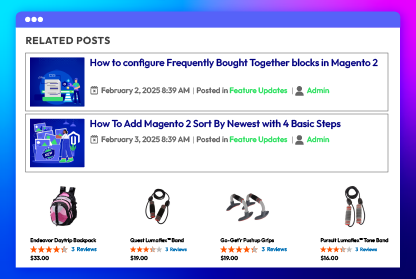
You can display related blog posts or products right alongside the main content. This enhances navigation on the blog, encourages readers to explore more useful content, and creates opportunities to introduce related products, thereby increasing sales.
Show more
Add related posts/ products

All features

Convenient blog setup

This extension offers a significant advantage by enabling you to build and manage your blog directly within your Magento environment. This eliminates the need for external blogging platforms or complex integrations, providing several key benefits:
check
Creating posts easily: Admins can easily create blogs without coding. You simply fill in the blog post information such as name, URL Key, author, short description, images, and content. Additionally, they can optionally arrange and present the blog in any layout.
check
Seamless integration: It helps you manage your blog within Magento without switching between platforms, ensuring a smooth workflow.
check
Simplified management: This module simplifies blog operations by using Magento’s built-in tools and workflows for greater efficiency.

Logical blog arrangement

Magento Better Blog extension helps you organize and present blog content systematically, providing a better user experience and improving SEO effectiveness. Here are the main features:
Clear content organization:
check
Allow sorting posts by categories, topics, and tags, making it easy for readers to find content of interest.
check
Creates a hierarchical structure, helping readers grasp an overview of the blog's content.
User-friendly navigation:
check
Provide navigation tools such as monthly archives and related post lists, making it easy for readers to explore content.
check
Offer an intuitive, easy-to-use interface suitable for a wide range of users.

Blog sharing button

This feature makes it easy to distribute your content efficiently. By adding share buttons for popular social platforms like Facebook and Twitter, it enables readers to share your posts with a single click. This boosts traffic from social media, increases content visibility, attracts more potential readers, and enhances SEO performance.

Like/dislike button & comment section

The 'Like/dislike button & comment section' feature of the Magento Better Blog extension is a powerful tool to enhance interaction and engagement between customers and your blog content. Here are the main benefits:
check
'Like' and 'dislike' buttons: These two buttons allow customers to quickly express their feelings about the article, creating a simple and intuitive form of feedback. Additionally, it helps you identify popular topics and adjust blog content accordingly.
check
Comment section: The comment section encourages customers to participate in discussions, share opinions, and ask questions, while also creating a dynamic and interactive online community around your blog.

Related posts/ products

By showcasing related articles or products, this module enhances both user interaction and site navigation. This improves user experience and reduces bounce rates.
Additionally, this feature optimizes SEO and boosts sales. Strong internal linking helps improve search engine rankings while showcasing related products directly on the blog encourages purchases.

View counts/ read time/ tags/ categories Pro

The Magento 2 Better Blog extension enhances user engagement by displaying key post details below each blog article. It shows view counts, estimated read time, tags, and categories, helping readers quickly assess the content’s relevance and popularity.

Blog status management

The Magento 2 Blog module automatically updates and organizes all blog posts in one central location. Store owners can track posts by title, status, author, category, and publication date.
Additionally, it saves time and effort by allowing you to add, delete, or update post statuses directly from the grid.

Tag/ topic tracking

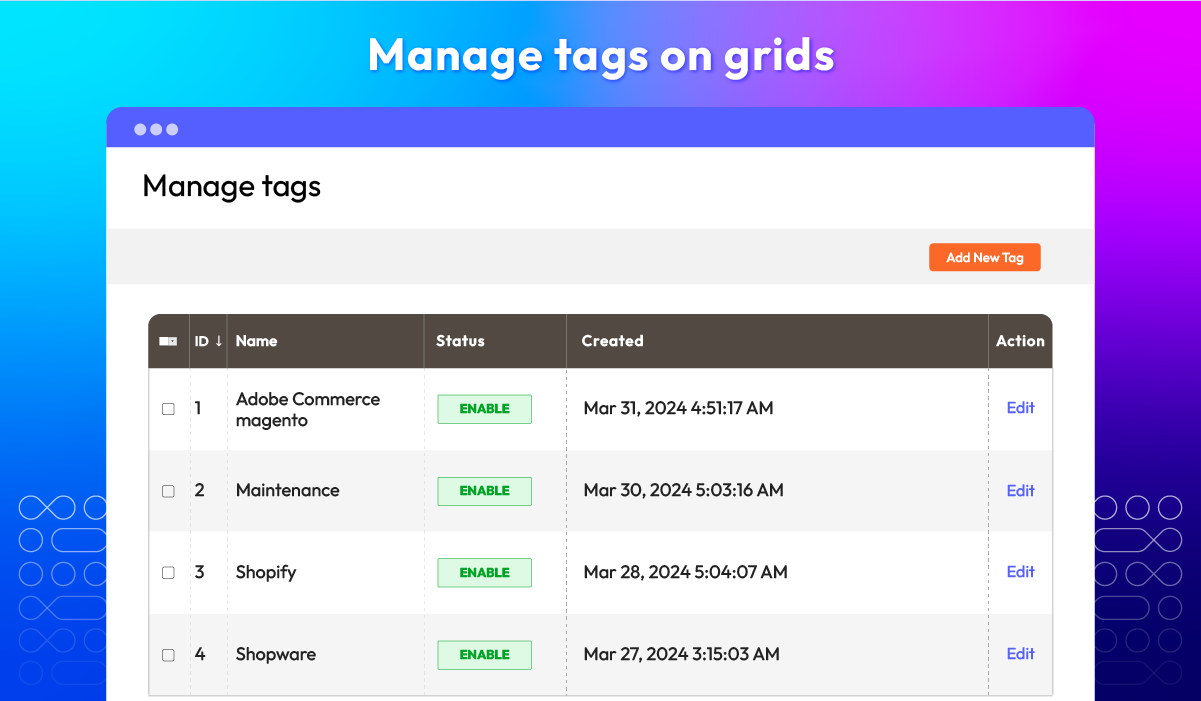
Admins can access a complete list of tags and topics, tracking them by name, ID, status, and creation date. They can easily add new tags or topics and assign them to blog posts to improve navigation.
By managing tags and topics effectively, admins ensure consistent categorization, making it easier for users to browse and find relevant content.

Author management

The Magento 2 Blog extension allows you to manage all blog authors in a structured grid, tracking them by name, URL key, email, and post count. You can easily access and edit any author’s profile as needed.
In the Author Information section, admins can add details such as the author's name, short bio, avatar, and social media links (Facebook, Twitter, etc.), ensuring a well-organized and engaging author profile.

SEO-friendly features Pro

The Magento 2 Better Blog extension provides a range of SEO-friendly features, enhancing your blog's visibility on search engines. Here are some key features:
check
SEO-friendly permalinks
This module supports SEO-friendly permalinks, such as https://example.com/blog/hello-world/. These URLs include relevant keywords related to your blog content, helping search engines understand the topic more easily.
check
XML Sitemap integration
Magento 2 Blog seamlessly integrates with Magento’s default XML Sitemap, ensuring search engines like Google can easily discover all blog content on your site. The sitemap is dynamically generated and automatically updated to include new posts and changes to existing ones, helping improve search engine visibility.
check
Metadata fields
Magento 2 Blog integrates with Magento’s default XML Sitemap, ensuring search engines like Google can easily index all blog content on your website. The sitemap updates automatically, reflecting new posts and modifications in real-time, improving search engine visibility and keeping your content up to date.

User-friendly interface

Our module enhances user experience with well-organized blog widgets, root categories, and a mobile-friendly design, making content easy to find and navigate.
check
Blog widgets: There are several widget types for you to choose. Adding recent posts in specific categories on the homepage is very easy. Your customers also see recent posts in the sidebar. Stores can limit the number of posts in the widget.
Here, we have created ready-made templates for posts.
check
Root categories: This module enables you to manage blog categories as you did in Magento 2 Catalog Categories with no limit level. Stores are allowed to create unlimited child and parent categories. Also, if necessary, you can assign these new categories to a specific post.
check
RSS integration: Magento 2 Blog fully integrates RSS, placing blog feeds alongside standard Magento 2 feeds for easy access and subscription.
check
Responsive design: The mobile-friendly design enhances user experience with easy reading and navigation via an off-canvas menu. Tested on Madison, Ultimo, and Porto themes.

Display the editing date Pro

The Magento 2 Blog extension allows users to see the last updated time of a blog post. This helps increase the transparency and credibility of the information, allowing readers to know if the content of the article is updated regularly.

Show previous/ next post links Pro

This feature enhances user experience by providing easy navigation between blog posts. When users read an article, they can quickly access previous or next articles without having to return to the blog list page. This creates a seamless reading flow, encouraging users to explore more content and increasing website interaction time.

Send email notifications to customers Pro

When a new article is published, the system will automatically send email notifications to customers who have subscribed to receive information, helping them not to miss useful content and the latest updates from your website.

Blog saving Pro

This plugin allows users to save blog posts as drafts or for later viewing. This increases flexibility and convenience in the blog content creation and management process, while also helping users easily manage their posts.

What customers say about us

Product reviews: 131
Overall rating: 5.0
5
4
3
2
1
How much do you like this product?
Leave your email to get reward points for reviews
Craig Einhorn
17 March 2025
Verified purchase
Peter Tilva
06 January 2025
Verified purchase
Ellie Litvinenko
11 June 2024
Verified purchase
Drea Anemone
06 March 2024
Verified purchase
Micky Thorley
20 February 2024
Verified purchase

Release notes

  • v4.2.8 (Magento v2.4.x)

    16 April 2025

    Standard:

    • Compatibility: Now compatible with Magento 2.4.8

    Professional:

    • Compatibility: Now compatible with Magento 2.4.8
  • v4.2.7 (Magento v2.4.x)

    13 February 2025

    Professional:

    • Bug Fix : Fix bug missing SEO Data when upgrade to v4.2.6
  • v4.2.6 (Magento v2.4.x)

    13 November 2024

    Standard:

    • New Update: Improved post display on small screens and mobile devices for better clarity and usability.

    Professional:

    • New Update: Improved post display on small screens and mobile devices for better clarity and usability.
  • v4.2.5 (Magento v2.4.x)

    20 October 2024

    Professional:

    • Compatibility: Now compatible with Hyva theme
  • v4.2.4 (Magento v2.4.x)

    20 August 2024

    Standard:

    • Bug Fix-Hyva We fixed Style in Post Blog
  • v4.2.3 (Magento v2.4.x)

    12 June 2024

    Standard:

    • Compatibility: Now compatible with Magento 2.4.7

    Professional:

    • Compatibility: Now compatible with Magento 2.4.7
  • v4.2.2 (Magento v2.4.x)

    15 April 2024

    Hotfix: facebook-graph-sdk lib

  • v4.2.1 (Magento v2.4.x)

    18 March 2024

    • Bug Fix: We fixed a minor bugs.
  • v4.2.0 (Magento v2.4.x)

    03 March 2024

    Standard:

    • New Feature: Added description for Limit Related Post
    • New Feature: Added fields: Enable, the maximum of categories to show on the post
    • New Update: Updated social share platform
    • New Update: Reworked layout for the backend configuration
    • New Update: Updated front-end design
    • Security: Fixed XSS in admin/view/blog
    • Bug Fix: Fixed “Allow remote shopping assistance option” on Customer Register
    • Bug Fix: Fixed php8.1 compatibility issue
    • Compatibility: Now compatible with Hyva theme

    Professional:

    • New Feature: Added new features for the view page
    • New Feature: Added functionality to send email for comments
    • New Feature: Added auto publish for social platforms
    • New Update: Updated template
    • New Update: Updated config
  • v4.1.7 (Magento v2.4.x)

    22 May 2023

    • Compatible with Magento v2.4.6
  • v4.1.6 (Magento v2.4.x)

    08 February 2023

  • v4.1.5 (Magento v2.4.x)

    12 September 2022

    • Compatible with Magento v2.4.4
  • v4.1.4 (Magento v2.4.x)

    22 June 2022

    Fixed minor bugs

  • v3.2.4 (Magento v2.3.x)

    22 June 2022

    Fixed minor bugs

  • v4.1.3 (Magento v2.4.x)

    28 December 2021

    • Compatible Mageplaza Automatic Related Products
    • Fixed minor bugs
  • v3.2.3 (Magento v2.3.x)

    28 December 2021

    • Compatible Mageplaza Automatic Related Products
    • Fixed minor bugs
  • v4.1.2 (Magento v2.4.x)

    16 November 2021

    • Fix minor bugs
  • v3.2.2 (Magento v2.3.x)

    16 November 2021

    • Fix minor bugs
  • v4.1.1 (Magento v2.4.x)

    16 August 2021

    • Updated content & labels
  • v3.2.1 (Magento v2.3.x)

    16 August 2021

    • Compatible with Magento v2.3.7
  • v4.1.0 (Magento v2.4.x)

    11 May 2021

    • Added get configuration information from Rest API & GraphQL
    • Supported Magento v2.4.2
    • Fixed minor bugs
  • v3.2.0 (Magento v2.3.x)

    11 May 2021

    • Added get configuration information from Rest API & GraphQL
    • Fixed minor bugs
  • v4.0.0 (Magento v2.4.x)

    20 October 2020

    • Supported Magento v2.4.0
  • v3.1.4 (Magento v2.3.x)

    20 October 2020

    • Fixed multi-store error with Site Map
  • v3.1.3 (Magento v2.3.x)

    23 July 2020

    • Compatible with Magento v2.3.5
  • v3.1.2 (Magento v2.3.x)

    06 May 2020

    • Fixed minor bugs
  • v3.1.1 (Magento v2.3.x)

    30 December 2019

    • Hotfix: Duplicate key error while installing on Magento 2.3
  • v3.1.0 (Magento v2.3.x)

    26 December 2019

    • Added Open Graph protocol https://ogp.me/
    • New feature:
      • Multiple authors for a post
      • Customer can submit post
      • Customer can like/dislike post
      • Manage history edit for a post (edit/delete/restore/preview)
      • Duplicate post/category
    • Improvement:
      • Show category on menu bar
      • Display numbers of comment/view/like on Post Info
    • Supported Rest API & GraphQL
    • Compatible with Magento 2.3
    • Fixed minor bugs
  • v3.0.6 (Magento v2.3.x)

    12 June 2019

    • Compatible with Magento 2.3.x & 2.2.8
    • Fixed minor bugs
  • v3.0.5 (Magento v2.3.x)

    25 May 2019

    • update footer
Load More

Frequently Asked Questions

Yes, Magento 2 does not have a built-in blog feature. By default, Magento 2 lacks the capability for blog functionality. To solve this, you should install the Magento 2 Blog Extension, which helps you efficiently manage posts, categories, tags, and comments within your Magento store.

Definitely, you can install the Magento 2 Blog extension via Composer. Follow this detailed guide to install the Magento 2 Blog module immediately.

Yes, it is. To maximize user satisfaction and boost sales, you need to integrate the Magento 2 Layered Navigation extension for rapid post searches.

Absolutely. The Magento 2 Blog Extension offers a responsive design, ensuring that the blog features are optimized for various devices, providing a seamless and user-friendly experience across different screen sizes.

Yes, the Magento 2 Blog extension supports the sharing of posts. The Mageplaza Blog extension allows you to share your blog posts via hundreds of social networks such as Facebook, Google+, Twitter, LinkedIn, Pinterest, Tumblr, etc.

Yes. Guest users are provided with the ability to post comments on blog posts. They can engage with blog posts using the comment section, encouraging community interaction and feedback.

There are 2 types of comments. They are Disqus comments and Facebook comments. You can switch comment types in the configuration.

The Blog extension allows you to manage categories, posts, and comments efficiently within Magento 2's back-end. The system will receive prompt updates for new comments, making it a valuable solution for creating SEO-friendly text links.

Yes, Blog Extension is compatible with Hyva theme. However, the checkout only supports hyva-themes/magento2-theme-fallback. To learn how to enable checkout on Hyva, please follow this guide.

Mageplaza provides FREE Hyva Checkout Compatibility for all of our extensions upon requests. You can request by contacting us via email, live chat, or support ticket. Our team will respond within 24 hours and ask for details such as Order ID, extension name, Magento & Hyva versions, and any special requirements. To qualify, your module subscription must be active. If your subscription has expired, renewal is required as some older modules do not support Hyva. Additional customization requests may incur extra costs, and our team will inform you before proceeding. For assistance, feel free to reach out - we're here to help!

Magento Edition *
Version * Compare versions
FREE installation Tooltip
Ends in:
03 : 00 : 00 : 00
Get 10% OFF
$0
icon logo magento 2.4.4 - 2.4.8
Tooltip
Hyva logo Theme
Tooltip

Pricing

Choose your suitable edition.

Standard

FREE
Free lifetime updates
Technical Support is NOT included
Read our policies
Features:
check
Create blogs without 3rd-party module
check
Support comments
check
Add social sharing buttons
check
Add related posts/products
check
Manage all aspects of blogs
check
Provide responsive design

Professional

$ 199 first year
Includes support & updates for 1 year Tooltip
60 days money back guarantee
Read our policies
Everything in Standard, plus:
check
Include all standard features, plus...
check
Use advanced SEO practices
check
Integrate with XML sitemap
check
Display view counts/ read time
check
Display tags/ categories
Can't see the feature you're looking for?
Describe it and we will customize this extension to suit your needs!
Request customization
feature looking icon