



1 min read
|
03-30-2026
How to Add Canonical Tags for Magento 2 Stores?
Vinh Jacker
|
03-17-2025
Magento is an ideal choice for those who looking for high-end customization abilities to build an attractive and feature-rich website. However, it’s not enough to run a successful business.
Marketers usually complain about duplicate content problems in Magento. It’s bad for SEO and draws the store away from success. To solve this issue, experts suggest using canonical tags to distinguish the main website and its duplicate pages.
In today’s blog, we’ll explain in depth how canonical tags work and guide you in adding them easily to your Magento store.
What Are Canonical Tags?
In terms of technical SEO, Canonical tags are the HTML tags that inform search engines about the duplicates of certain web pages and help them prioritize the authentic web page for ranking.
Canonical tags are HTML codes that tell search engines which version of a web page is the preferred one, helping to manage duplicate content and prioritize the correct page for ranking.
Typically, webmasters use canonical tags to inform search engines about the original version of a webpage on its duplicate pages. These tags are placed in the HTML header and follow this format: <link rel="canonical" href="original-webpage-url" />
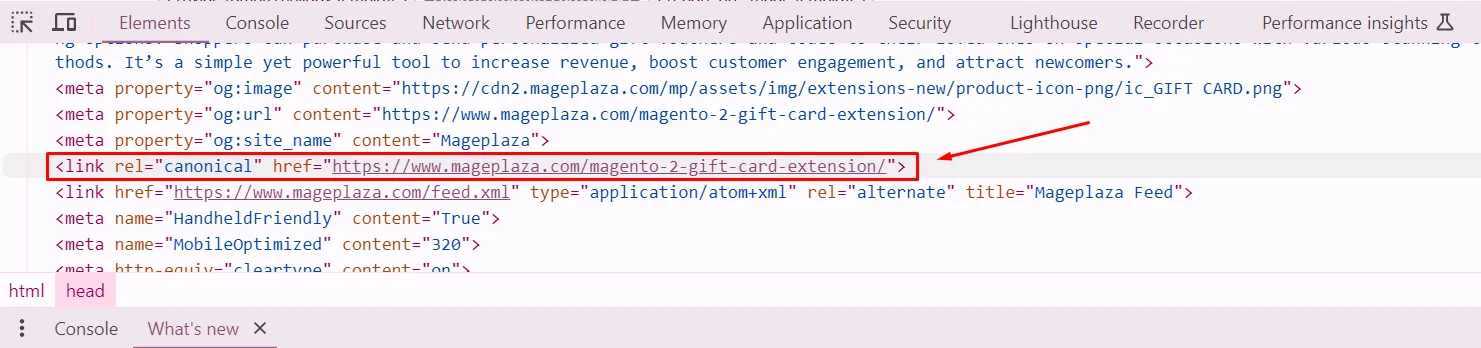
Example of canonical tags
Imagine you have two URLs leading to the same webpage:
`
https://mageplaza.com/layla-tee.html
https://mageplaza.com/women-tshirts/layla-tee.html
`
This signals to search engines that the page they’re crawling is a duplicate and directs them to prioritize the original URL for ranking.
Are Canonical Tags Important in Magento 2?
To answer this question, let’s take a look at the potential drawbacks of not adding canonical tags in Magento 2.
- Harm SEO: Having identical content across multiple URLs can confuse search engines, leading to duplicate content issues, which negatively impact SEO.
- Lower Rankings: Search engines may view duplicate content as poor SEO performance, causing your site’s ranking to drop.
- Reduced Traffic: A lower ranking results in decreased traffic to your store, which affects your business revenue.
Fortunately, Magento store owners can apply canonical tags to tell web crawlers that this is not duplicate content, but they are just identical pages and avoid all the above problems.
2 Methods to Add Canonical Tags in Magento 2
Canonical tags can be added in various places in Magento 2. In this guide, we’ll show you how to add them in each place to ensure you get it right the first time you try.
Method 1: Product & Category Pages
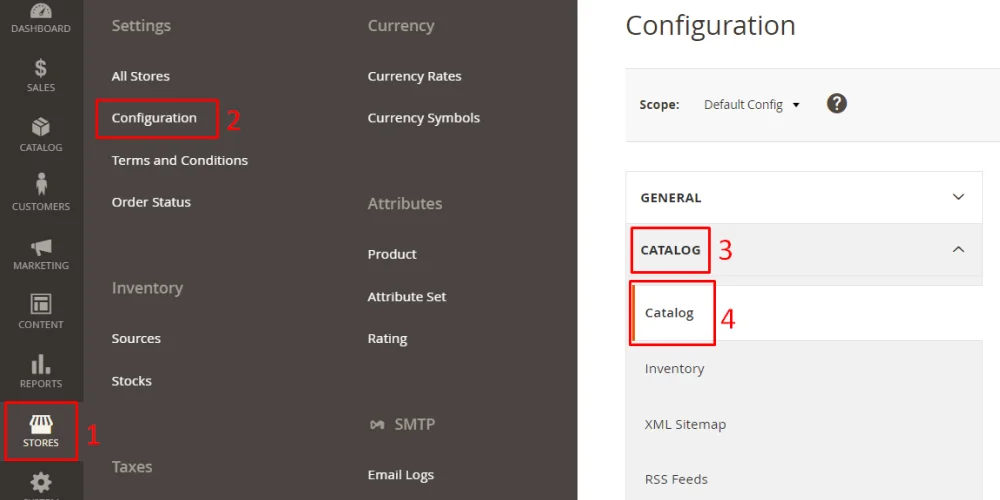
- Step 1: Log into your Magento 2 account and navigate to the store backend > Stores > Settings > Configuration > Catalog > Catalog.
-
Step 2: Scroll down and expand the Search Engine Optimization section.
- Use Canonical Link Meta Tag For Categories: Select Yes to enable this option. It helps add canonical tags to category pages.
- Use Canonical Link Meta Tag For Products: Select Yes to enable this option. It helps add canonical tags to product pages.
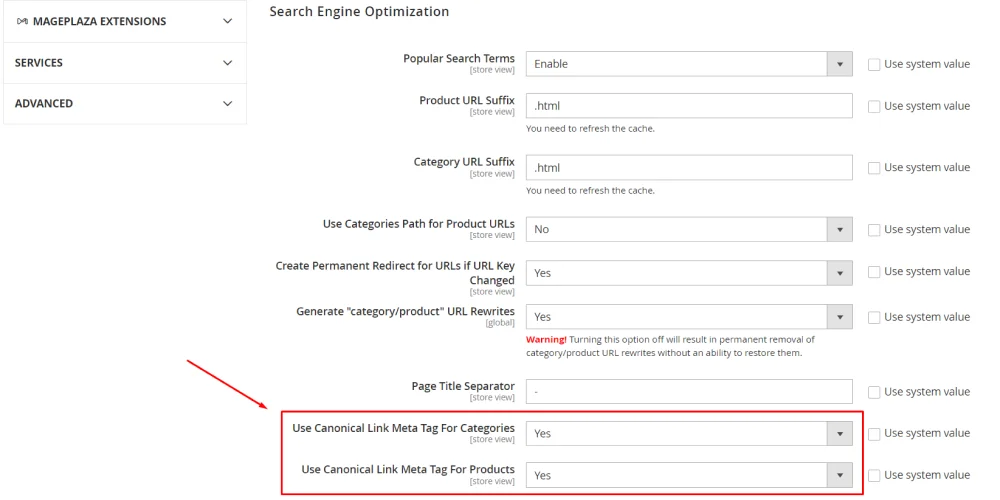
- Step 3: Save the configuration.
Method 2: Other CMS Pages
It’s easy to add canonical tags to Magento 2 product and category pages thanks to the platform’s built-in functions, but for CMS pages, it’s a bit more complex.
We will make an example of adding canonical tags to the About Us page so you can clearly understand the process.
- Step 1: Create a
cms_page_view_selectable_about-us_test.xmlfile. In which about-us refers to the CMS page identifier of the page, and test refers to the name of the layout update. - Step 2: Add the following code line:
<!--?xml version="1.0"?--> - Step 3: Put the file you created in step 1 into the
root\vendor\magento\theme-frontend-luma\Magento_Theme\layoutdirectory and flush the cache.
Now, you are able to add canonical tags to any other pages. For other pages besides About Us, simply change the CMS page identifier and the URL in the code.
Dangerous Risks for Not Using Canonical Tags Correctly
What happens if you declare canonical cards indiscriminately. For example, if you have two pages with different content, you need SEO for both pages, but Page A declares the canonical of page B. As I mentioned before, page A will not be indexed by Google anymore. And then, no matter how hard you try, search engines will not rank your page. Some people even confuse that, the use of the canonical tag to emphasize a content page they need SEO, this is completely wrong. Incorrect use of the canonical tag can lead to several detrimental effects on a website’s SEO:
-
Duplicate Content Issues: Failure to implement the canonical tag correctly may result in impact SEO rankings and visibility.
-
Keyword Cannibalization: If canonical tags are not used properly, it might result in keyword cannibalization, where multiple pages compete for the same keywords, make down the authority of individual pages, and can confuse search engines about which page to prioritize in search results.
Some caution when using the canonical tag
In most cases of the path change, you can use canonical to handle duplicate content. However, in the case below, you need to be really careful when using it. For pagination indexes (many pages), there are usually path changes as follows:
Page 1: 
Page 2: 
Page 3: 
…
Page n: 
In this case, changing the paths along with the change of content. Therefore, the use of canonical to treat pages 2, page 3, …, page n is a copy of page 1, this indicates that you are wrong in using.
Conclusion
Adding a short line of canonical tags may seem like a small detail, but it can actually boost your store rankings. It’s a signal that explains how your site works to Google and other search engines to avoid unnecessary confusion, which can harm your site’s SEO performance.
For further SEO practice, check our Step by step SEO tutorial.
Table of content

Jacker is the Chief Technology Officer (CTO) at Mageplaza, bringing over 10 years of experience in Magento, Shopify, and other eCommerce platforms. With deep technical expertise, he has led numerous successful projects, optimizing and scaling online stores for global brands. Beyond his work in eCommerce development, he is passionate about running and swimming.
Related Post

Magento 2.4.9 Beta Release: What's New?
Magento 2.4.9 beta is here. Stay up to date with every release milestone with this regularly updated guide.
11 mins read
|
03-17-2026
Google Analytics Website Traffic: The A–Z Guide for Magento 2 Store Owners
Learn how to analyze website traffic in Google Analytics 4, identify high-quality traffic sources, and grow your Magento 2 store with data-driven insights.
18 mins read
|
03-17-2026
The Complete Guide to UTM Parameters & Google Analytics for Magento website
Master UTM parameters and Google Analytics for Magento. Track traffic sources, measure campaign performance, and practical tips to use it for better business decisions.
9 mins read
|
10-05-2025
How to implement Cookie Consent for GTM & Google Analytics in Magento Under GDPR?
Implement cookie consent for GTM & GA4 in Magento under GDPR. Step-by-step guide using Google Consent Mode v2 to avoid fines and maintain analytics.
15 mins read
|
02-27-2026

Speed vs. Sales: Comparing Hyvä Checkout and Mageplaza One Step Checkout
Learn how Hyvä Checkout and Mageplaza One Step Checkout impact order completion rates and revenue growth.
8 mins read
|
02-25-2026
1 min read
|
03-30-2026
Magento 2.4.9 Beta Release: What's New?
Magento 2.4.9 beta is here. Stay up to date with every release milestone with this regularly updated guide.
11 mins read
|
03-17-2026
Google Analytics Website Traffic: The A–Z Guide for Magento 2 Store Owners
Learn how to analyze website traffic in Google Analytics 4, identify high-quality traffic sources, and grow your Magento 2 store with data-driven insights.
18 mins read
|
03-17-2026
The Complete Guide to UTM Parameters & Google Analytics for Magento website
Master UTM parameters and Google Analytics for Magento. Track traffic sources, measure campaign performance, and practical tips to use it for better business decisions.
9 mins read
|
10-05-2025
How to implement Cookie Consent for GTM & Google Analytics in Magento Under GDPR?
Implement cookie consent for GTM & GA4 in Magento under GDPR. Step-by-step guide using Google Consent Mode v2 to avoid fines and maintain analytics.
15 mins read
|
02-27-2026
Speed vs. Sales: Comparing Hyvä Checkout and Mageplaza One Step Checkout
Learn how Hyvä Checkout and Mageplaza One Step Checkout impact order completion rates and revenue growth.
8 mins read
|
02-25-2026