



1 min read
|
03-30-2026
How To Create Admin Menu In Magento 2
Vinh Jacker | 06-12-2024
In this article, we will find how to add a link to Magento 2 Admin Menu, which shown on the left site of Admin Menu pages of Magento 2.
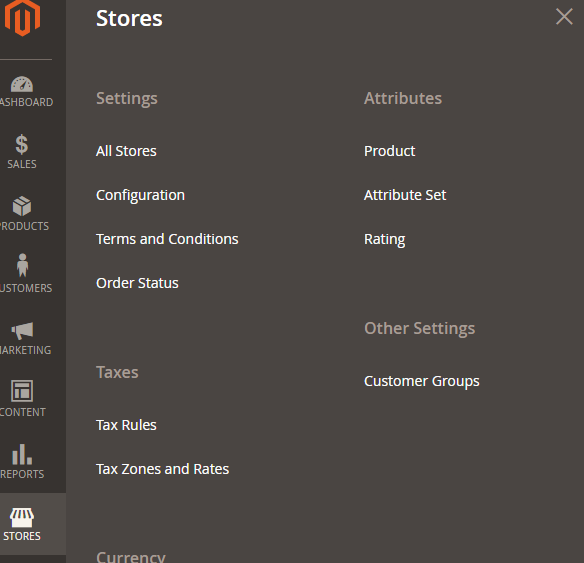
Firstly, we will find out the structure of the admin menu and how the action in each menu like. The structure of the menu is separated by level. You will see the level-0 on the left bar and the higher level is grouped and shown when you click on level-0 menu. For example, this image is a menu of Stores. You will see the Stores is a level-0 and show on the left bar. When you click on it, the sub-menu will show up like: Setting, Attributes, Taxes… and that sub-menu has some sub-sub-menu also (Setting has All Stores, Configuration, Terms and Conditions, Order Status).
Like on the frontend, we will have this format {router_name}_{controller_folder}_{action_name}. But in the admin menu, we will have a admin router name (this can be customized) before which made Magento know this’s a Backend area.
So how the menu created? We will use the simple module Hello World which was created in previous topic to create a menu.
In Magento 2, we use the menu.xml to add this menu. Let create it:
To Create Admin Menu in Magento 2
Step 1: Create menu.xml
Create admin menu file called: menu.xml file
app/code/Mageplaza/HelloWorld/etc/adminhtml/menu.xml
with the following content:
<?xml version="1.0"?>
<config xmlns:xsi="http://www.w3.org/2001/XMLSchema-instance" xsi:noNamespaceSchemaLocation="urn:magento:module:Magento_Backend:etc/menu.xsd">
    <menu>
    </menu>
</config>
Step 2: Add admin menu item
<?xml version="1.0"?>
<config xmlns:xsi="http://www.w3.org/2001/XMLSchema-instance" xsi:noNamespaceSchemaLocation="urn:magento:module:Magento_Backend:etc/menu.xsd">
    <menu>
        <add id="Mageplaza_HelloWorld::helloworld" title="Hello World" module="Mageplaza_HelloWorld" sortOrder="51" resource="Mageplaza_HelloWorld::helloworld"/>
        <add id="Mageplaza_HelloWorld::post" title="Manage Posts" module="Mageplaza_HelloWorld" sortOrder="10" action="mageplaza_helloworld/post" resource="Mageplaza_HelloWorld::post" parent="Mageplaza_HelloWorld::helloworld"/>
        <add id="Mageplaza_HelloWorld::hello_configuration" title="Configuration" module="Mageplaza_HelloWorld" sortOrder="99" parent="Mageplaza_HelloWorld::helloworld" action="adminhtml/system_config/edit/section/helloworld" resource="Mageplaza_HelloWorld::helloworld_configuration"/>
    </menu>
</config>
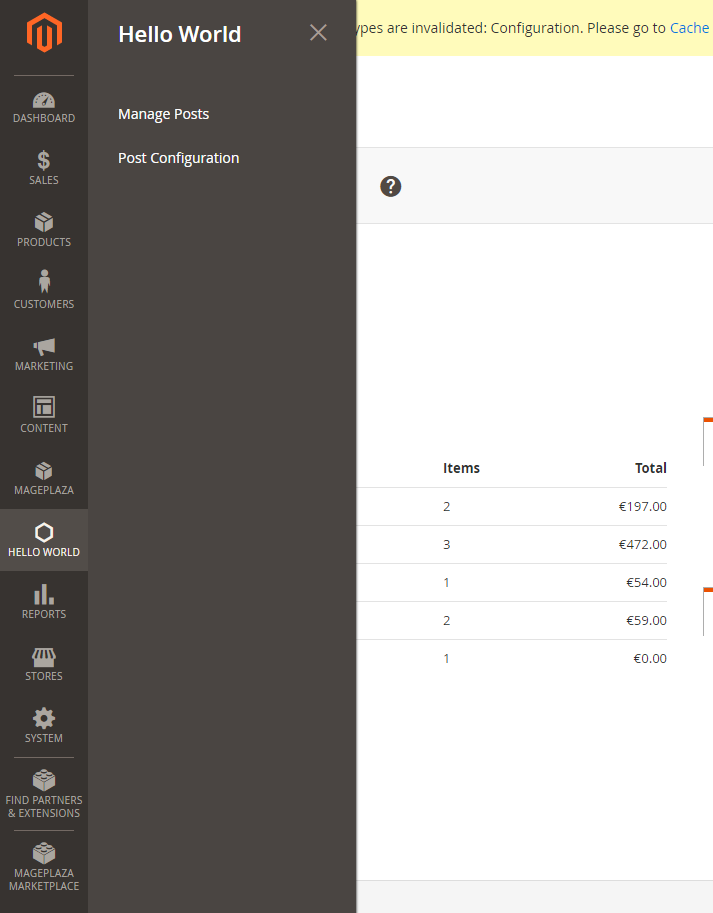
In this example, we will create a level-0 menu named “Hello World” and two sub-menus named “Manage Posts” and “Configuration”. The menu.xml file will define a collection of ‘add’ note which will add a menu item to Magento backend. We will see its structure:
<add id="Mageplaza_HelloWorld::post" title="Manage Posts" module="Mageplaza_HelloWorld" sortOrder="10" action="mageplaza_helloworld/post" resource="Mageplaza_HelloWorld::post" parent="Mageplaza_HelloWorld::helloworld"/>
Let’s explain some attributes:
- The
idattribute is the identifier for this note. It’s a unique string and should follow the format: {Vendor_ModuleName}::{menu_description}. - The
titleattribute is the text which will be shown on the menu bar. - The
moduleattribute is defined the module which this menu is belong to. - The
sortOrderattribute is defined the position of the menu. Lower value will display on top of menu. - The
parentattribute is an Id of other menu node. It will tell Magento that this menu is a child of another menu. In this example, we have parent=”Mageplaza_HelloWorld::helloworld”, so we - know this menu “Manage Posts” is a child of “Hello World” menu and it will show inside of Hello World menu. - The
actionattribute will define the url of the page which this menu link to. As we talk above, the url will be followed this format {router_name}{controller_folder}{action_name}. - In this example, this menu will link to the module HelloWorld, controller Post and action Index - The
resourceattribute is used to defined the ACL rule which the admin user must have in order to see and access this menu. We will find more detail about ACL in other topic.
You can also create more child menus and it will show like Store menu above.
I want to talk about the icon on the top menu level. You can see them above the level-0 menu title. This icon is generated by ‘Admin Icons’ font in Magento. You can see all of the icon and how to create an icon in this link
Step 3: Flush Magento cache
Make sure it admin menu items are displayed on Magento 2 admin, you should try to flush Magento 2 cache.
Run the following command line:
php bin/magento cache:clean
Now to go Magento 2 Admin and see result:
You may get 404 Not Found message, to trouble shoot it, follow this tutorial: 404 Not Found .
If you got this error message: Exception printing is disabled by default for security reasons, this topic may help.
Related Post
x

Jacker is the Chief Technology Officer (CTO) at Mageplaza, bringing over 10 years of experience in Magento, Shopify, and other eCommerce platforms. With deep technical expertise, he has led numerous successful projects, optimizing and scaling online stores for global brands. Beyond his work in eCommerce development, he is passionate about running and swimming.
Related Post

Magento 2.4.9 Beta Release: What's New?
Magento 2.4.9 beta is here. Stay up to date with every release milestone with this regularly updated guide.
11 mins read
|
03-17-2026

Google Analytics Website Traffic: The A–Z Guide for Magento 2 Store Owners
Learn how to analyze website traffic in Google Analytics 4, identify high-quality traffic sources, and grow your Magento 2 store with data-driven insights.
18 mins read
|
03-17-2026
The Complete Guide to UTM Parameters & Google Analytics for Magento website
Master UTM parameters and Google Analytics for Magento. Track traffic sources, measure campaign performance, and practical tips to use it for better business decisions.
10 mins read
|
10-05-2025
How to implement Cookie Consent for GTM & Google Analytics in Magento Under GDPR?
Implement cookie consent for GTM & GA4 in Magento under GDPR. Step-by-step guide using Google Consent Mode v2 to avoid fines and maintain analytics.
15 mins read
|
02-27-2026

Speed vs. Sales: Comparing Hyvä Checkout and Mageplaza One Step Checkout
Learn how Hyvä Checkout and Mageplaza One Step Checkout impact order completion rates and revenue growth.
8 mins read
|
02-25-2026
1 min read
|
03-30-2026
Magento 2.4.9 Beta Release: What's New?
Magento 2.4.9 beta is here. Stay up to date with every release milestone with this regularly updated guide.
11 mins read
|
03-17-2026
Google Analytics Website Traffic: The A–Z Guide for Magento 2 Store Owners
Learn how to analyze website traffic in Google Analytics 4, identify high-quality traffic sources, and grow your Magento 2 store with data-driven insights.
18 mins read
|
03-17-2026
The Complete Guide to UTM Parameters & Google Analytics for Magento website
Master UTM parameters and Google Analytics for Magento. Track traffic sources, measure campaign performance, and practical tips to use it for better business decisions.
10 mins read
|
10-05-2025
How to implement Cookie Consent for GTM & Google Analytics in Magento Under GDPR?
Implement cookie consent for GTM & GA4 in Magento under GDPR. Step-by-step guide using Google Consent Mode v2 to avoid fines and maintain analytics.
15 mins read
|
02-27-2026
Speed vs. Sales: Comparing Hyvä Checkout and Mageplaza One Step Checkout
Learn how Hyvä Checkout and Mageplaza One Step Checkout impact order completion rates and revenue growth.
8 mins read
|
02-25-2026