



1 min read
|
03-30-2026
How to Access Control Lists (ACL) in Magento 2
Vinh Jacker | 03-17-2025

Magento 2 Admin ACL panel use an authentication system and a robust system for create Access Control List Rules (ACL) which allows a store owner to create fine grained roles for each and every user in their system. In this article, we will find how it work and how to add ACL for our custom module.
Magento 2 Access Control List Rules
The Magento 2 Admin ACL resources are visible under the Magento 2 admin System > Permissions > User Roles area. When we click on the Add New Role button or access to a role, you will see the page look like:
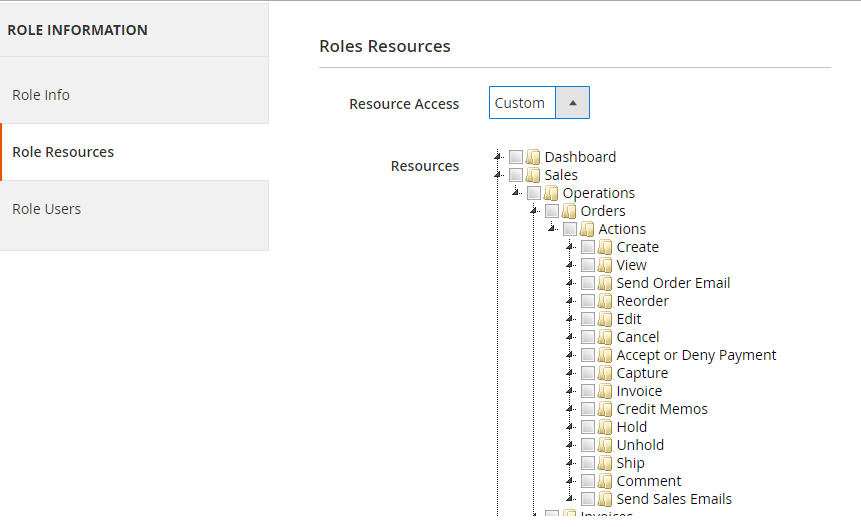
In this resources tab, you can see a tree-list of all the available resources in your system. You can choose all Resource or some of them for this role and select the user for this role in Role Users tab. All of the user who belong to this role will be limit access to the resource which you choose. They cannot see and access to other one.
To Create Admin Admin ACL
Step 1: Create ACL rule
Now, we will see how to add our module to ACL role. We will use a previous simple module HelloWorld to do this. As in the Admin Menu and System Configuration article, you saw that we alway have a resource attribute when create it. Now we will register that resources to the system, so Magento can realize and let us set a role for them.
To register the resource, we use the acl.xml file which located in app/code/{namespace}/{module}/etc/acl.xml. Let’s create this file for our simple Module:
File: app/code/Mageplaza/HelloWorld/etc/acl.xml
Contents would be:
<?xml version="1.0"?>
<config xmlns:xsi="http://www.w3.org/2001/XMLSchema-instance" xsi:noNamespaceSchemaLocation="urn:magento:framework:Acl/etc/acl.xsd">
    <acl>
        <resources>
            <resource id="Magento_Backend::admin">
                <resource id="Mageplaza_HelloWorld::helloworld" title="Hello World" sortOrder="51">
                    <resource id="Mageplaza_HelloWorld::post" title="Posts" sortOrder="10"/>
                    <resource id="Mageplaza_HelloWorld::helloworld_configuration" title="Configuration" sortOrder="99" />
                </resource>
                <resource id="Magento_Backend::stores">
                    <resource id="Magento_Backend::stores_settings">
                        <resource id="Magento_Config::config">
                            <resource id="Mageplaza_HelloWorld::helloworld_config" title="Hello World"/>
                        </resource>
                    </resource>
                </resource>
            </resource>
        </resources>
    </acl>
</config>
Our resource will be placed as child of Magento_Backend::admin. Each resource will have an Id, title and sortOrder attribute:
- Id attribute is the identify of this resource. You can use this when define resource in Admin menu, configuration and limit access to your module controller. This is a unique string and should be in this format: Vendor_ModuleName::resource_name.
- Title attribute is the label of this resource when showing in resource tree.
- sortOrder attribute define the position of this resource in tree.
After this done, please refresh the cache and see the result on resource tree
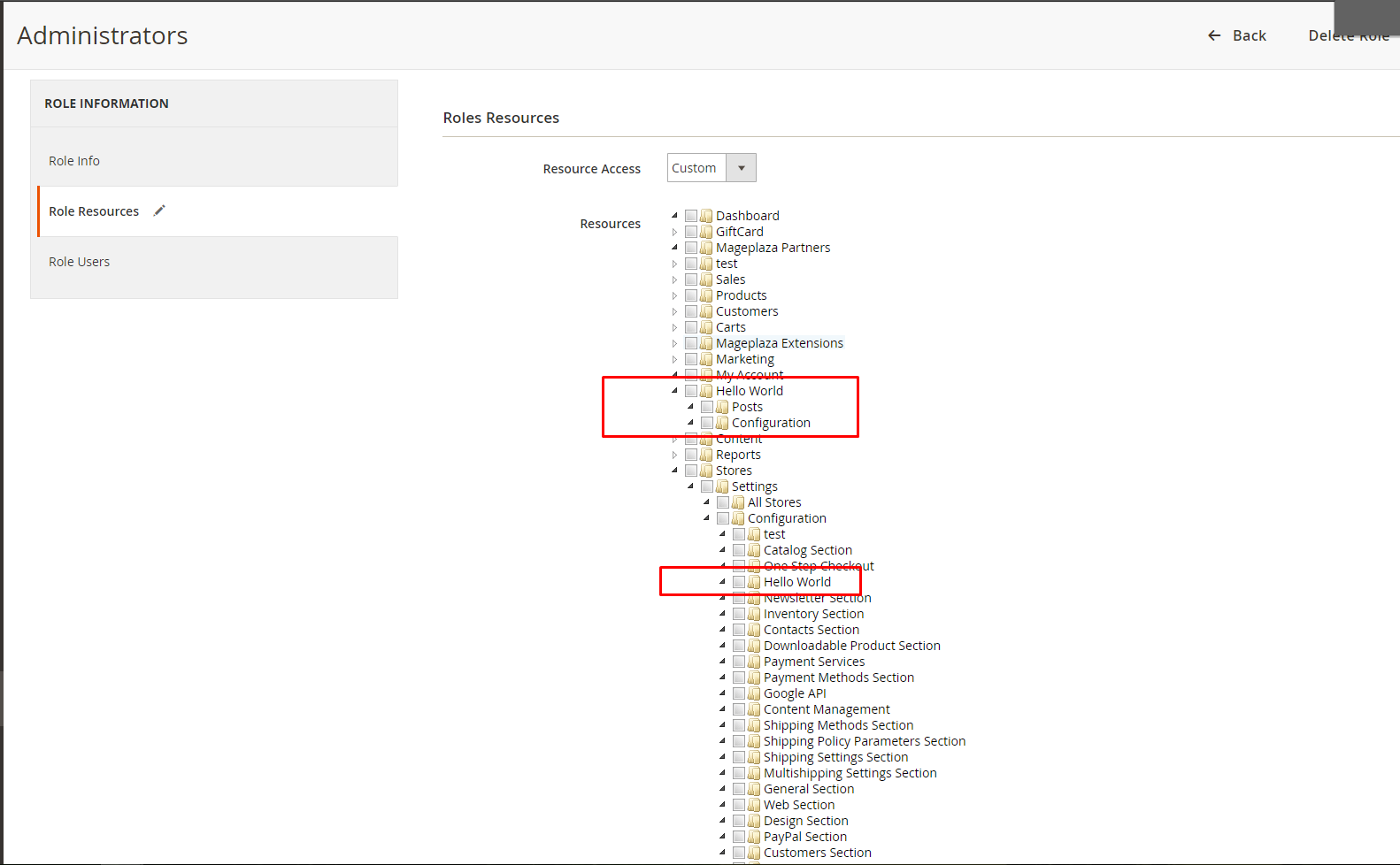
Step 2: Flush Magento cache
Make sure it admin menu items are displayed on Magento 2 admin, you should try to flush Magento 2 cache.
Step 3: Check ACL rule
There are some place where we put the ACL resource to make it limit the access:
Admin menu: Put the ACL resource to hide the menu if it’s not allowed by store owner.
File: app/code/Mageplaza/HelloWorld/etc/adminhtml/menu.xml
<add id="Mageplaza_HelloWorld::helloworld" title="Hello World" module="Mageplaza_HelloWorld" sortOrder="51" resource="Mageplaza_HelloWorld::helloworld"/>
System configuration: Put the ACL resource to limit access to this section page.
File: app/code/Mageplaza/HelloWorld/etc/adminhtml/system.xml
<section id="helloworld" translate="label" sortOrder="130" showInDefault="1" showInWebsite="1" showInStore="1">
        ….
            <resource>Mageplaza_HelloWorld::helloworld_configuration</resource>
        ….
</section>
We will use Mageplaza_HelloWorld::helloworld_configuration in Magento 2 How to Create System.xml Configuration
With resource it also use on controller.
In admin controllers: Magento provides an abstract type Magento\Framework\AuthorizationInterface which you can use to validate the currently logged in user against a specific ACL. You can call that object by use the variable: $this->_authorization. In the controller, you have to write a protected function to check the resource:
Example:
File: vendor/magento/module-customer/Controller/Adminhtml/Index.php
protected function _isAllowed()
{
 return $this->_authorization->isAllowed('Magento_Customer::manage');
}
Recommend
x

Jacker is the Chief Technology Officer (CTO) at Mageplaza, bringing over 10 years of experience in Magento, Shopify, and other eCommerce platforms. With deep technical expertise, he has led numerous successful projects, optimizing and scaling online stores for global brands. Beyond his work in eCommerce development, he is passionate about running and swimming.
Related Post

Magento 2.4.9 Beta Release: What's New?
Magento 2.4.9 beta is here. Stay up to date with every release milestone with this regularly updated guide.
11 mins read
|
03-17-2026
Google Analytics Website Traffic: The A–Z Guide for Magento 2 Store Owners
Learn how to analyze website traffic in Google Analytics 4, identify high-quality traffic sources, and grow your Magento 2 store with data-driven insights.
18 mins read
|
03-17-2026
The Complete Guide to UTM Parameters & Google Analytics for Magento website
Master UTM parameters and Google Analytics for Magento. Track traffic sources, measure campaign performance, and practical tips to use it for better business decisions.
10 mins read
|
10-05-2025
How to implement Cookie Consent for GTM & Google Analytics in Magento Under GDPR?
Implement cookie consent for GTM & GA4 in Magento under GDPR. Step-by-step guide using Google Consent Mode v2 to avoid fines and maintain analytics.
15 mins read
|
02-27-2026

Speed vs. Sales: Comparing Hyvä Checkout and Mageplaza One Step Checkout
Learn how Hyvä Checkout and Mageplaza One Step Checkout impact order completion rates and revenue growth.
8 mins read
|
02-25-2026
1 min read
|
03-30-2026
Magento 2.4.9 Beta Release: What's New?
Magento 2.4.9 beta is here. Stay up to date with every release milestone with this regularly updated guide.
11 mins read
|
03-17-2026
Google Analytics Website Traffic: The A–Z Guide for Magento 2 Store Owners
Learn how to analyze website traffic in Google Analytics 4, identify high-quality traffic sources, and grow your Magento 2 store with data-driven insights.
18 mins read
|
03-17-2026
The Complete Guide to UTM Parameters & Google Analytics for Magento website
Master UTM parameters and Google Analytics for Magento. Track traffic sources, measure campaign performance, and practical tips to use it for better business decisions.
10 mins read
|
10-05-2025
How to implement Cookie Consent for GTM & Google Analytics in Magento Under GDPR?
Implement cookie consent for GTM & GA4 in Magento under GDPR. Step-by-step guide using Google Consent Mode v2 to avoid fines and maintain analytics.
15 mins read
|
02-27-2026
Speed vs. Sales: Comparing Hyvä Checkout and Mageplaza One Step Checkout
Learn how Hyvä Checkout and Mageplaza One Step Checkout impact order completion rates and revenue growth.
8 mins read
|
02-25-2026