




1 min read
|
03-30-2026
A Guide on How to Create Magento 2 Events & Observers
Vinh Jacker | 03-17-2025

Customizing the Magento 2 store is essential for meeting business requirements, and Events and Observers provide a systematic approach to achieve this. By taking advantage of Magento 2 events and observers, you can integrate custom workflows, automate processes, and enhance the user experience without modifying core files. From handling order updates to tracking customer interactions, this guide will show you how to create Magento 2 events & observers.
Role of Events in Magento 2
- Action triggers: In Magento 2, events trigger actions when specific conditions are met and inform other components of changes. This system allows developers to add new features without modifying core files, making the system both flexible and modular. Events also ensure that different parts of the application remain separate.
- Performance improvement: By offloading processes to background tasks, events help reduce the load on the main application. Thus, Magento stores have better performance.
- Customization facilitation: Events allow developers to execute custom code in response to specific actions. Therefore, developers can add new features or modify existing ones without changing the core code.
- Interoperability enhancement: Magento 2 events support seamless integration with third-party systems, such as CRMs, ERP solutions, and payment gateways. Events can be used to trigger API calls, sync data, or notify external services when specific actions occur in the store.
- Logging and auditing support: By applying events, Magento can support logging and auditing by recording specific actions for future review. It is crucial for monitoring changes and identifying problems. Auditing helps ensure data integrity and security, and event-based logging can create more transparent systems.
Role of Observers in Magento 2
- Event response: Magento 2 Observers respond to specific events by executing custom code when a designated event is triggered. They allow developers to implement logic that reacts to system changes. This event-driven approach enhances Magento’s scalability.
- Business logic management: Observers help manage business logic by modifying data and altering processes based on predefined conditions. This ensures that Magento 2 behaves as intended under various scenarios. For example, an observer can update pricing rules, modify order status, or apply custom discounts dynamically. By managing business logic efficiently, observers contribute to system consistency and reliability.
- Custom workflow: Observers in Magento 2 enable custom workflows by triggering additional actions in response to events. These capabilities allow the creation of complex workflows tailored to specific operational needs. For instance, when you add a new field to the checkout, an observer can capture and process that data after submission — see our guide on create checkout fields via code in Magento 2 for a step-by-step example. Observers can also integrate with third-party services or Magento APIs to improve functionality, helping businesses streamline operations and enhance efficiency.
- User experience enhancement: By allowing real-time updates and interactions, observers significantly enhance the user experience. They can dynamically modify the UI, adjust product availability based on stock levels, or provide instant feedback to users. For example, an observer can update a shopping cart summary when a product is added, creating a more engaging and responsive eCommerce experience.
- Testing and debugging support: Observers also play a role in testing and debugging Magento 2 applications. They allow developers to monitor events and log critical information, making it easier to identify issues and troubleshoot problems. By tracking event responses, developers can analyze system behavior and optimize performance.
Understand Catching and handling a event
Magento use area definitions to manage the store. We will have a frontend area and admin area. With the configuration file, they can be put in 3 places:
- Under
etc/folder is the configuration which can be used in both admin and frontend. - Under
etc/frontendfolder will be used for frontend area. - Under
etc/adminhtmlfolder will be used for admin area.
The same with the event configuration file. You can create an event configuration file for each area like this:
- Admin area:
app/code/Mageplaza/HelloWorld/etc/adminhtml/events.xml - Frontend area:
app/code/Mageplaza/HelloWorld/etc/frontend/events.xml - Global area:
app/code/Mageplaza/HelloWorld/etc/events.xml
How to Create an Event in Magento 2
Step 1: Dispatch event
Now we want to dispatch an Magento 2 event list which allow other module can change the word displayed. We will change the controller like this:
File: app/code/Mageplaza/HelloWorld/Controller/Index/Test.php
Content would be:
<?php

namespace Mageplaza\HelloWorld\Controller\Index;

class Test extends \Magento\Framework\App\Action\Action
{

	public function execute()
	{
		$textDisplay = new \Magento\Framework\DataObject(array('text' => 'Mageplaza'));
		$this->_eventManager->dispatch('mageplaza_helloworld_display_text', ['mp_text' => $textDisplay]);
		echo $textDisplay->getText();
		exit;
	}
}
The dispatch method will receive 2 arguments: an unique event name and an array data. In this example, we add the data object to the event and call it back to display the text.
Step 2: Create a event file: events.xml
File: app/code/Mageplaza/HelloWorld/etc/frontend/events.xml
<?xml version="1.0"?>
<config xmlns:xsi="http://www.w3.org/2001/XMLSchema-instance" xsi:noNamespaceSchemaLocation="urn:magento:framework:Event/etc/events.xsd">
    <event name="mageplaza_helloworld_display_text">
        <observer name="mp_display_text" instance="Mageplaza\HelloWorld\Observer\ChangeDisplayText" />
    </event>
</config>
In this file, under config element, we define an event element with the name of the event dispatch above. The class that will execute this event will be defined in the observer element by an instance attribute. The name of observer is used to identify this with other observers of this event.
With this events.xml file, Magento will execute class Mageplaza\HelloWorld\Observer\ChangeDisplayText whenever the dispatch method of this event was called in frontend area. Please note that we place events.xml in the frontend area, so if you dispatch that event in the admin area (like admin controller), it will not run.
Step 3: Create Observer class
Now we will create a class to execute above event.
File: app/code/Mageplaza/HelloWorld/Observer/ChangeDisplayText.php
<?php

namespace Mageplaza\HelloWorld\Observer;

class ChangeDisplayText implements \Magento\Framework\Event\ObserverInterface
{
	public function execute(\Magento\Framework\Event\Observer $observer)
	{
		$displayText = $observer->getData('mp_text');
		echo $displayText->getText() . " - Event </br>";
		$displayText->setText('Execute event successfully.');

		return $this;
	}
}
This class will implement the ObserverInterface and declare the execute method. You can see this simple method to know how it work.
Step 4: Flush cache and check the result
Let’s flush cache and see the result.
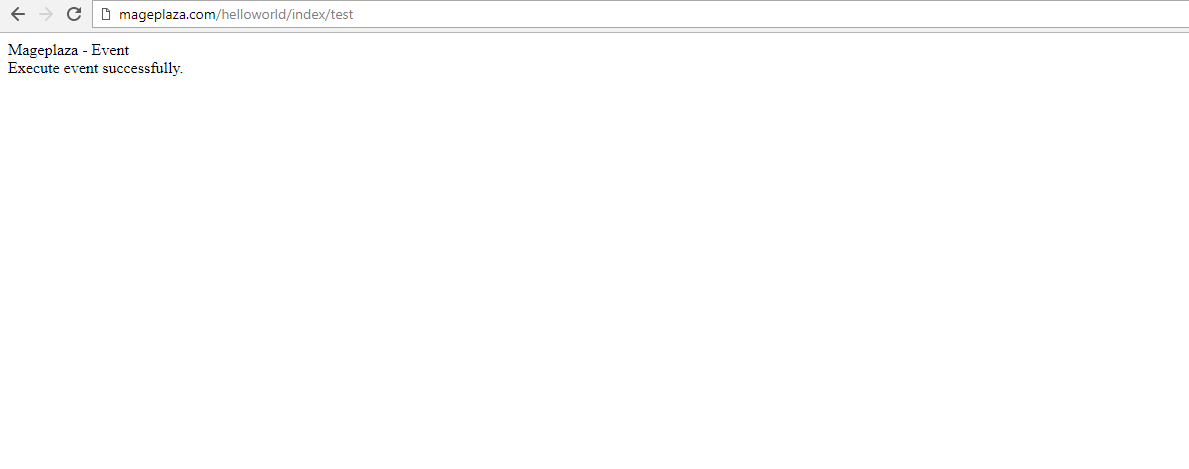
Examples of Magento 2 Events and Observers
Magento 2 events
1. Order placement
Use case: Trigger a custom action when a new order is placed.
Example: Send an order confirmation email with personalized content or additional promotional offers.
2. Customer registration
Use case: Execute custom code when a new customer registers on the site.
Example: Automatically assign the new customer to a specific group or send a welcome email.
3. Product save
Use case: Perform actions when a product is saved or updated.
Example: Update inventory levels in a third-party system or reindex related data.
Magento 2 observers
1. Send custom emails
Use case: Observe the order placement event.
Example: Send a custom email to the customer or store admin when an order is placed.
2. Log customer activities:
Use case: Observe customer login/logout events.
Example: Log these activities to analyze customer behavior and improve the site’s performance.
3. Update external inventory
Use case: Observe product save events.
Example: Update inventory levels in an external warehouse management system.
Tips for Magento 2 Event and Observer Performance Optimization
Optimizing the performance of Magento 2 events and observers is crucial for maintaining a fast and responsive eCommerce store. Here are some tips to help you achieve optimal performance:
- Minimize observer logic: Keep the logic in observers as simple and efficient as possible. Avoid complex operations and database queries within observers.
- Use asynchronous processing: Whenever possible, use asynchronous processing to handle tasks that don’t need to be completed immediately. This can help reduce the load on the main application.
- Optimize database queries: Ensure that any database queries within observers are optimized for performance. Use indexes and avoid unnecessary joins.
- Limit event dispatches: Dispatch events only when absolutely necessary. Excessive event dispatching can lead to performance issues.
- Monitor performance: Regularly monitor the performance of your Magento store using tools like Google PageSpeed Insights and Magento’s built-in performance monitoring tools. Identify and address any bottlenecks.
- Profile code execution: Use profiling tools to identify slow-running code within your observers and event handlers. Optimize these areas to improve overall performance.
- Batch processing: For operations that involve multiple records, consider using batch processing to handle them in smaller, manageable chunks.
Troubleshooting Common Issues with Magento 2 Events & Observers
Observer not triggering
Issue: The observer is not being triggered when the event is dispatched.
Troubleshooting: Ensure that the event name is correct and matches the one used in the observer declaration. Check the event configuration in events.xml and confirm that the observer is properly registered.
Null object in observer
Issue: The observer receives a null object instead of the expected data.
Troubleshooting: Verify that the event passes the correct data. Check the event declaration and ensure that the data is being dispatched correctly. Make sure the observer is configured to receive the correct parameters.
Performance issues
Issue: The observer is causing performance issues due to heavy processing or database queries.
Troubleshooting: Optimize the observer code by minimizing database queries and using caching where possible. Consider moving heavy processing to asynchronous tasks or background jobs.
Event dispatching issues
Issue: Events are not being dispatched as expected.
Troubleshooting: Check the event dispatching code for errors. Ensure that the event manager is being used correctly and that the event is being dispatched in the right context.
Event conflicts
Issue: Multiple observers are conflicting or causing unexpected behavior.
Troubleshooting: Review the order of observer execution and ensure that there are no conflicts. Use priority settings to control the order in which observers are executed. Check for duplicate event registrations.
FAQs
1. Can I have multiple observers for the same event?
Yes, you can have multiple observers for the same event. Each observer will be executed in the order they are defined in the events.xml file. You can use the sortOrder attribute to control the execution order.
2. How do I debug issues with events and observers?
To debug issues with events and observers, you can use logging to track the flow of execution and identify where things might be going wrong. Additionally, ensure that the event names and observer configurations are correct and check for any typos or errors.
3. How do events and observers affect performance?
Events and observers can impact performance if not used efficiently. It’s important to keep observer logic simple, minimize database queries, use caching, and consider asynchronous processing for heavy tasks.
4. Can I modify event data in an observer?
Yes, you can modify event data in an observer by accessing the event object and updating its values. However, be cautious, as modifying core event data may impact other observers listening to the same event.
5. Can I use events and observers for API requests?
Yes, you can trigger events when an API request modifies data (e.g., a new order is created via API). Observers can then listen for these events and perform additional actions, such as syncing with an external system. To expose your custom logic or data as a service, learn how to create API in Magento 2 and integrate it with events and observers for a complete modular setup.
Conclusion
To sum up, creating events and observers in Magento 2 allows developers to create modular and maintainable code that can adapt to future changes easily. By following the detailed steps in this article, you can ensure that your customizations are efficient, upgrade-safe, and easy to manage in the long run.
Related Post
x

Jacker is the Chief Technology Officer (CTO) at Mageplaza, bringing over 10 years of experience in Magento, Shopify, and other eCommerce platforms. With deep technical expertise, he has led numerous successful projects, optimizing and scaling online stores for global brands. Beyond his work in eCommerce development, he is passionate about running and swimming.
Related Post

Magento 2.4.9 Beta Release: What's New?
Magento 2.4.9 beta is here. Stay up to date with every release milestone with this regularly updated guide.
11 mins read
|
03-17-2026
Google Analytics Website Traffic: The A–Z Guide for Magento 2 Store Owners
Learn how to analyze website traffic in Google Analytics 4, identify high-quality traffic sources, and grow your Magento 2 store with data-driven insights.
18 mins read
|
03-17-2026
The Complete Guide to UTM Parameters & Google Analytics for Magento website
Master UTM parameters and Google Analytics for Magento. Track traffic sources, measure campaign performance, and practical tips to use it for better business decisions.
10 mins read
|
10-05-2025
How to implement Cookie Consent for GTM & Google Analytics in Magento Under GDPR?
Implement cookie consent for GTM & GA4 in Magento under GDPR. Step-by-step guide using Google Consent Mode v2 to avoid fines and maintain analytics.
15 mins read
|
02-27-2026

Speed vs. Sales: Comparing Hyvä Checkout and Mageplaza One Step Checkout
Learn how Hyvä Checkout and Mageplaza One Step Checkout impact order completion rates and revenue growth.
8 mins read
|
02-25-2026
1 min read
|
03-30-2026
Magento 2.4.9 Beta Release: What's New?
Magento 2.4.9 beta is here. Stay up to date with every release milestone with this regularly updated guide.
11 mins read
|
03-17-2026
Google Analytics Website Traffic: The A–Z Guide for Magento 2 Store Owners
Learn how to analyze website traffic in Google Analytics 4, identify high-quality traffic sources, and grow your Magento 2 store with data-driven insights.
18 mins read
|
03-17-2026
The Complete Guide to UTM Parameters & Google Analytics for Magento website
Master UTM parameters and Google Analytics for Magento. Track traffic sources, measure campaign performance, and practical tips to use it for better business decisions.
10 mins read
|
10-05-2025
How to implement Cookie Consent for GTM & Google Analytics in Magento Under GDPR?
Implement cookie consent for GTM & GA4 in Magento under GDPR. Step-by-step guide using Google Consent Mode v2 to avoid fines and maintain analytics.
15 mins read
|
02-27-2026
Speed vs. Sales: Comparing Hyvä Checkout and Mageplaza One Step Checkout
Learn how Hyvä Checkout and Mageplaza One Step Checkout impact order completion rates and revenue growth.
8 mins read
|
02-25-2026