




1 min read
|
03-30-2026
How to Restrict Order in Magento 2
Vinh Jacker
|
09-17-2024

If you want to succeed in the e-commerce business, you should ensure smooth operations in managing orders. Magento 2 provides a range of features that meet diverse business needs. However, in some cases, you should restrict orders in the Magento 2 store to create a more personalized shopping experience. This can be achieved by offering exclusive products or services to specific customer segments.
In this article, we’ll explore how to restrict orders in Magento 2 and enhance your store’s management.
A Detailed Guide to Restrict Orders in Magento 2
Before implementing order restrictions, ensure you create the necessary customer groups. You can achieve this by following the steps below:
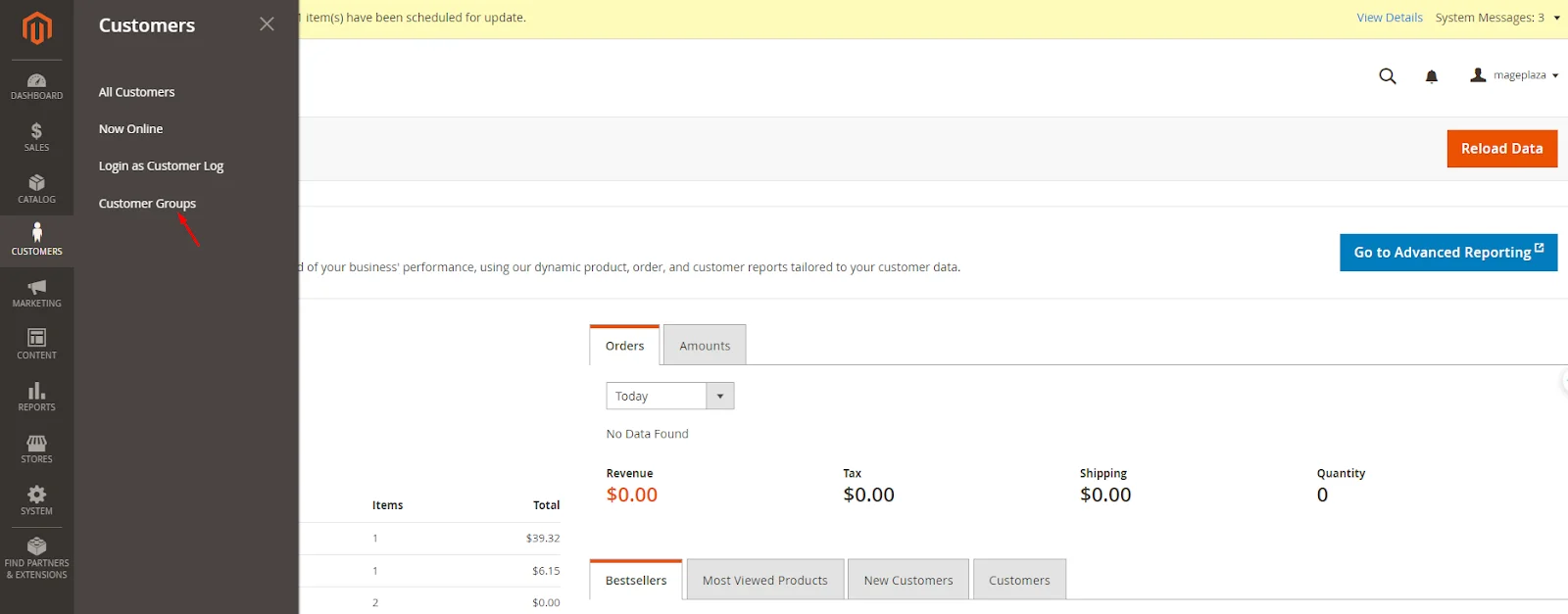
- Navigate to
Customers > Customer Groups.
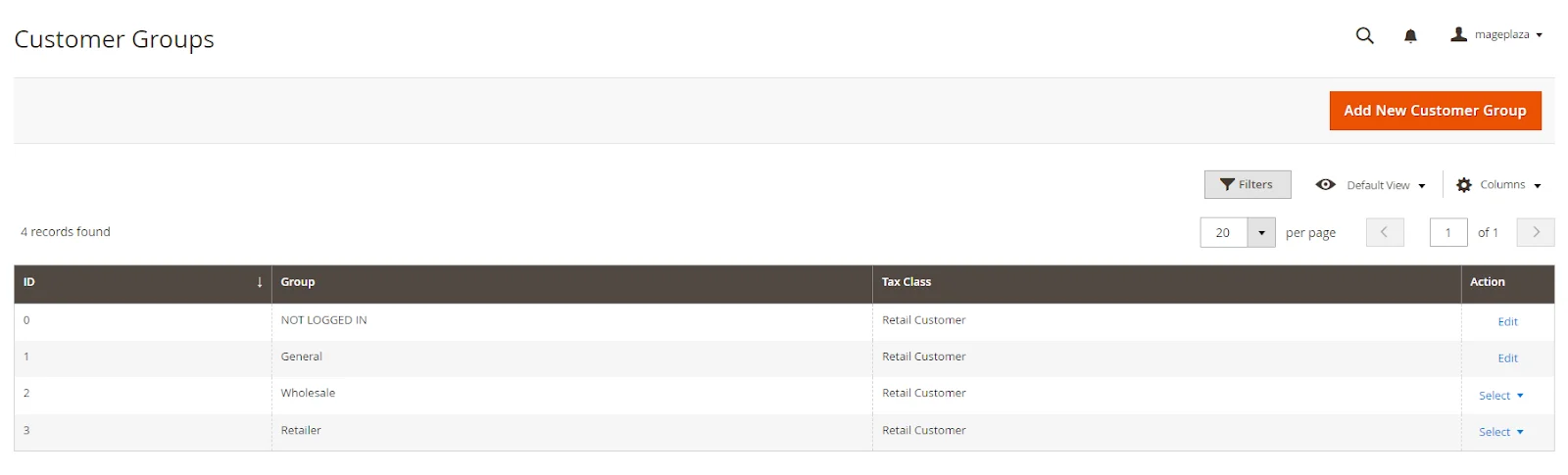
- Click on
Add New Customer Groupand create the groups you need, such as Wholesale, Retail, VIP, etc.
Step 1: Create a Custom Module
Firstly, you need to create a custom module. Let’s call it Vendor_CustomerGroupRestriction.
- Set up the module directory structure:
app/code/Vendor/CustomerGroupRestriction/
├── registration.php
├── etc
│   ├── module.xml
│   └── di.xml
└── Plugin
    ├── GuestPaymentInformationManagementPlugin.php
    └── PaymentInformationManagementPlugin.php
Step 2: Configure The Module
-
Register the module:
registration.php -
Configure the module:
etc/module.xml
Step 3. Create Plugins
In Magento 2, the plugins allow you to modify behavior. You need to create three plugins:
- Dependency Injection Configuration:
etc/di.xml
Run the code as given below:
<?xml version="1.0"?>
<config xmlns:xsi="http://www.w3.org/2001/XMLSchema-instance" xsi:noNamespaceSchemaLocation="urn:magento:framework:ObjectManager/etc/config.xsd">
    <type name="Magento\Checkout\Api\GuestPaymentInformationManagementInterface">
        <plugin name="guest_payment_information_management_plugin" type="Vendor\CustomerGroupRestriction\Plugin\GuestPaymentInformationManagementPlugin"/>
    </type>
    <type name="Magento\Checkout\Api\PaymentInformationManagementInterface">
        <plugin name="payment_information_management_plugin" type="Vendor\CustomerGroupRestriction\Plugin\PaymentInformationManagementPlugin"/>
    </type>
</config>

```

* **Guest Payment Information Management Plugin**

Patch: ``Plugin/GuestPaymentInformationManagementPlugin.php``

This plugin restricts guest users based on customer group conditions. Add the below-mentioned code.

```
<?php

namespace Vendor\CustomerGroupRestriction\Plugin;

use Magento\Checkout\Api\GuestPaymentInformationManagementInterface;
use Magento\Framework\Exception\LocalizedException;
use Magento\Quote\Api\CartRepositoryInterface;
use Magento\Customer\Api\CustomerRepositoryInterface;

class GuestPaymentInformationManagementPlugin
{
    protected $cartRepository;
    protected $customerRepository;

    public function __construct(
        CartRepositoryInterface $cartRepository,
        CustomerRepositoryInterface $customerRepository
    ) {
        $this->cartRepository = $cartRepository;
        $this->customerRepository = $customerRepository;
    }

    public function beforeSavePaymentInformationAndPlaceOrder(
        GuestPaymentInformationManagementInterface $subject,
        $cartId,
        $email,
        \Magento\Quote\Api\Data\PaymentInterface $paymentMethod,
        \Magento\Quote\Api\Data\AddressInterface $billingAddress
    ) {
        $quote = $this->cartRepository->getActive($cartId);
        $customerId = $quote->getCustomerId();

        if ($customerId) {
            $customer = $this->customerRepository->getById($customerId);
            $customerGroupId = $customer->getGroupId();

            // Check if the customer group is allowed to place the order
            if (!$this->isAllowedCustomerGroup($customerGroupId)) {
                throw new LocalizedException(__('You are not allowed to place orders.'));
            }
        }

        return [$cartId, $email, $paymentMethod, $billingAddress];
    }

    protected function isAllowedCustomerGroup($customerGroupId)
    {
        // Add your custom logic to determine if the customer group is allowed
        $allowedCustomerGroups = [1, 2]; // Example: Only allow customer groups with IDs 1 and 2
        return in_array($customerGroupId, $allowedCustomerGroups);
    }
}

```

* **Payment Information Management Plugin**


Patch: ``Plugin/PaymentInformationManagementPlugin.php``

This plugin restricts registered users based on customer group conditions.

```

<?php

namespace Vendor\CustomerGroupRestriction\Plugin;

use Magento\Checkout\Api\PaymentInformationManagementInterface;
use Magento\Framework\Exception\LocalizedException;
use Magento\Quote\Api\CartRepositoryInterface;
use Magento\Customer\Api\CustomerRepositoryInterface;

class PaymentInformationManagementPlugin
{
    protected $cartRepository;
    protected $customerRepository;

    public function __construct(
        CartRepositoryInterface $cartRepository,
        CustomerRepositoryInterface $customerRepository
    ) {
        $this->cartRepository = $cartRepository;
        $this->customerRepository = $customerRepository;
    }

    public function beforeSavePaymentInformationAndPlaceOrder(
        PaymentInformationManagementInterface $subject,
        $cartId,
        \Magento\Quote\Api\Data\PaymentInterface $paymentMethod,
        \Magento\Quote\Api\Data\AddressInterface $billingAddress
    ) {
        $quote = $this->cartRepository->getActive($cartId);
        $customerId = $quote->getCustomerId();

        if ($customerId) {
            $customer = $this->customerRepository->getById($customerId);
            $customerGroupId = $customer->getGroupId();

            // Check if the customer group is allowed to place the order
            if (!$this->isAllowedCustomerGroup($customerGroupId)) {
                throw new LocalizedException(__('You are not allowed to place orders.'));
            }
        }

        return [$cartId, $paymentMethod, $billingAddress];
    }

    protected function isAllowedCustomerGroup($customerGroupId)
    {
        // Add your custom logic to determine if the customer group is allowed
        $allowedCustomerGroups = [1, 2]; // Example: Only allow customer groups with IDs 1 and 2
        return in_array($customerGroupId, $allowedCustomerGroups);
    }
}
Conclusion
By executing the steps outlined in this article, you can successfully restrict orders in Magento 2. This will help you manage inventory effectively and tailor your e-commerce store to different customer segments. Remember to test your restrictions thoroughly to ensure a seamless shopping process for your customers.
Feel free to contact us if you have any further questions or need additional assistance!
Table of content

Jacker is the Chief Technology Officer (CTO) at Mageplaza, bringing over 10 years of experience in Magento, Shopify, and other eCommerce platforms. With deep technical expertise, he has led numerous successful projects, optimizing and scaling online stores for global brands. Beyond his work in eCommerce development, he is passionate about running and swimming.
Related Post

Magento 2.4.9 Beta Release: What's New?
Magento 2.4.9 beta is here. Stay up to date with every release milestone with this regularly updated guide.
11 mins read
|
03-17-2026

Google Analytics Website Traffic: The A–Z Guide for Magento 2 Store Owners
Learn how to analyze website traffic in Google Analytics 4, identify high-quality traffic sources, and grow your Magento 2 store with data-driven insights.
18 mins read
|
03-17-2026

The Complete Guide to UTM Parameters & Google Analytics for Magento website
Master UTM parameters and Google Analytics for Magento. Track traffic sources, measure campaign performance, and practical tips to use it for better business decisions.
9 mins read
|
10-05-2025
How to implement Cookie Consent for GTM & Google Analytics in Magento Under GDPR?
Implement cookie consent for GTM & GA4 in Magento under GDPR. Step-by-step guide using Google Consent Mode v2 to avoid fines and maintain analytics.
15 mins read
|
02-27-2026

Speed vs. Sales: Comparing Hyvä Checkout and Mageplaza One Step Checkout
Learn how Hyvä Checkout and Mageplaza One Step Checkout impact order completion rates and revenue growth.
8 mins read
|
02-25-2026
1 min read
|
03-30-2026
Magento 2.4.9 Beta Release: What's New?
Magento 2.4.9 beta is here. Stay up to date with every release milestone with this regularly updated guide.
11 mins read
|
03-17-2026
Google Analytics Website Traffic: The A–Z Guide for Magento 2 Store Owners
Learn how to analyze website traffic in Google Analytics 4, identify high-quality traffic sources, and grow your Magento 2 store with data-driven insights.
18 mins read
|
03-17-2026
The Complete Guide to UTM Parameters & Google Analytics for Magento website
Master UTM parameters and Google Analytics for Magento. Track traffic sources, measure campaign performance, and practical tips to use it for better business decisions.
9 mins read
|
10-05-2025
How to implement Cookie Consent for GTM & Google Analytics in Magento Under GDPR?
Implement cookie consent for GTM & GA4 in Magento under GDPR. Step-by-step guide using Google Consent Mode v2 to avoid fines and maintain analytics.
15 mins read
|
02-27-2026
Speed vs. Sales: Comparing Hyvä Checkout and Mageplaza One Step Checkout
Learn how Hyvä Checkout and Mageplaza One Step Checkout impact order completion rates and revenue growth.
8 mins read
|
02-25-2026